This sentence sums-up pretty well the importance given to enumeration by HTB writers. They even made an “ELI5” explanation of the enumeration’s goal :
ELI5 by HTB
Our partner is not at home and has misplaced our car keys. We call our partner and ask where the keys are. If we get an answer like “in the living room,” it is entirely unclear and can take much time to find them there. However, what if our partner tells us something like “in the living room on the white shelf, next to the TV, in the third drawer”? As a result, it will be much easier to find them.
Emphasis on manual enumeration is important as well, since timeout delay can impact directly automated enumeration results. The content is quite verbose and should be read more than re-written.
This apply for a scan of multiple IP in a network. Saving output in file is a must, -oA ensure you store in 3 different format your scan output.
Scan Network Range
Scan Network Range
nmap $ipscope/{mask} -sn -oA nmap_range_scan#Only retrieve IP :sudo nmap 10.129.2.0/24 -sn -oN scan_output | grep for | cut -d" " -f5#Specify file input with -iL. Expect IP each line for file format. Output will only give active host.sudo nmap -sn -oA tnet -iL hosts.lst | grep for | cut -d" " -f5
Basically you can stack up different IP addresses / IP ranges next to the others in the command, and use something like 10.10.10.27-64 if you want a precise range and not rely on mask.
Scan Single IP
Nothing crazy, keep the host check for a single target.
sudo nmap 10.129.2.18 -sn -oA hostStarting Nmap 7.80 ( https://nmap.org ) at 2020-06-14 23:59 CESTNmap scan report for 10.129.2.18Host is up (0.087s latency).MAC Address: DE:AD:00:00:BE:EFNmap done: 1 IP address (1 host up) scanned in 0.11 seconds
HTB choice of words confused me. They stated that nmap does sent ICMP echo requests if -sn is disabled. However since nmap sends ARP ping in priority, if they get an ARP reply no ICMP request will be sent. As such, if you try to scan your own network you can see the ARP ping using --packet-trace. Adding -PE as they mention does not send ICMP requests if ARP gets a successful reply before. If you want to use ICMP, you need to add --disable-arp-ping.
Questions
Based on the last result, find out which operating system it belongs to. Submit the name of the operating system as result.
Windows
Solution
sudo nmap 10.129.2.18 -sn -oA host -PE --packet-trace --disable-arp-pingStarting Nmap 7.80 ( https://nmap.org ) at 2020-06-15 00:12 CESTSENT (0.0107s) ICMP [10.10.14.2 > 10.129.2.18 Echo request (type=8/code=0) id=13607 seq=0] IP [ttl=255 id=23541 iplen=28 ]RCVD (0.0152s) ICMP [10.129.2.18 > 10.10.14.2 Echo reply (type=0/code=0) id=13607 seq=0] IP [ttl=128 id=40622 iplen=28 ]Nmap scan report for 10.129.2.18Host is up (0.086s latency).MAC Address: DE:AD:00:00:BE:EFNmap done: 1 IP address (1 host up) scanned in 0.11 seconds
The common default TTL values are: 64 – Linux/MAC OSX systems. 128 – Windows systems. 255 – Network devices like routers.
Briefly recap open/closed/filtered/unfiltered state. They made the following table :
State
Description
open
This indicates that the connection to the scanned port has been established. These connections can be TCP connections, UDP datagrams as well as SCTP associations.
closed
When the port is shown as closed, the TCP protocol indicates that the packet we received back contains an RST flag. This scanning method can also be used to determine if our target is alive or not.
filtered
Nmap cannot correctly identify whether the scanned port is open or closed because either no response is returned from the target for the port or we get an error code from the target.
unfiltered
This state of a port only occurs during the TCP-ACK scan and means that the port is accessible, but it cannot be determined whether it is open or closed.
open|filtered
If we do not get a response for a specific port, Nmap will set it to that state. This indicates that a firewall or packet filter may protect the port.
closed|filtered
This state only occurs in the IP ID idle scans and indicates that it was impossible to determine if the scanned port is closed or filtered by a firewall.
Discovering Open TCP Ports
By default Nmap scans the 1000 most common ports (TCP), but you can specify a specific number with --top-ports={number}
Quick mention about -sT being accurate but not stealthy.
Filtered Ports
When getting a filtered state, it means the packets were dropped or rejected. “To be able to track how our sent packets are handled, we deactivate the ICMP echo requests (-Pn), DNS resolution (-n), and ARP ping scan (--disable-arp-ping) again.”
The resulting error code returned in the received packet (RCVD) can indicate the nature of the error.
Error code 3 means the host is reachable but the port is closed or not listening
sudo nmap 10.129.2.28 -p 445 --packet-trace -n --disable-arp-ping -PnStarting Nmap 7.80 ( https://nmap.org ) at 2020-06-15 15:55 CESTSENT (0.0388s) TCP 10.129.2.28:52472 > 10.129.2.28:445 S ttl=49 id=21763 iplen=44 seq=1418633433 win=1024 <mss 1460>RCVD (0.0487s) ICMP [10.129.2.28 > 10.129.2.28 Port 445 unreachable (type=3/code=3) ] IP [ttl=64 id=20998 iplen=72 ]Nmap scan report for 10.129.2.28Host is up (0.0099s latency).PORT STATE SERVICE445/tcp filtered microsoft-dsMAC Address: DE:AD:00:00:BE:EF (Intel Corporate)Nmap done: 1 IP address (1 host up) scanned in 0.05 seconds
Discovering Open UDP Ports
Always make an UDP scan in background
Nmap does default to TCP scan, but you should make a UDP scan anyway since otherwise you might miss important enumeration information. UDP scan is a lot longer, so you can just keep it in background and save output while doing the other tests.
The exact same reasoning explained for TCP can be applied to UDP. Check top ports, disable ARP, ICMP and DNS resolution if you get filtered output to identify better the underlying behavior. Use -sU for UDP scan.
Questions
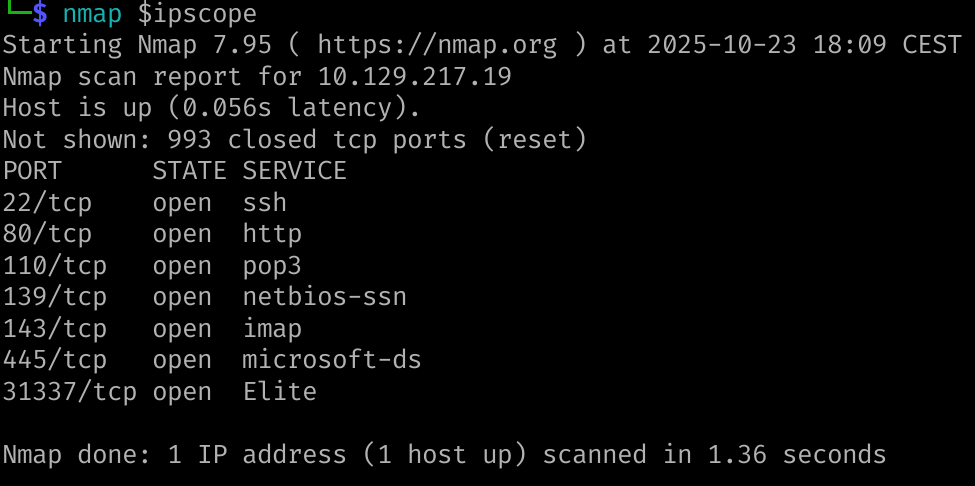
Find all TCP ports on your target. Submit the total number of found TCP ports as the answer.
7
Solution
Enumerate the hostname of your target and submit it as the answer. (case-sensitive)
XML output is particularly suited to use with other parsing software that use templates to add information to restitution document. Note that you can create an HTML output using xsltproc {nmap_xml_output} -o {outputfile}
Questions
Perform a full TCP port scan on your target and create an HTML report. Submit the number of the highest port as the answer.
Same thing, but adding the holy -Pn -n --disable-arp-ping --packet-trace helps us find additional info we would have missed otherwise, like Ubuntu version in the example given
sudo nmap 10.129.2.28 -p- -sV -Pn -n --disable-arp-ping --packet-traceStarting Nmap 7.80 ( https://nmap.org ) at 2020-06-16 20:10 CEST<SNIP>NSOCK INFO [0.4200s] nsock_trace_handler_callback(): Callback: READ SUCCESS for EID 18 [10.129.2.28:25] (35 bytes): 220 inlane ESMTP Postfix (Ubuntu)..Service scan match (Probe NULL matched with NULL line 3104): 10.129.2.28:25 is smtp. Version: |Postfix smtpd|||NSOCK INFO [0.4200s] nsock_iod_delete(): nsock_iod_delete (IOD #1)Nmap scan report for 10.129.2.28Host is up (0.076s latency).PORT STATE SERVICE VERSION25/tcp open smtp Postfix smtpdMAC Address: DE:AD:00:00:BE:EF (Intel Corporate)Service Info: Host: inlaneService detection performed. Please report any incorrect results at https://nmap.org/submit/ .Nmap done: 1 IP address (1 host up) scanned in 0.47 seconds
tcpdump and nc are valid alternative for banner grabbing.
Questions
Enumerate all ports and their services. One of the services contains the flag you have to submit as the answer.
HTB{pr0F7pDv3r510nb4nn3r}
Solution
As you can see the flag is also visible in the GetRequest Data
This is already a bit more interesting to work with. NSE allows to use scripts with nmap scans. You can use a list of scripts by specifying the associated categories like noted in the cheatsheet.
Use NSE and its scripts to find the flag that one of the services contain and submit it as the answer.
HTB{873nniuc71bu6usbs1i96as6dsv26}
Solution
nmap $ipscope -p 80 --script vulnStarting Nmap 7.95 ( https://nmap.org ) at 2025-10-24 11:44 CESTPre-scan script results:| broadcast-avahi-dos:| Discovered hosts:| 224.0.0.251| After NULL UDP avahi packet DoS (CVE-2011-1002).|_ Hosts are all up (not vulnerable).Nmap scan report for 10.129.2.49Host is up (0.051s latency).PORT STATE SERVICE80/tcp open http|_http-dombased-xss: Couldn't find any DOM based XSS.|_http-stored-xss: Couldn't find any stored XSS vulnerabilities.|_http-csrf: Couldn't find any CSRF vulnerabilities.| http-enum:|_ /robots.txt: Robots file
Timing seems the first thing that should be mentioned
Nmap offers many feature to configurate scanning. One of the most known is -T {0-5} with 0 being extremely slow to try to avoid any detection, while 5 is bombarding without a care and might lose accuracy. Default speed is 3, going up to 4 can be interesting to make quicker scan and at first and start more thorough ones in the background.
Should be talked about more especially in saturated labs. --min-RTT-timeout specify the amount of time you should wait at maximum before considering a retry or dropping the probe. Though, you’d prefer using --initial-rtt-timeout. The latter sets the minimum but allow for increase up to --max-RTT-timeout depending on previous probes outcome. Default min RTT is 100ms. Syntax of these parameters is as follow :
After a failed probe, Nmap can send back one up to the amount of time specified by --max-retries. Default is 10 and can be changed accordingly to the context.
Rates
We can specify the number of packets per second using --min-rate and --max-rate if we know the load capacity of the target. This can make us spare a lot of time which is the most important thing during mission since we’re on a limited time for specified scope, might as well give us the best condition for giving results.
Firewall are an interesting topic, but it should be looked up at with documentation though. Look up for Stateful and Stateless firewall. Differentiate passed, ignored, blocked to understand the best way possible how your packets are received and the conclusion you can make.
IDS/IPS
The are software solution to try to detect malicious actions and incoming attacks. A unusual / absent User-Agent header, repeated packets sent without proper connection… are all metrics used to determine the actions taken.
Using ACK scan -sA is “much harder to filter for firewalls and IDS/IPS systems than regular SYN (-sS) or Connect scans (sT) because they only send a TCP packet with only the ACK flag. When a port is closed or open, the host must respond with an RST flag” (from HTB text).
Detect IDS/IPS
IDS has rules and search for matching elements to raise alerts. IPS will trigger the expected actions tied to the alerts raised by IDS. Determining the presence of these security will result in you getting blocked. As such, using a VPS to test the network and scan it should be done, even if you burn this IP.
Cloud VPS could be a good idea at first for fast IP rotation, but you are definitely breaching their policies.
Decoys
We can add multiple IP addresses in the IP header to hide our own IP among them. Only active IP should be used to prevent triggering SYN-flooding security. Use -D and IP, or RND:{number} to insert random IP adresses.
We can also change the source IP address with -S to something else, though it’s use is limited by the fact the response will be sent to the one specified.
Interface from which the packets are sent and received can also be specified with -e.
DNS Proxying
Be aware that dns servers can be specified using --dns-server especially in a DMZ for DNS resolution. For administrative purposes, specifying the source port using --source-port can be used notably with port 53. These can help bypassing simple ACL rules that accepts DNS responses based on port.
This can also be applied for connection with netcat for example.
sudo ncat -nv --source-port 53 10.129.2.28 50000Ncat: Version 7.80 ( https://nmap.org/ncat )Ncat: Connected to 10.129.2.28:50000.220 ProFTPd
Make sure the source-port is available
You might encounter an already in use port upon using —source-port on ncat. To fix the problem, identify which service is using the selected port
HTB courses always (most of the time) specify contextual information you could miss before jumping to questions.
“We are only ever provided with a machine protected by IDS/IPS systems and can be tested. For learning purposes and to get a feel for how IDS/IPS can behave, we have access to a status web page at: (http://{target}/status.php)”
This page shows us the number of alerts. We know that if we receive a specific amount of alerts, we will be banned. Therefore we have to test the target system as quietly as possible.
Questions
Our client wants to know if we can identify which operating system their provided machine is running on. Submit the OS name as the answer.
Ubuntu
Solution
Since we’re asked the operating system, we might get that from WebServer version detection or Host detection.
nmap 10.129.2.80 -sV -ONmap scan report for 10.129.2.80Host is up (0.20s latency).Not shown: 993 closed tcp ports (reset)PORT STATE SERVICE VERSION22/tcp open ssh OpenSSH 7.6p1 Ubuntu 4ubuntu0.7 (Ubuntu Linux; protocol 2.0)80/tcp open http Apache httpd 2.4.29 ((Ubuntu))110/tcp open pop3 Dovecot pop3d139/tcp open netbios-ssn Samba smbd 3.X - 4.X (workgroup: WORKGROUP)143/tcp open imap Dovecot imapd (Ubuntu)445/tcp open netbios-ssn Samba smbd 3.X - 4.X (workgroup: WORKGROUP)10001/tcp open scp-config?1 service unrecognized despite returning data. If you know the service/version, please submit the following fingerprint at https://nmap.org/cgi-bin/submit.cgi?new-service :SF-Port10001-TCP:V=7.98%I=7%D=10/24%Time=68FBE163%P=x86_64-pc-linux-gnu%r(SF:GetRequest,1F,"220\x20HTB{pr0F7pDv3r510nb4nn3r}\r\n");Device type: general purposeRunning: Linux 5.XOS CPE: cpe:/o:linux:linux_kernel:5OS details: Linux 5.0 - 5.14Network Distance: 2 hopsService Info: Host: NIX-N>> MAP-EASY; OS: Linux; CPE:>> cpe:/o:linux:linux_kernel
We could hear that the administrators were not satisfied with their previous configurations during the meeting, and they could see that the network traffic could be filtered more strictly.
Note
To successfully solve the exercise, we must use the UDP protocol on the VPN.
Questions
After the configurations are transferred to the system, our client wants to know if it is possible to find out our target's DNS server version. Submit the DNS server version of the target as the answer.
HTB{GoTtgUnyze9Psw4vGjcuMpHRp}
Solution
Since we are tasked to find the DNS server version, we should focus on port 53 (unless unusual configuration). The listening port is in UDP, so we need to use -sU.
PORT STATE SERVICE VERSION53/udp open domain (unknown banner: HTB{GoTtgUnyze9Psw4vGjcuMpHRp})1 service unrecognized despite returning data. If you know the service/version, please submit the following fingerprint at https://nmap.org/cgi-bin/submit.cgi?new-service :SF-Port53-UDP:V=7.98%I=7%D=10/25%Time=68FC0422%P=x86_64-pc-linux-gnu%r(DNSSF:VersionBindReq,57,"\0\x06\x85\0\0\x01\0\x01\0\x01\0\0\x07version\x04binSF:d\0\0\x10\0\x03\xc0\x0c\0\x10\0\x03\0\0\0\0\0\x1f\x1eHTB{GoTtgUnyze9PswSF:4vGjcuMpHRp}\xc0\x0c\0\x02\0\x03\0\0\0\0\0\x02\xc0\x0c")%r(DNSStatusReqSF:uest,C,"\0\0\x90\x04\0\0\0\0\0\0\0\0")%r(DNS-SD,101,"\0\0\x80\x80\0\x01SF:\0\0\0\r\0\0\t_services\x07_dns-sd\x04_udp\x05local\0\0\x0c\0\x01\0\0\xSF:02\0\x01\x006\xee\x80\0\x14\x01A\x0cROOT-SERVERS\x03NET\0\0\0\x02\0\x01SF:\x006\xee\x80\0\x04\x01J\xc0;\0\0\x02\0\x01\x006\xee\x80\0\x04\x01E\xc0SF:;\0\0\x02\0\x01\x006\xee\x80\0\x04\x01M\xc0;\0\0\x02\0\x01\x006\xee\x80SF:\0\x04\x01K\xc0;\0\0\x02\0\x01\x006\xee\x80\0\x04\x01D\xc0;\0\0\x02\0\xSF:01\x006\xee\x80\0\x04\x01F\xc0;\0\0\x02\0\x01\x006\xee\x80\0\x04\x01H\xSF:c0;\0\0\x02\0\x01\x006\xee\x80\0\x04\x01B\xc0;\0\0\x02\0\x01\x006\xee\xSF:80\0\x04\x01I\xc0;\0\0\x02\0\x01\x006\xee\x80\0\x04\x01C\xc0;\0\0\x02\0SF:\x01\x006\xee\x80\0\x04\x01L\xc0;\0\0\x02\0\x01\x006\xee\x80\0\x04\x01GSF:\xc0;")%r(RPCCheck,C,"r\xfe\x98\x01\0\0\0\0\0\0\0\0")%r(NBTStat,105,"\xSF:80\xf0\x80\x90\0\x01\0\0\0\r\0\0\x20CKAAAAAAAAAAAAAAAAAAAAAAAAAAAAAA\0\SF:0!\0\x01\0\0\x02\0\x01\x006\xee\x80\0\x14\x01C\x0cROOT-SERVERS\x03NET\0SF:\0\0\x02\0\x01\x006\xee\x80\0\x04\x01I\xc0\?\0\0\x02\0\x01\x006\xee\x80SF:\0\x04\x01H\xc0\?\0\0\x02\0\x01\x006\xee\x80\0\x04\x01J\xc0\?\0\0\x02\0SF:\x01\x006\xee\x80\0\x04\x01B\xc0\?\0\0\x02\0\x01\x006\xee\x80\0\x04\x01SF:F\xc0\?\0\0\x02\0\x01\x006\xee\x80\0\x04\x01G\xc0\?\0\0\x02\0\x01\x006\SF:xee\x80\0\x04\x01M\xc0\?\0\0\x02\0\x01\x006\xee\x80\0\x04\x01E\xc0\?\0\SF:0\x02\0\x01\x006\xee\x80\0\x04\x01L\xc0\?\0\0\x02\0\x01\x006\xee\x80\0\SF:x04\x01K\xc0\?\0\0\x02\0\x01\x006\xee\x80\0\x04\x01D\xc0\?\0\0\x02\0\x0SF:1\x006\xee\x80\0\x04\x01A\xc0\?");
Now the administrator has taken all the necessary precautions and wants us to test this again because specific services must be changed, and the communication for the provided software had to be modified.
No tunnel requirements
This time, it’s not necessary to use an UDP tunnel to HTB environment.
Now our client wants to know if it is possible to find out the version of the running services. Identify the version of service our client was talking about and submit the flag as the answer.
HTB{kjnsdf2n982n1827eh76238s98di1w6}
Solution
Re-reading the Firewall and IDS/IPS Evasion is important to make sure you can leverage the good options to pass filters. At first, simple nmap scans showed no interesting results but my brain got triggered by the --source-port learning material. So I tried that and got a specific port output.
nmap 10.129.2.47 -Pn -p- --source-port 53Stats: 0:00:03 elapsed; 0 hosts completed (1 up), 1 undergoing SYN Stealth ScanSYN Stealth Scan Timing: About 41.82% done; ETC: 10:10 (0:00:06 remaining)Nmap scan report for 10.129.2.47Host is up (0.024s latency).Not shown: 65528 closed tcp ports (reset)PORT STATE SERVICE22/tcp open ssh80/tcp open http110/tcp open pop3139/tcp open netbios-ssn143/tcp open imap445/tcp open microsoft-ds50000/tcp open ibm-db2Nmap done: 1 IP address (1 host up) scanned in 7.04 seconds
Now this 50000 port ibm-db2 is shown open and wasn’t here before. So ovviamente we’ll dig on this. I tried using the db2 scrips using
and utilizing them with Nmap, without any probing result. After trying multiple options, I looked up on the learning material again and tried to use ncat with --source-port option still. I had the already in use port error I had to fix and once I got past that, I could use
sudo ncat 10.129.2.47 50000 -nv --source-port 53Ncat: Version 7.98 ( https://nmap.org/ncat )Ncat: Connected to 10.129.2.47:50000.220 HTB{kjnsdf2n982n1827eh76238s98di1w6}
As you can see the flag is also visible in the GetRequest Data