Compute Engine
A core GCP service, heavily used. Google provides VMs that the company has to manage itself, minimal delegation on Google’s side.
So in practice :
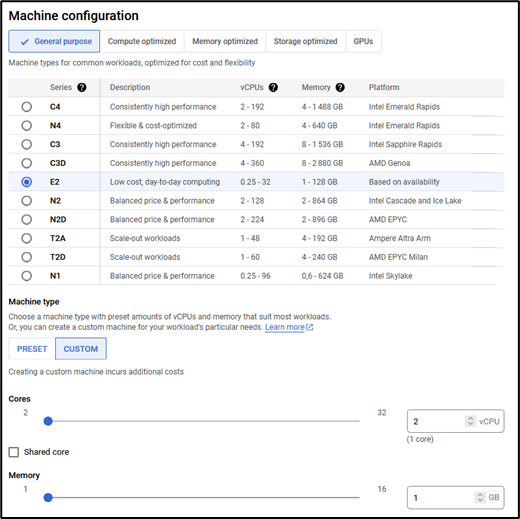
- You choose the VM type, requires thinking through cost and actual need
- You manage container deployment, clusters, and so on
Compute Engine VM configuration view
OS Login
Allows centralizing SSH connection management to VMs through IAM. Available roles :
- roles/compute.osLogin
- roles/compute.osAdminLogin
- roles/compute.osLoginExternalUser
Boot security
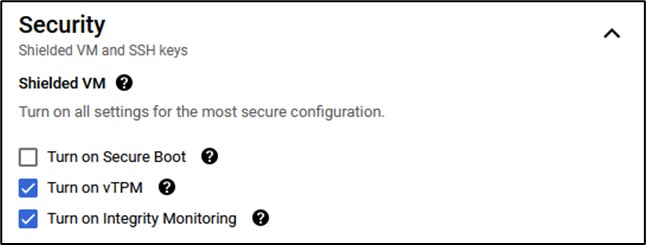
Default configuration
List of default security options for virtual machines. Secure Boot can be added on top, but make sure the disk used contains a signed operating system.
IP addresses
Internal IPs are used for communication within the VPC. A static external IP can be added to make the instance reachable from the internet (depending on the network configuration in place).
VM scope
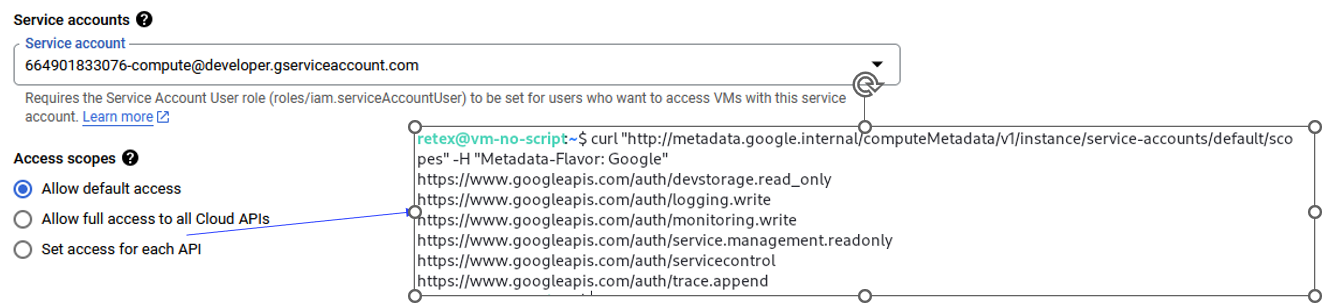
Concept of scope on VMs.
Full access
Full access authorization to all Google APIs combined with a default service account is far too permissive. Editor role on the PROJECT with no perimeter restriction on APIs effectively allows editing every resource in the project.
VM Hardening
Several VM options are available at creation :
- Shielded VM
- Confidential VM
Shielded VM
A vTPM on the instance checks whether a rootkit or OS-level malware is installed on the machine.
Confidential VM
Uses AMD processors to achieve the full trinity :
- Encryption-at-rest (disk encrypted)
- Encryption-in-transit
- Encryption-in-use
Google on AMD
Confidential VM runs on hosts with AMD EPYC processors which feature AMD Secure Encrypted Virtualization (SEV).