Identity
An entity is called a Principal (sometimes “member” in the API). Several types of principals exist :
- Google Account : a Gmail account or one associated with another domain in the project
- Service Account : tied to resources (compute, storage, etc.). Deployed applications and programs run under a service account
- Google Group : a grouping of accounts, used to manage role assignment across a set of identities at once (it’s a management entity, not an identity itself)
- Google Workspace Account : a virtual group of every Google account in the organization
- Cloud Identity Domain : similar to Workspace, but uses the Cloud Identity service to manage users with accounts external to the company (personal accounts or other constraints)
- Special identities : authenticated users, all users
Three identity management approaches exist :
- Use Cloud Identity or Workspace as the IdP directly
- Federate external identities with Cloud Identity or Workspace
- Workforce Identity Federation
IdP
Identity Provider.
A workforce identity is a set of users whose identity is not tied to a Cloud Identity/Workspace account. Their permissions come from workforce identity pools with defined roles, using attributes from the external IdP.
Two user profiles exist :
- Managed users : fully administered, respecting organizational and security principles. An account belonging to the domain tied to the Cloud is considered managed
- Unmanaged users : a personal account (
example@gmail.com) added to the platform. It cannot be removed from the platform, nor can you act on resources it created. Worth checking for in any cloud platform audit
Cloud IAM
Identity and access management, governing access based on accounts. An allow policy can take the following form :
{
  "role": "ROLE_NAME",
  "members": [
    "PRINCIPAL_1",
    "PRINCIPAL_2",
    ...
    "PRINCIPAL_N"
  ],
  "conditions": {
    CONDITIONS
  }
}- Role : the role associated with the members specified below
- Members : the set of users targeted and described
- Conditions : conditions that must be satisfied to obtain the rights tied to the given roles
Service Agent
Some services obtain access to resources through service accounts managed by Google. These accounts are created dynamically when needed, then “destroyed” shortly after.
The roles tied to these accounts are quite aggressive and subject to change. Do not associate these roles with principals manually!
Roles
Three role categories exist, each carrying a set of permissions :
- Basic roles (Viewer, Editor, Owner) : broad, legacy roles
- Predefined roles : scoped to specific resources, following a coherent naming convention
- Custom roles : hand-built, require strong maturity to maintain properly
Permissions only flow through roles
Permissions can’t be granted directly, only through role assignment.
Predefined roles are the most reliable and simplest option to implement, since they follow a naming convention that maps cleanly to resources and permissions.
Avoid basic roles
Basic roles should be avoided as much as possible. They violate least privilege and carry a disproportionate amount of permissions for what’s usually needed.
Custom roles need real maturity to get right : every permission has to be granted deliberately.
Google can change permissions over time
Google may modify existing permissions over time, and doesn’t guarantee custom roles get updated to reflect that. A custom role can silently drift from its intended scope.
Permission management and inheritance
IAM access is managed through Policies, Principals and Roles :
- Create an allow policy
- Add principals to the policy
- Bind each principal to the desired role(s)
An allow policy must be attached to a node to take effect (same logic as firewall policies), and child nodes inherit it transitively.
Logic in practice :
- Every permission is denied by default (no grant = no access)
- An allow policy grants certain permissions through role assignment ; children inherit them
- Child policies can add further roles on top
Descending the tree down to individual resources lets you grant increasingly specific permissions on an increasingly narrow scope.
Respect least privilege
Watch out for roles granted too high in the tree. This kind of mistake tends to happen through misconfiguration, or through a change in the hierarchy itself.
Moving resources in the hierarchy
A Folder or even an Organization can grant roles that flow down to every child. If a node gets moved within the hierarchy, it inherits the roles of its new parents (and loses those of the old ones).
Privilege escalation through a move
A project gets moved into a different folder. That folder grants more permissions than the previous one on certain resources, this is a potential privilege escalation vector worth checking whenever resources get reorganized.
More documentation on IAM.
Organization Policy Service
A service for centralizing IAM policy management.
Constraints
Creates deny policies, which are checked before allow policies.
CLI-only
Assigning deny policies is currently only possible through the CLI, the console doesn’t support creating them yet.
Constraints can be assigned at :
- Project
- Folder
- Organization
Constraints on machines
Direct assignment on instances and applications isn’t possible. Tags can be used instead to specify which resources are targeted, then tag the relevant resources accordingly.
Example of retrieving a constraint :
gcloud resource-manager org-policies describe \
compute.trustedImageProjects --project=PROJECT_ID \
--effective > policy.yamlconstraint: constraints/compute.trustedImageProjects
listPolicy:
allowedValues:
- projects/debian-cloud
- projects/cos-cloud
deniedValues:
- projects/IMAGE_PROJECTAfter editing, apply the new version with :
gcloud resource-manager org-policies set-policy \
policy.yaml --project=PROJECT-ID
Policy Intelligence
A tool that checks whether a user holds a permission on a resource, useful to identify users with excessive permissions.
Does not evaluate :
- Conditional role grants
- Role grants on Google-managed service accounts
- Access controls other than IAM
Provides recommendations for replacing or revoking roles, among others.
Another useful feature :
- Policy Simulator : lets you test IAM changes based on the last 90 days of logs before applying them.
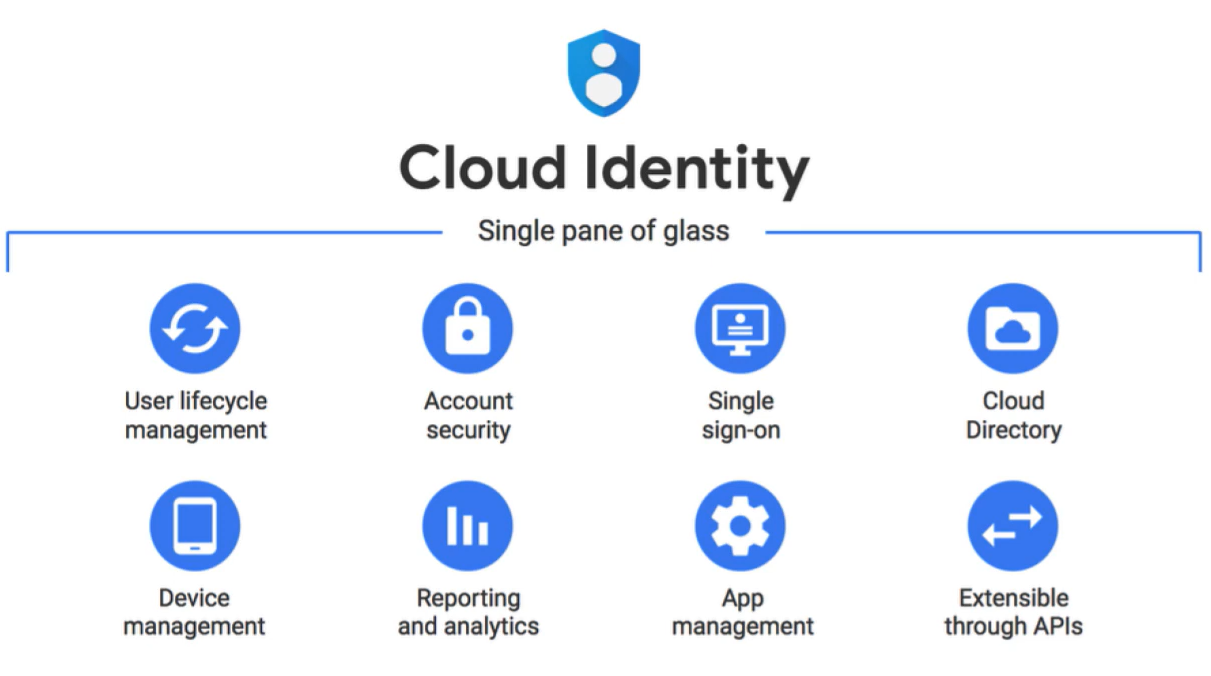
Cloud Identity
Identity management service. As a rule, every account should be tied to either Cloud Identity OR Workspace. An unmanaged account is difficult to properly integrate into a GCP solution from a resource access management standpoint.
Cloud Identity is free, with a paid tier option available (Android identity integration).
An account tied to Cloud Identity that isn’t a personal account is considered managed. Full control over rights and resource access can be enforced on accounts of this type.
Multiple organizations?
Your Google Workspace or Cloud Identity account is associated with exactly one organization resource.
Cloud Identity is compatible with any domain capable of receiving email.
Cloud Identity features
Cloud OAuth 2.0
Roles vs scopes nuance
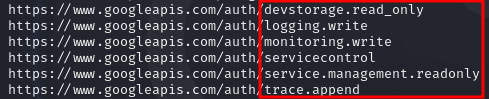
A role holds permissions, a scope defines the perimeter over which these permissions apply. You can have a complete role but still fail to access a resource because the OAuth token restricts the Google scope.
Scope bypass techniques
- Generating a token (to complete)
- Using an API key (full scope by default)
Unclear
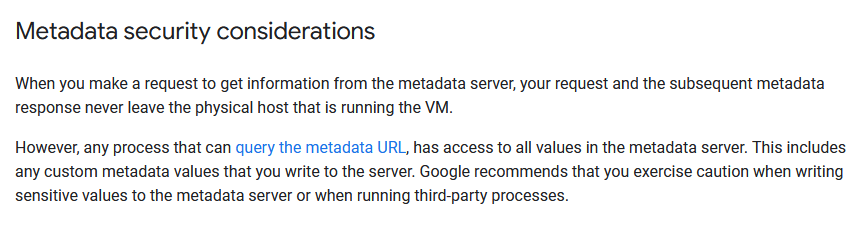
Context
Scope assignment through OAuth tokens is considered a legacy method on GCP and is not recommended for tenant management.
It’s preferable to manage everything through IAM rather than relying on scopes, which can be bypassed depending on the token generation method.
Example of the default scope assigned to a default Compute Engine service account :
GCP Authentication
Accessing identity through Cloud Identity supports two authentication methods :
- The default Google authentication, with email and password.
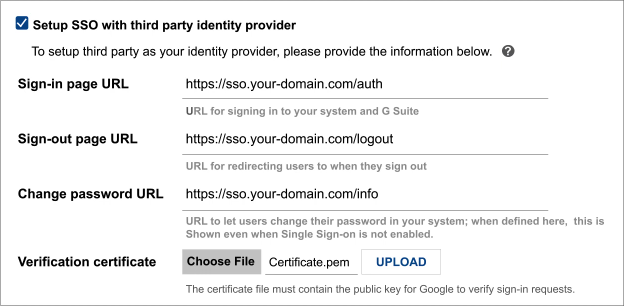
- SSO from Google using your own authentication mechanism or a third-party one.
SSO prerequisites
Cloud IAP
An HTTPS proxy that verifies access authorization to a resource based on prerequisites and user identity. The check can be bypassed on certain services (Compute Engine, Cloud Run, Google Kubernetes Engine) provided you already have certain information beforehand (external IP and port, the auto-generated URL for Cloud Run, etc.)
Verification flow :
- Authentication
- IAM authorization
Cloud GCDS
A tool that syncs accounts to the cloud from an AD, used for migration purposes.
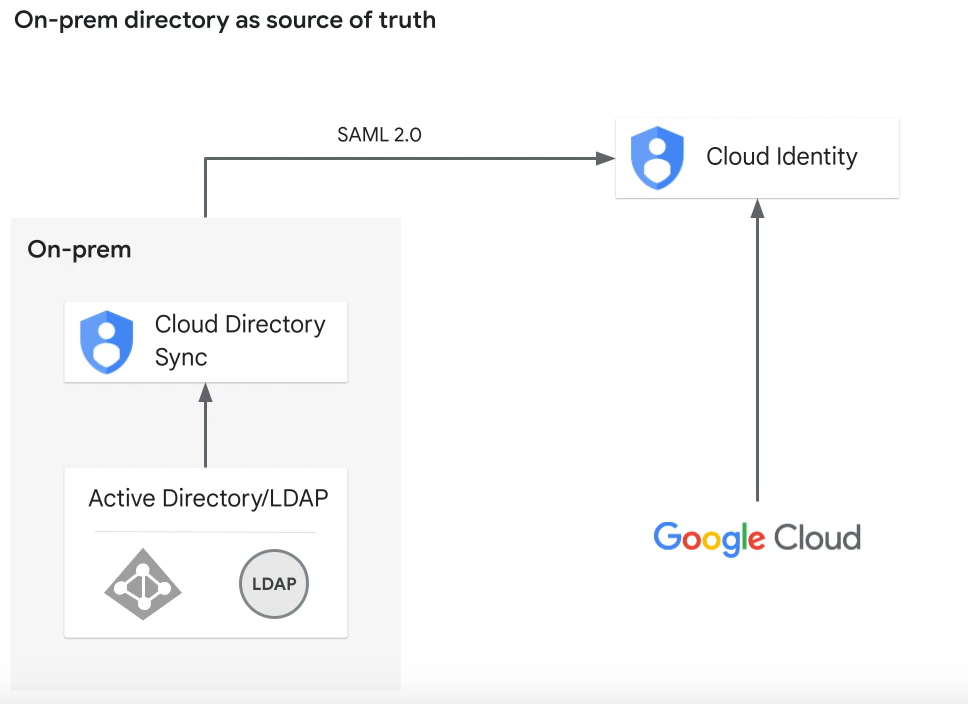
One-way sync
No modification is made on the directory. AD or LDAP content is fetched but never modified.
Synthetic process
- Create rules to specify and scope the data export
- Export data as a list from an LDAP or AD server
- GCDS connects to the Google domain and generates the desired users and groups
- The specified users are compared against the list obtained from the export
- Synchronization is performed between the two results, then a report is sent to the email addresses configured in GCDS
GCDS supports auto-provisioning and deprovisioning, allowing a user to be removed from the Cloud once they’re no longer present in the AD.
GCP Managed Microsoft AD
A GCP service that lets you deploy an AD service on the platform :
- No maintenance required (in theory)
- Supports hybrid cloud and cloud-only domains
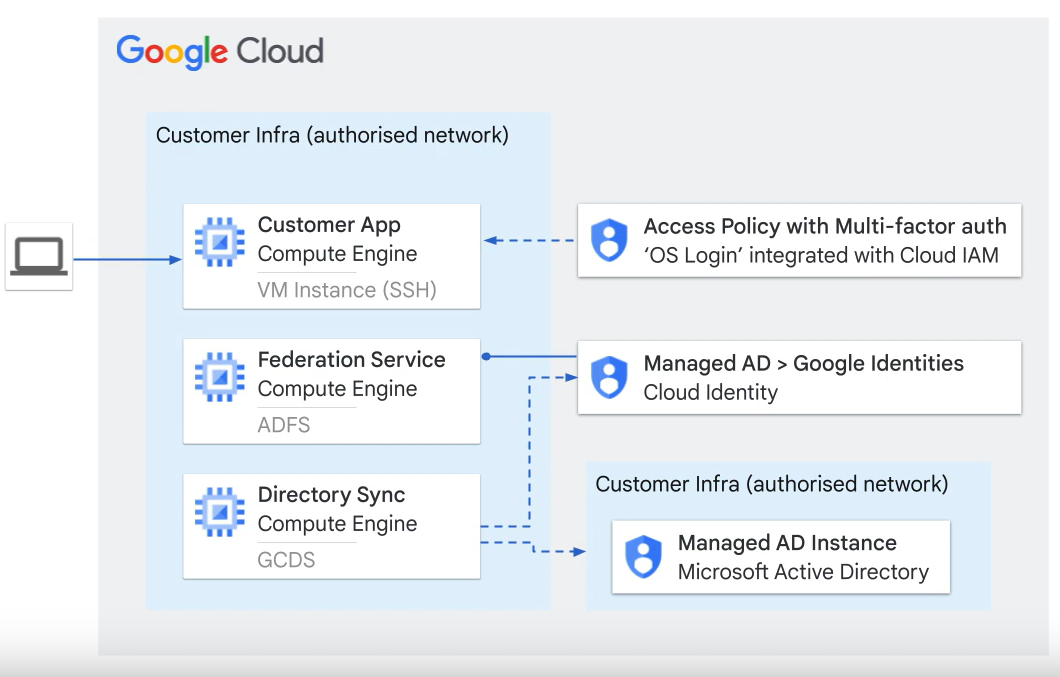
Integration possible with Cloud DNS.
Tags
Tags can be created to apply policies across every node associated with a given tag (inheritance applies). Useful for grouping entities efficiently and referencing a tag instead of maintaining a list of addresses or resource names.
A tag can be used for :
- Firewall rules
- Access control rules
More documentation on Tags.