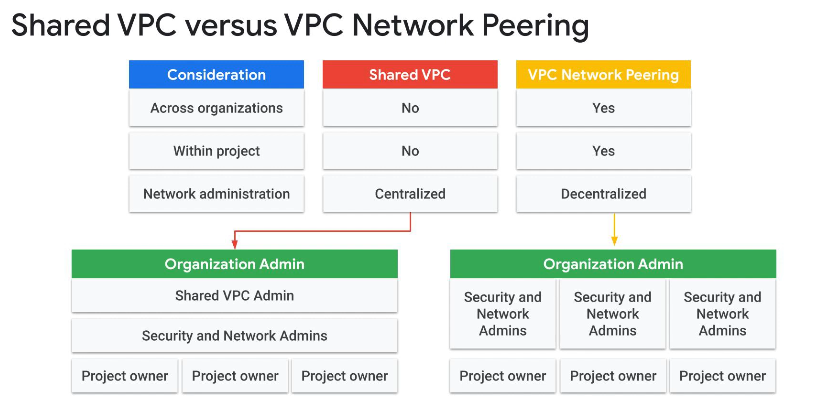
Hierarchy and Architecture
The whole platform is built on a hierarchical tree. Two consequences fall out of that : fine-grained management is possible at every node, and rules/permissions are inherited transitively from parent to child.
Structure :
- Organization : root of the platform structure
- Folder : intermediate organizational node
- Project : the node that actually contains resources. Far denser to manage than the rest, this is where most of the day-to-day work happens
- Resource : services, applications, storage, VMs, and so on
Terminology note
Google’s documentation tends to call everything a “resource” at every level. Using Organization/Folder/Project/Resource explicitly here makes the hierarchy easier to follow.
More documentation on the hierarchy.
VPC
Directly tied to projects. At the scope level, a project has a VPC network that governs intra-network access and access outside the cloud.
A project can own multiple VPC networks!
Unless an organization policy says otherwise, a project has 1 VPC by default and one subnet in each region.
This enables quite a few things, notably :
- Connecting VMs (any instance type, from classic compute to Kubernetes clusters, up to FaaS)
- Managing network load distribution across instances (handled by Cloud Load Balancing)
- Network interconnection via Cloud VPN tunnels and Cloud Interconnect (to be detailed further)
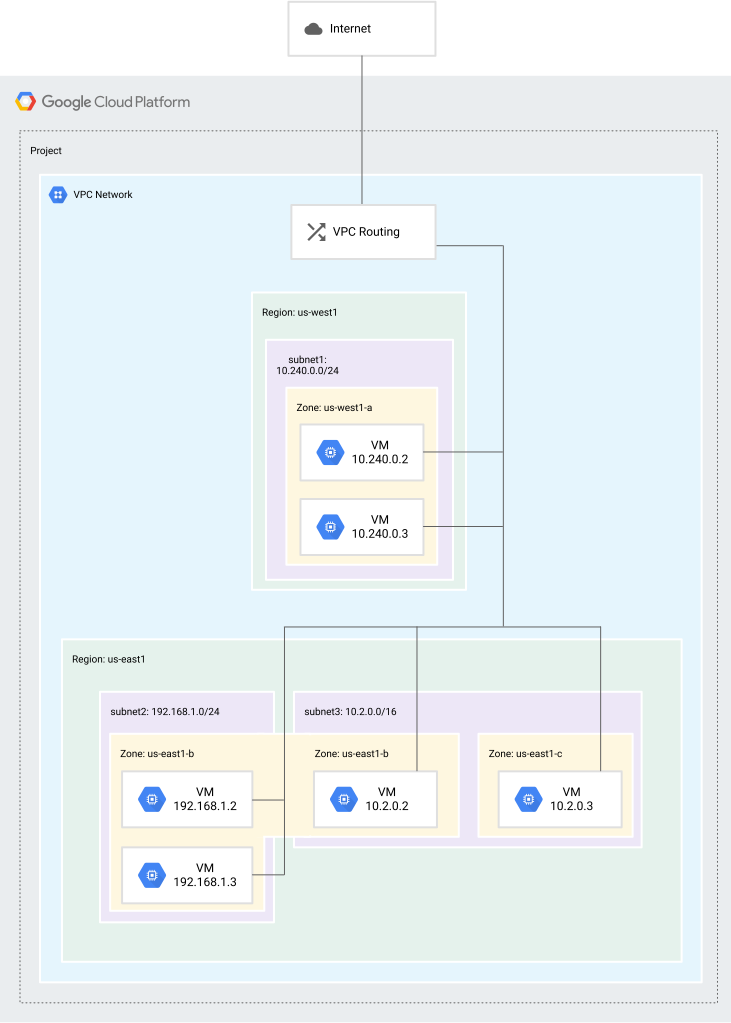
Regions, zones and subnets
- Region : a physical geographic location.
- Zone : a physical subdivision of a region.
- Subnet : a logical address range allocated within a VPC.
A resource is deployed in a subnet, which belongs to a zone, which sits in a region. By default, every resource in a VPC can communicate with every other regardless of region, zone, or subnet.
Resources also get categorized by reach :
- Global : reachable from any other resource
- Regional : reachable from resources in the same region
- Zonal : reachable from resources in the same zone
Zonal resource example
A persistent disk is a zonal resource, it can only be attached to an instance in the same zone. A snapshot or image of that disk can be taken and used to duplicate it into a different zone.
Regions and zones matter mostly for fault tolerance, by forcing the deployment of certain resources across different locations. Firewall policies can also be scoped to a region.
Auto mode vs custom mode
A VPC is deployed in automatic mode by default. It can be reconfigured into custom mode.
- Automatic mode : allocates one subnet per region automatically, using a pre-determined IPv4 range. No IPv6 support.
- Custom mode : subnets and address ranges are chosen manually. Supports both IPv4 and IPv6.
One-way switch
Switching from automatic mode to custom mode is irreversible.
Shared VPC
https://cloud.google.com/vpc/docs/shared-vpc
Mostly useful in a large-scale organization with multiple projects that need to communicate. It shares VPC access from one project to another, ranging from full VPC network access down to a restriction enforced through IAM permissions. The concept maps fairly well onto AD forests with trees, if that helps the mental model.
Three project types exist in this context :
- Autonomous project : not attached to any other project, the default state
- Host project : hosts other projects on its VPC(s)
- Service project : attached to a host project
Hierarchy subtleties
A project that participates in Shared VPC is either a host project or a service project :
A host project contains one or more Shared VPC networks. A Shared VPC Admin must first enable a project as a host project. After that, a Shared VPC Admin can attach one or more service projects to it.
A service project is any project that has been attached to a host project by a Shared VPC Admin. This attachment allows it to participate in Shared VPC. It’s a common practice to have multiple service projects operated and administered by different departments or teams in your organization.
A project cannot be both a host project and a service project simultaneously. Thus, a service project cannot be a host project to further service projects.
You can create and use multiple host projects; however, each service project can only be attached to a single host project. For an illustration, see the multiple host projects example.
You can create networks, subnets, secondary address ranges, firewall rules, and other network resources in the host project. The host project can then share selected subnets, including secondary ranges, with the service projects. Services running in a service project can use Shared VPC to communicate with resources running in the other service projects.
Shared VPC example in production :
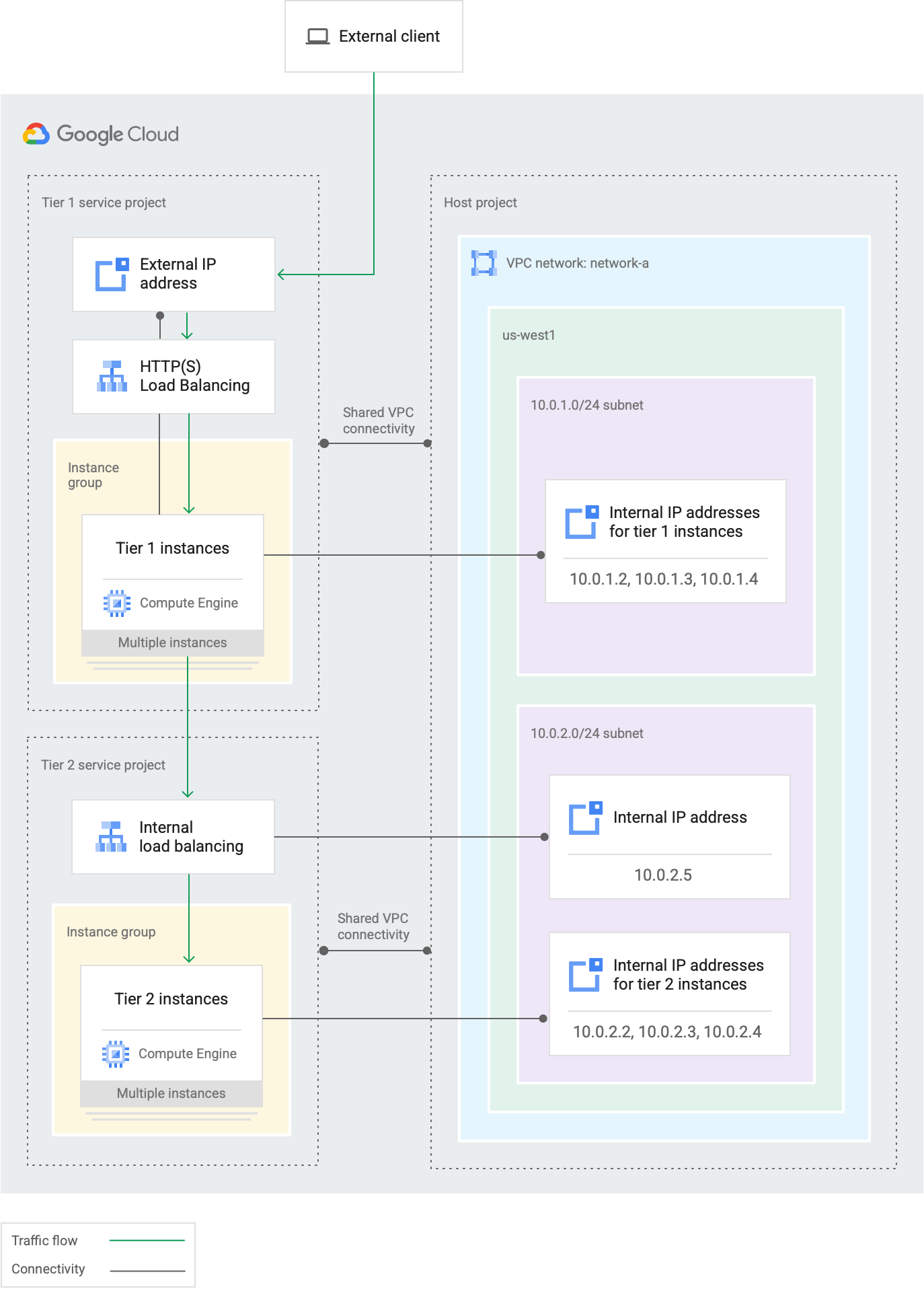
Tier 1 = Premium Tier 2 = Standard (Pricing and network relays are either handled directly by Google or via agreements with ISPs for the Standard tier)
VPC Firewall
Default
Every VPC network has two implied firewall rules that block all incoming connections and allow all outgoing connections.
VPC firewall rules can be configured, finer-grained control happens at the instance level (or region, needs confirming).
Don’t confuse VPC firewall rules with the pre-populated ones that exist within the VPC by default.
| VPC | PRE-POPULATED |
|---|---|
| Incoming from outside = denied | Inter-instance incoming = allowed |
| Outgoing from inside = allowed |
In short, it behaves like a closed members-only club by default.
SO, unless instance-level configuration says otherwise, lateral movement between resources within the network is possible if you’re already inside it.
SSH, RDP, ICMP
SSH, ICMP and RDP are allowed by default with priority 65534 (lower than 65535), meaning every exposed IP has SSH open by default.
Pre-populated rules
| Rule name | Direction | Priority | Source ranges | Action | Protocols and ports | Description |
|---|---|---|---|---|---|---|
default-allow-internal | ingress | 65534 | 10.128.0.0/9 | allow | tcp:0-65535 udp:0-65535 icmp | Permits incoming connections to VM instances from other instances within the same VPC network. |
default-allow-ssh | ingress | 65534 | 0.0.0.0/0 | allow | tcp:22 | Lets you connect to instances with tools such as ssh, scp, or sftp. |
default-allow-rdp | ingress | 65534 | 0.0.0.0/0 | allow | tcp:3389 | Lets you connect to instances using the Microsoft Remote Desktop Protocol (RDP). |
default-allow-icmp | ingress | 65534 | 0.0.0.0/0 | allow | icmp | Lets you use tools such as ping. |
Managing access to public Google services
Private Google API access allows (to complete)
VPC Peering
While Shared VPC lets you join multiple VPCs through a host and service projects, Peering is preferred when the management of the two projects needs to stay separate.
Peering is not transitive : VPC1 ⇐> VPC2 ⇐> VPC3 means 1 and 3 will not be able to communicate.
No network redundancy
For a valid peering setup, there must be no overlapping subnets between the two VPCs (no IP overlap).