Learning
Assuming you know encryption
This is about understanding by practicing how encryption is applied with OS, not encryption itself.
LUKS’s creator published his thesis here.
Practice on blocks-level encryption
Resources
The dedicated virtual machine is available here to practice safely. Note that this was setup with BIOS legacy mode and not UEFI.
Q1 : What command would you use to encrypt a partition with LUKS2 ; serpent-xts ; 512bits master key generation ? Note what it should be doing and how to use the encrypted partition afterwards.
Context
We want to build multiple logical volumes on our partition. This operation can be done both ways :
- Encryption, then the volume group on the partition.
- Build the volume group and encrypt LVM volumes.
Q2: What are the advantages and disadvantages of each method ?
Disk Encryption
Using the Debian install assisted partitioning feature, you can select to use encryption on “Whole” disk. A virtual machine image set-up is available here :
- encryption password is : password
- user login credentials are user:user
- root login credentials are root:root
Q3: Is the “whole disk” encryption accurate ? Note the non-encrypted partition(s) .
Q4: Supposing we do not possess any external component, explain the limitations of “full disk encryption”. Suggest a change to get closer to aimed encryption.
Boot partition encryption
LUKS2
LUKS2 defaults to using Argon2 . Grub pre-boot doesn’t support this KDF (Key derivation function) and needs to be changed to PKBDF2.
Task1 : from initramfs cmd line, use cryptsetup to convert the Argon2 KDF to pbkdf2 for your keyslot. Once this is done and verified, the next goal is to move the boot partition’s content in the root partition.
Task2 : Copy the boot content into the Root partition (under a boot folder)
Task3 : Boot partition is now left unused. Modify /etc/fstab by commenting the old boot mount target. Add the CRYPTODISK module to GRUB parameters.
Update GRUB after changes
Task 4 : Verify that the necessary modules to detect encrypted disks are active in the grub boot configuration file (/boot/grub/grub.cfg).
Task 5 : Reboot. If everything was correctly done, you should be prompted for the password. What are you noticing ?
Useful resources : https://www.gnu.org/software/grub/manual/grub/html_node/Simple-configuration.html
Practice on the unused boot partition
The empty boot partition available can be used to practice the encryption questions above.
If you’re using a QWERTY layout, no problem should appear. However, a different layout can invalidate the password typing at start. GRUB usually loads the keyboard layout on the boot partition.
Adding a key file
Insert the password as if you were in QWERTY if you’re not. Notice that after the first prompt, you’re now booting and a second prompt is required. The reason for that is the GRUB pre-boot isn’t sending the mapped volume to the kernel after the initramfs.
To avoid having to input the password twice, we will add a key-file that will automatically used at initramfs start to decrypt the disk.
Task 1 : Create a random file using dd and urandom.
Task 2 : Add the created file as a key to an available LUKS keyslot.
Task 3 : Edit the crypttab file to use the keyfile on startup. Add the keyfile path to the /etc/cryptsetup-initramfs/conf-hook file.
Task 4 : Regenerate the initramfs image. Verify the configuration is correct (lsinitramfs can be used). If the keyfile is correctly added, it should appear under the line cryptroot/keyfiles/sda5_crypt.key.
Walkthrough
Q1 :
#everything is done with root privilege
#Encrypt an existing partition
cryptsetup --type LUKS2 --cipher serpent-xts-plain64 --key-size 512 luksFormat {partition}

cryptsetup open {partition} {volume_name}
mkfs.ext4 /dev/mapper/{volume_name}
mount {volume_name} {target_folder}
Q2 : The first method (LVM on LUKS) allow 1 encryption for every logic partitions. This is the easiest way to implement simple encryption across everything on a partition.
Second one would be LUKS on LVM. This can be used if you need separate encryption or having some logical ones unencrypted. You basically would use LVM, then implement encryption on desired logical volumes.
Practical example is if you have multiple physical drives and you want to merge them on a logical volume for a bigger unified partition. However, keep in mind that having any of the drive damaged would render useless the whole partition.
Q3 : We can use lsblk and notice the boot partition is left unencrypted. sda5 is the LVM volume group made during the Debian installation containing the root partition and the swap.
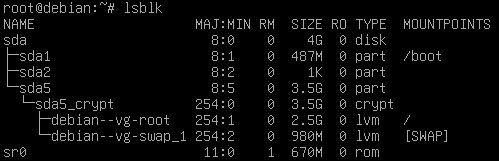
Currently, saying “full disk encryption” is a stretch. Boot partition is left unencrypted.
Q4 : A possible improvement would be to integrate the boot partition and let the BIOS load MBR boot code and GRUB to decrypt the boot partition. It is not the most practical application, but it is a great way to work practice.
"Full disk encryption"
Ideal setup for whole disk encryption is to use an external peripheral to decrypt it.
Boot partition encryption
Task1 :
Adding a breakpoint on root mount to land on initramfs.
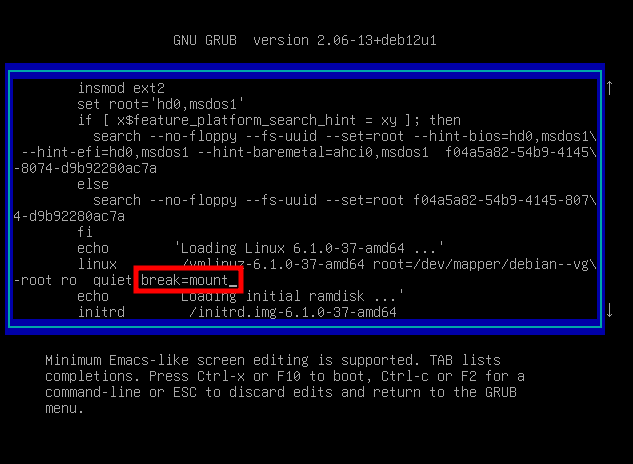
From this point we can edit the LUKS container to switch from Argon2 to PBKDF2 on our active keyslot.
LuksDump before conversion
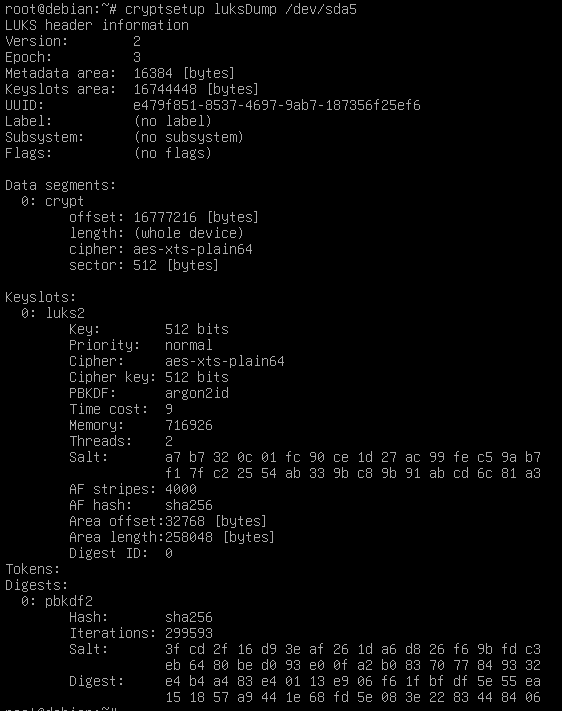
cryptsetup luksConvertKey --pbkdf pbkdf2 /dev/sda5
cryptsetup luksDump /dev/sda5
The dump ensure everything went correctly and GRUB will be able to decrypt the partition.
LuksDump after conversion
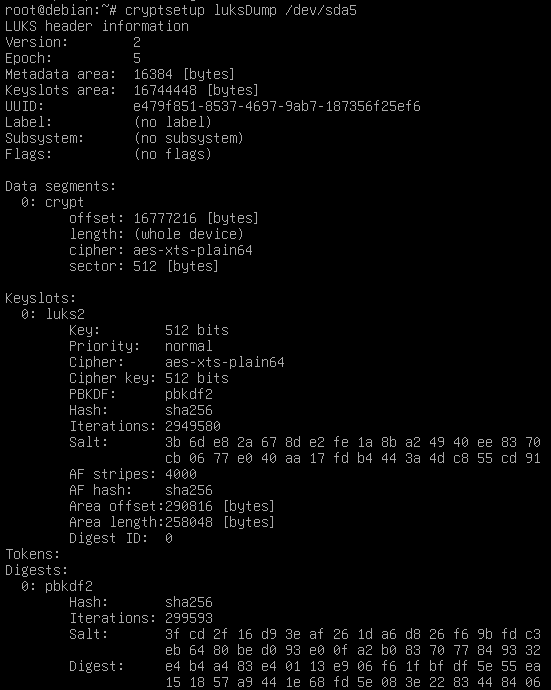
Argon2 and GRUB
GRUB currently doesn’t handle Argon2 KDF properly . Projects like Libreboot are supporting Argon2 KDF on start.
Task2 :
The boot partition is mounted on /boot location after startup. We will copy its content, unmount it and properly add the files to the root partition.
mount -o remount,ro /boot
cp -axT /boot /boot.tmp
umount /boot
rmdir /boot && mv -T /boot.tmp /boot
Task3 :
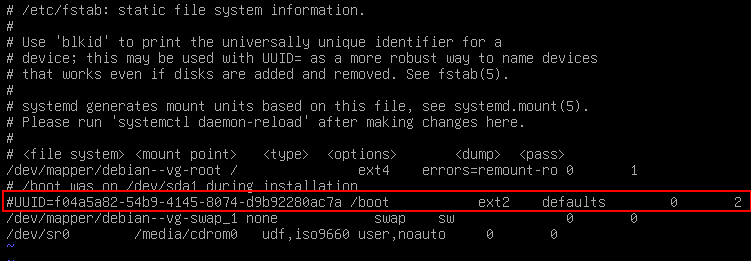
echo "GRUB_ENABLE_CRYPTODISK=y" >> etc/default/grub
update-grub
grub-install /dev/sda
Task4 :
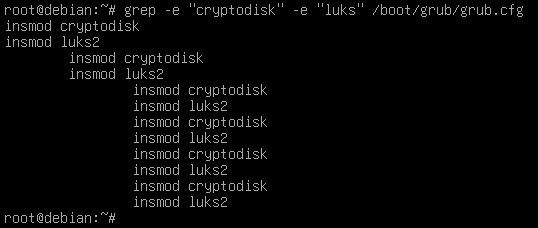
Task 5 :
Inserting “password” with an AZERTY layout :

The GRUB image does not embed keyboard layout modules when it is loaded from the MBR boot sector. The default QWERTY layout is used until the boot partition is deciphered and grub.cfg is readable. Building a custom GRUB image for pre-boot is out of this current topic, I might consider writing a note on it, though it is a niche subject.
Adding a key file
Task 1 :
dd bs=512 count=1 if=/dev/urandom of=/keyfile
Key file size
aes-256-xts uses 2*256bit keys each.
Quote
Similarly, an implementation may restrict its support to either the 256-bit key size (for XTS-AES-128) or the 512-bit key size (for XTS-AES-256).
More details available here
Task 2 :
chmod 600 /keyfile
cryptsetup luksAddKey /dev/sda5 /keyfile
crypstesetup luksDump /dev/sda5
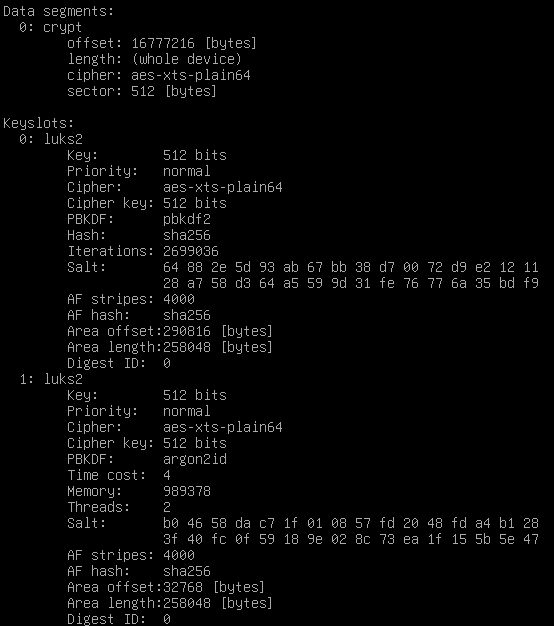
Now a new Keyslot should appear when doing a luksDump :
Task 3 :
/etc/crypttab before modifications
sda5_crypt UUID=e479f851-8537-4697-9ab7-187356f25ef6 none luks,discard
after indicating the key file :
sda5_crypt UUID=e479f851-8537-4697-9ab7-187356f25ef6 /keyfile luks,discard,key-slot=1
More info on crypttab.
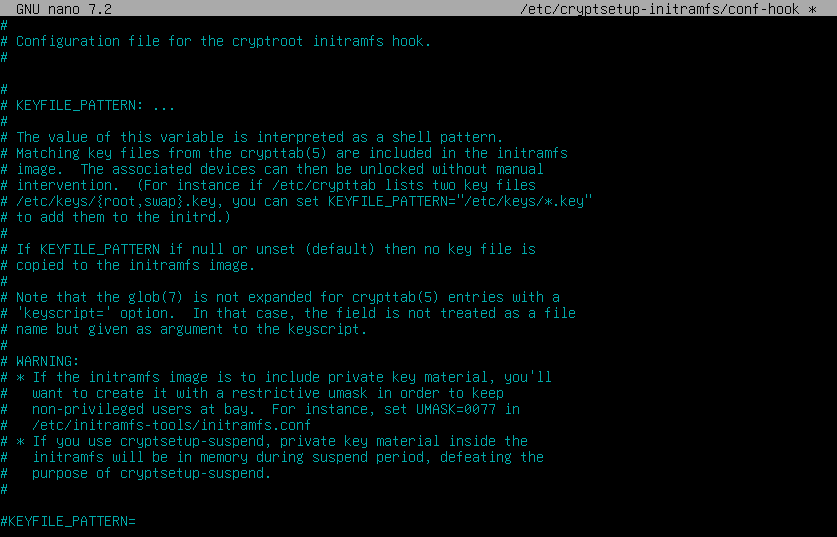
Adding the keyfile to /etc/cryptsetup-initramfs/conf-hook :
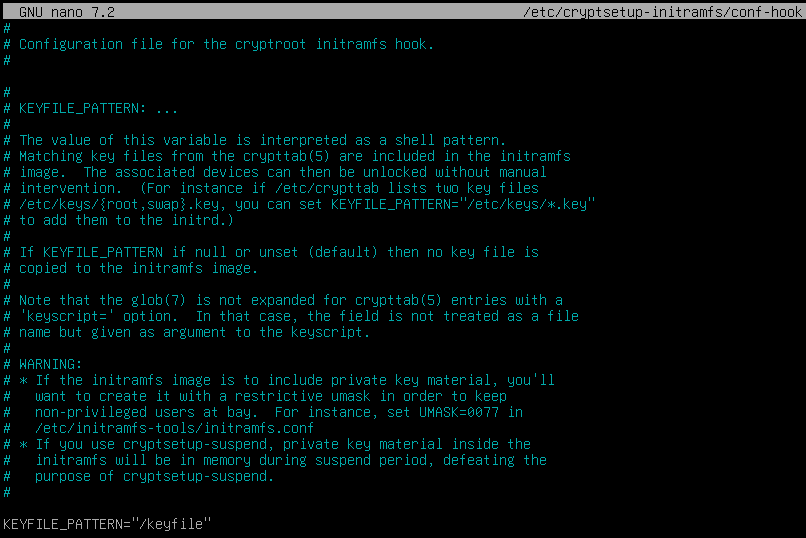
echo “UMASK=0077” >> /etc/initramfs-tools/initramfs.confTask 4 :
update-initramfs -u
stat -L -c "%A %n" /initrd.img
lsinitramfs /initrd.img | grep "cryptroot"
If everything above is validated without error, the setup is valid and rebooting will only prompt for the password during the GRUB pre-boot phase. The key-file method can be used and adapted to use it with external peripherals.