Context
This challenge was made after some digging on Hashcat features and LUKS encryption. Some changes (encryption mode) have been made to make this solvable in a short time without hardware requirements.
This challenge’s goal is to make you create an appropriate wordlist based off public informations, aswell as discovering encryption using LUKS.
You can check block level encryption exercises if you’re interested in learning more about LUKS and practicing.
Resources
The iso file is the home disk’s partition of the owner of the Instagram account.
Write-ups
You have an .iso file and an Instagram account.
Scratching the ISO file
Quick iso inspection :
file exported.iso
exported.iso: LUKS encrypted file, ver 1 [aes, cbc-essiv:sha256, sha1] UUID: 6b95c40b-26dd-4a68-9bb6-63a4d09488f1, at 0x1000 data, 32 key bytes, MK digest 0x201c93739d9a9a32ff69072bcd6da7991a855c62, MK salt 0xdf44494c7b1bfbe4e8ff8306239951f90e91e78005bf2fa1f10d19afeb6e597b, 137680 MK iterations; slot #0 active, 0x8 material offset; slot #1 active, 0x108 material offset; slot #2 active, 0x208 material offset; slot #3 active, 0x308 material offset
Encryption mode is not standard
LUKS default encryption is aes, xts-plain64, sha256. Argon2 or PBKDF2 is used to make password cracking harder, which is precisely why I changed it to be doable without specific hardware.
Trying to mount it as is will result in the following error :
sudo mount exported.iso /mnt/temp
mount: /mnt/temp: unknown filesystem type 'crypto_LUKS'.
       dmesg(1) may have more information after failed mount system call.
As such, mounting and reading the content iso’s content will require to decipher it first. To find the password used to encrypt the partition, you first need to dump the data from the iso.
LUKS can handle up to 8 keyslots
Using luks2john will return only the first keyslot found when dumping content. You should be using luks2hashcat (located in /usr/share/hashcat/tools/) to dump every keyslot. I added multiple combinations of the password in the keyslots to make the research easier as it is an introductory challenge, but you have to dump them all.
The luks2hashcat.py file is available here. The dump for each keyslot is made of these parts :
| Field | Description |
|---|---|
$luks | LUKS indication for hashcat |
1 | LUKS version (LUKS1 in this case) |
sha1 | Hash function used in the PBKDF2 key derivation |
aes | Cipher algorithm |
cbc-essiv:sha256 | Block cipher mode |
256 | Key size |
2255002 | PBKDF2 iteration count |
278ec6d73821... | Encoded salt + encrypted keyslot (base 64) |
Creating custom wordlist
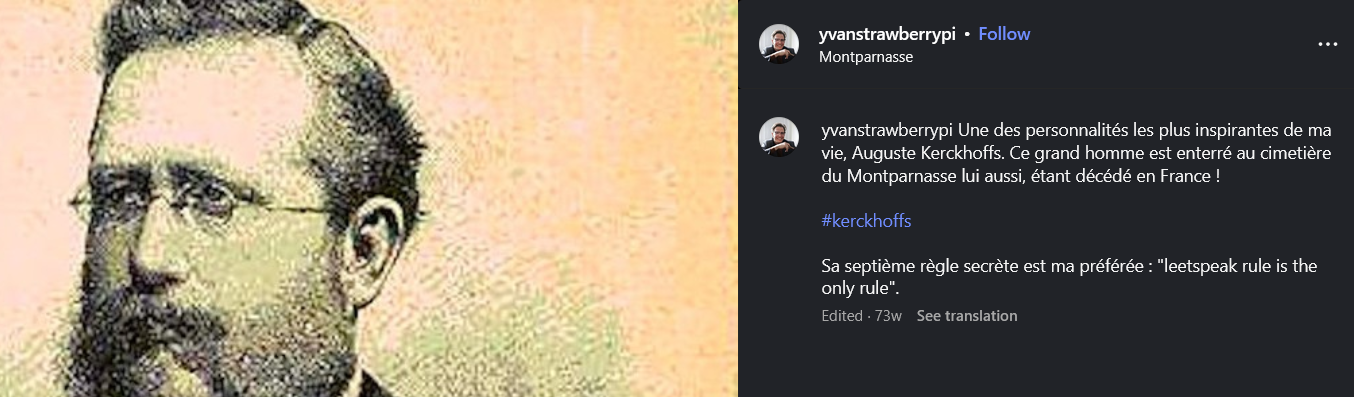
Trying to crack them with a generic wordlist will be long and won’t succeed. This is were the Instagram account gets interesting. Crawling through every post will allow us to create a small wordlist of candidate words :
- Andrew
- Mirabelle
- Sinatra
- Kerchkhoffs
- Catacombes
Eventually you can add more to the list but this is the bare minimum. Kerchkoffs post contains the description with a citation “leetspeak rule is the only rule”, which is a hint to hashcat rules.
Checking the account’s profile picture as a whole by opening it directly in the browser (or downloading it) reveals a second hint combinator.bin. A quick search online gives you an other hashcat tool.
We can build the wordlist using these commands :
hashcat -a1 --stdout customwordlist.txt customwordlist.txt > combinedwords.txt
hashcat -a0 --stdout combinedwords.txt -r leetspeak.rule > leet_wordlist.txt
You should obtain similar files :
The result is sufficiently small to search for the password in a reasonable time.
hashcat -a 0 -m 29511 hashs leet_wordlist.txtThe password is one of the 4 permutations :
- m1r@b3ll3k3r<kh0ff$
- m1r@b3ll3K3r<kh0ff$
- M1r@b3ll3k3r<kh0ff$
- M1r@b3ll3K3r<kh0ff$
Once you’ve found it, you can create a volume and mount it to an existing folder as such :
cryptsetup open exported.iso challenge
mkdir chall_folder
sudo mount /dev/mapper/challenge chall_folder
The flag can be found in the folders.
Setup challenges resources
The iso creation shell script is available here : setupLUKS.sh
#!/bin/bash

#Set variables needed
image="exported.iso"
pass1="m1r@b3ll3k3r<kh0ff$"
pass2="m1r@b3ll3K3r<kh0ff$"
pass3="M1r@b3ll3k3r<kh0ff$"
pass4="M1r@b3ll3K3r<kh0ff$"
mount_path="/media/imageCTF"
volume_name="volumeCTF"

#Create the file with desired size
fallocate -l 4M "$image"

# Initialize the Luks container using the first key.
echo -n "$pass1" | sudo cryptsetup luksFormat --type LUKS1 --cipher aes-cbc-essiv:sha256 --hash sha1 "$image" -

# Add keys:
echo -n "$pass1" > firstKey
echo -n "$pass2" > secondKey
echo -n "$pass3" > thirdKey
echo -n "$pass4" > fourthKey

sudo cryptsetup luksAddKey "$image" --key-file=firstKey --new-keyfile=secondKey
sudo cryptsetup luksAddKey "$image" --key-file=firstKey --new-keyfile=thirdKey
sudo cryptsetup luksAddKey "$image" --key-file=firstKey --new-keyfile=fourthKey

rm firstKey secondKey thirdKey fourthKey
#Open the container to mount if afterwards.
echo -n "$pass1" | sudo cryptsetup open "$image" "$volume_name" -

#Make file system on image
sudo mkfs.ext4 /dev/mapper/"$volume_name"
#Mount the filesystem
sudo mkdir -p "$mount_path"
sudo mount /dev/mapper/"$volume_name" "$mount_path"
And closing the LUKS partition can be done using crypsetup aswell available closeLUKS.sh:
#!/bin/bash

#Make sure this matches the setupLUKS.sh path
mount_path="/media/imageCTF"
volume_name="volumeCTF"

sudo umount "$mount_path"
sudo cryptsetup close "$volume_name"