Some context
Recently, I was discussing Azure topics on a group tchat and realized one friend was not familiar with Cloud concepts. After explaining SaaS (we’ll get to it) to him, I decided to make this note so anyone can grasp the fundamentals needed to understand a discussion about Cloud. This note is a list of what I consider to be the most importants notions to be comfortable with Cloud topics.

Trivia about “Cloud” emergence as people commonly know before diving in. Amazon had loads spike during holidays vs. lots of idle resources during the rest of the year and decided to optimize that by renting their computational resources. This lead to the creation of what we know as EC2, S3, RDS (SimpleDB back then). Take notes of these names if you never heard of it we’ll be back on this soon enough. The creation of AWS progressively lead to the dissociation with Amazon retail infrastructure.
Introduction
First of all, it is mandatory to understand that most people mentionning cloud have no clue what they are talking about really, so let’s define what it truely is : Cloud is an infrastructure and service delivery model. Let me repeat it one more time. Cloud is an infrastructure and service delivery model.
“Cloud computing is a model for enabling ubiquitous, convenient, on-demand network access to a shared pool of configurable computing resources (e.g., networks, servers, storage, applications, and services) that can be rapidly provisioned and released with minimal management effort or service provider interaction.” NIST definition.
At no point does Cloud computing means you must rely on an external provider. To keep quoting the NIST article, we must consider the different types of Cloud.
Differentiating Cloud provider’s types
TL;DR
Public Cloud : external provider, shared physical hardware among customer, isolated data between each other.
Private Cloud : dedicated hardware for the organization. Can be hosted on premises or on an external company.
Community Cloud : multiple organizations sharing a Cloud infrastructure together.
Hybrid Cloud : Combine two (or more) environments of the above Cloud types.
- Public Cloud : provisioned for the general public. Owned, managed and operated by an external provider which holds computational resources in his own data-center. While your data are isolated, the physical server is used for multiple customers at the same time. Virtualization and pooling carry a very strong role in ensuring a proper segmentation. Most of us know Cloud from public providers such as GCP, AWS, Azure.
- Private Cloud : The organization owns the hardware. They can be on your data center or in a third party data center, but they remain exclusively used for you, even when idle. You can still rent resources outside of your data center, but they are exclusive to you. Openstack is a great example of solution used to deploy a private cloud environment. VMware Cloud Foundation, Microsoft (Azure local), IBM Cloud Private, Nutanix are all different private Cloud providers.
- Community Cloud is basically multiple organizations working in tandem and sharing some resources through a common infrastructure, be it managed by one or multiple organization among them or a third party.
- Hybrid Cloud is the “cool” mix of two of the aforementioned Cloud types. Hybrid Cloud implies integrating different Cloud environment together and should not be confounded with “multiple cloud”. For example, UniSuper were using multiple cloud providers and not and hybrid Cloud model during their outage incident.
During a Cloud conversation you can expect people to talk about Public Cloud most of the time. From now on, I’ll be dissociating the provider from the users as managing both parts are separate, be it for an organization or an external provider.
Understanding service delivery model
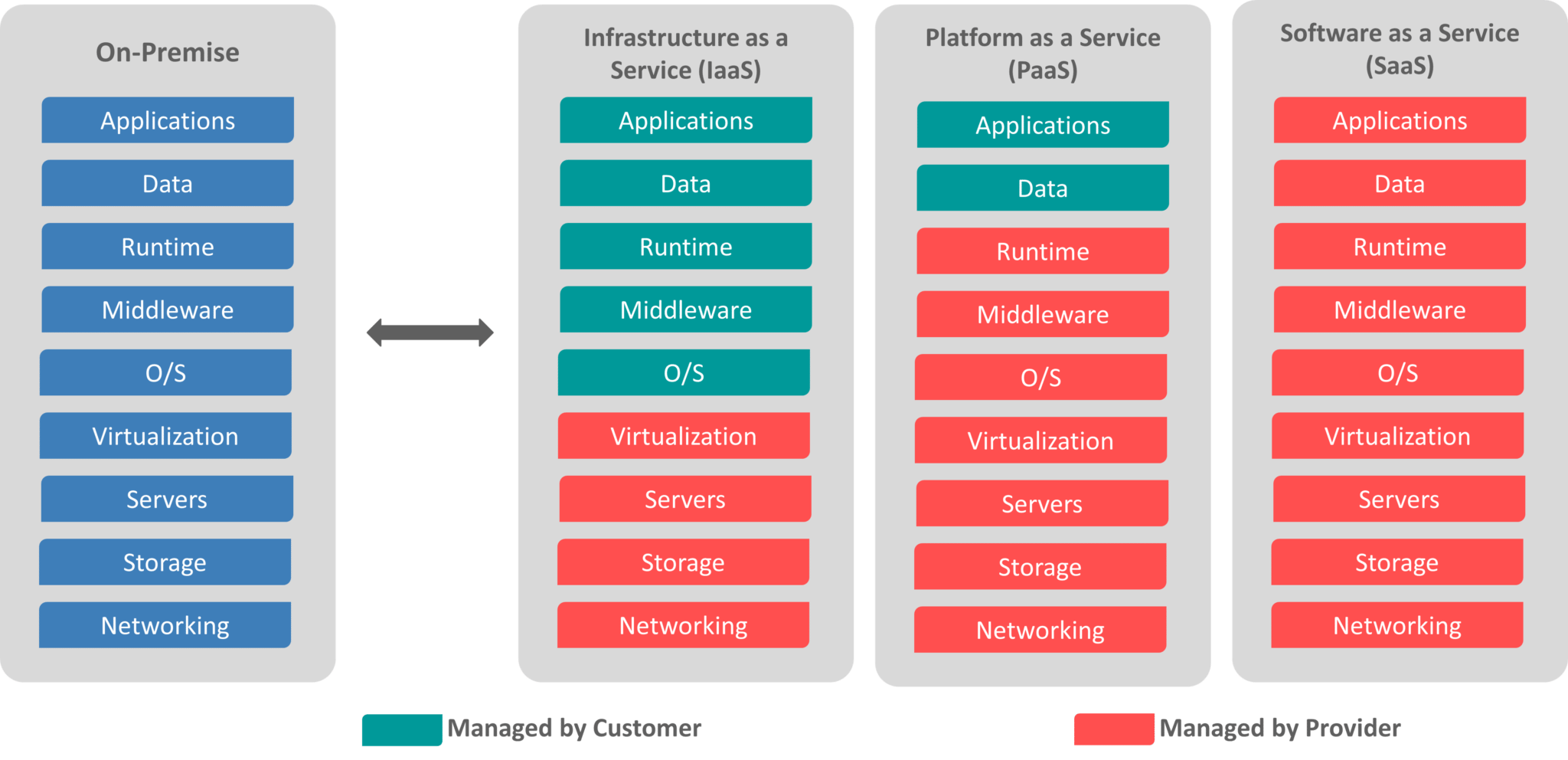
Depending on the resources we want to deploy and use, we need to categorize them. This is mandatory in order to differentiate the control customers have over the services they deploy, and the responsibility shared between the provider and consumer.
Solution can be separated into 3 main categories :
Software as a Service (SaaS)
The service deployed is already fully managed, other than certain applicative configuration levels. Microsoft Teams goes into this category and Microsoft teams administration centers allows for some configuration still. Note that Microsoft365 is also considered a SaaS while integrating Teams.
Platform as a Service (PaaS)
Service that allow you to deploy code, data, applications, etc… without handling the underlying OS or computational power necessity to handle the associated workload. The scaling is on the provider responsibility, but the security of the deployed resource is the customer’s one. Google App Engine is a good example of this type of service. RDS is a PaaS since Amazon handles the OS and everything above, leaving you only the need to manage the database.
Infrastructure as a Service (IaaS)
Here lies most of the interesting services for security. You’re basically setting up resources as they would be on premises, without having to handle the hardware. This means the customer holds all responsibilities towards the deployed resources other than physical compromission and provider availability. EC2, S3 buckets are examples of IaaS.
Here is a compute/ VM oriented schema to remind yourself how you can categorize services. Note that if a service does not possess these characteristics, they must not be taken into consideration (e.g : S3 buckets are IaaS because they do not have Runtime, Middleware or OS. Some people tend to ignore that and qualify it as PaaS anyway).
Understanding core designs of Cloud
In order to elaborate this topic, core designs should be properly distinguished between business and technical. The former will discuss both the interests for the Client and the provider, while technical principles will be oriented towards Identity and Access Management (IAM), Networking, Storage, Computing.
Financial objectives
Providers
Fundamentally, Cloud providers sell infrastructure and responsibility delegation. They aim to rent their computational power and make it as profitable as possible. The ratio cost/price must be incredibly high to overcome the maintenance, infrastructure, security needs plus the organisational model they built and still make profit, right ?
Actually, the scale of all the hardware bought, the fact each provider use their own chips for hardware and other topics make it way cheaper than you’d expect. While the cost and pollution emitted by cooling remains a concern, very potent solutions are available using AI as a predictive model and newest cooling mechanisms. If you’re interested in checking recent (to this day) prowess on the topic, this Cooling solutions Paper is definitely a must read.
With that said, the prices given varies massively from each services. The more responsibility is given to the provider and the less control you need to make a service functional, the pricier it will be. If you followed correctly the previously explained concepts with SaaS, PaaS and IaaS everything should start to be clearer. Each provider has their strengths :
- AWS hold so much computational power with such efficiency over the world that their IaaS services are the most profitable sector. The lower margins compared to their SaaS and PaaS are completely negated by the usage scale by companies.
- Microsoft Azure makes an incredible amount of money through their SaaS with Office 365 Suite. Since almost every companies leverage Microsoft environments, their marketing argument is a default choice.
- GCP currently make the most money out of PaaS with BigQuery and GKE. Their services for Data and AI processing are currently unmatched, and cluster automation through Kubernetes was a Google thing first (previously Borg). They remain the most advanced provider for containerisation.
Cloud and AI
- AWS makes the most money out of their IaaS to provide for computational power with AI. They don’t have any focus on AI models inciting companies who wants a liberty in the model usage.
- Azure partnership with OpenAI directly impact decision making towards providers. It is also directly integrated in every Office 365 products now.
- GCP is intensively used for model training using their TPU processors. Their argument lies in the data processing associated using their services.
Customers
To be continued.