The actual data sent to the web application during fuzzing. Can be a simple string, numerical value, or complex data structure.
' OR 1=1 -- (for SQL injection)
Response Analysis
Examining the web application’s responses (e.g., response codes, error messages) to the fuzzer’s payloads to identify anomalies that might indicate vulnerabilities.
Normal: 200 OK Error (potential SQLi): 500 Internal Server Error with a database error message
Fuzzer
A software tool that automates generating and sending payloads to a web application and analyzing the responses.
ffuf, wfuzz, Burp Suite Intruder
False Positive
A result that is incorrectly identified as a vulnerability by the fuzzer.
A 404 Not Found error for a non-existent directory.
False Negative
A vulnerability that exists in the web application but is not detected by the fuzzer.
A subtle logic flaw in a payment processing function.
Fuzzing Scope
The specific parts of the web application that you are targeting with your fuzzing efforts.
Only fuzzing the login page or focusing on a particular API endpoint.
There a pletora of Fuzzer and I vary their usage on some write-ups. Example of commands for them are noted in web enumeration. HTB mention these in particular:
FFUF (Fuzz Faster you Fool)
ideal for file enum, also handles recursive if looking through directories.
Gobuster
dedicated option for subdomain and vhosts enumeration.
Feroxbuster
Great default wordlist for directory enumeration especially recursive ones. It also offers a Burpsuite options to add results to the sitemap.
wenum/wfuzz.
I’ve never used it but they describe it as a good tool for parameters and brute-force.
older content (unused paths/files, etc… that weren’t cleaned)
admin portals
exposed test environments (if in scope, this could be by fuzzing subdomains)
exposed features that shouldn’t be accessible normally
Using wordlist for effective fuzzing
Look up for classic SecLists content such as common.txt, directory-list-2.3-medium.txt, all the raft wordlists, the big.txt … check web enumeration for specific content. If you read the associated note for fuzzing, you should be able to solve the following.
Questions
Within the "webfuzzing_hidden_path" path on the target system (ie http://IP:PORT/webfuzzing_hidden_path/), fuzz for folders and then files to find the flag.
HTB{w3b_f1l3_fuzz1ng_fl4g}
Solution
For this example I’ll proxy through Burp and set the redirect to my scope like this :
By sorting my results in the burp history by status code, I get a 200 from http://94.237.120.112:33455/webfuzzing_hidden_path/flag/ and I repeat my enumeration on found directory using file directory this time. Note that ideally I’d simply trigger a recursive search on directory aswell and lookup for file enumeration from root path anyway.
Here our output returns the file http://192.168.0.148:8080/webfuzzing_hidden_path/flag/flag.html that we can curl or directly inspect in Burp to retrieve the flag.
Mentioned it during previous question.
Some tools like feroxbuster fire up a custom wordlist and auto recurse, ffuf needs -recursion flag to enable it.
TL;DR
If a successful path is found, branch over it and start fuzzing on the newfound path in parallel. Repeat the process indefinitely until exhaustion of results (if no depth is specified).
The course expands a lot on the usefulness of recursive fuzzing and most importantly mentions :
-rate
-timeout
-recursion-depth
All of these settings allow to make sure we fuzz without downing the target and not get blacklisted if measures are active.
our “updated” command should look like this if we follow the course recommendations :
Fuzzing doesn’t stop at file and directory enumeration. It should be used on GET requests parameters, POST request body parameters. Note that sometimes fuzzing can reveal unknown / hidden parameters. You would have to find one and a value that returns a different response even if it’s unlikely.
HTB recommend wenum but it’s not mandatory since ffuf and many other tools do the trick fine already. Burp Intruder can also work fine for this.
Distinguish fuzzing over GET requests using parameters in the url like such :
Using GoBuster against the target system to fuzz for vhosts using the common.txt wordlist, which vhost starts with the prefix "web-"? Respond with the full vhost, eg web-123.inlanefreight.htb.
Using GoBuster against inlanefreight.com to fuzz for subdomains using the subdomains-top1million-5000.txt wordlist, which subdomain starts with the prefix "su"? Respond with the full vhost, eg web.inlanefreight.com.
support.inlanefreight.com
Solution
gobuster dns --domain inlanefreight.com -w /usr/share/seclists/Discovery/DNS/subdomains-top1million-5000.txt --quiet | grep "su"
You should find the correct answer in the output. the --quiet option avoids filling your terminal with warning and errors message for invalid subdomains.
Curated list of parameter for each tool regarding filtering output. Imo this is not very resourceful other than practicing and using them. Each tool have their own specification, notably feroxbuster offers filtering on excluding response matching a specified regex. This should be read more than thought of.
Questions
What flag do you find when successfully fuzzing the POST parameter?
HTB{p0st_fuzz1ng_succ3ss}
Solution
The process is very similar to previous exercises on post request enumeration. However in our case we’ll add an exclusion rule on 404 output since we get flooded with noise if we don’t. Our command looks like this :
ffuf -u http://$ipscope/post.php -X POST -H "Content-Type: application/x-www-form-urlencoded" -d "y=FUZZ" -w /usr/share/SecLists/Discovery/Web-Content/common.txt -v -mc all -fc 404
We find the same value as before SUNWmc and cURL with POST request gives us the flag.
This section can be accurate for Bug Bounty however I don’t really agree with the last process part. Yes, findings should be manually confirmed and reproduced, and documenting how it is done is mandatory.
However, during a mission we want to prove our results and be as explicit as possible. We can still screenshot our results and hide sensitive data without restraining to Content-Size to show our findings.
TL;DR
For bug-bounty with specified mention, don’t reveal content. For a mission, this could be used to leverage privilege escalation, login to administrative feature, connect through SSH on the machine etc…
Questions
Question
Content-Length: 210
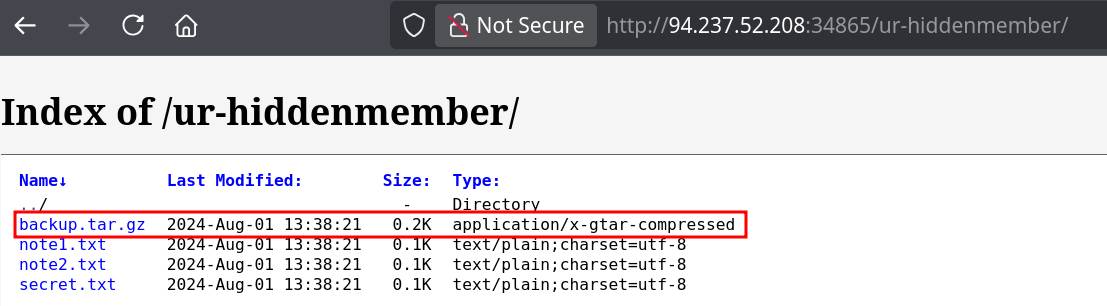
Solution backup folder which contains both backup.sql and password.txt. This could be the correct answer however a second folder is called ur_hiddenmember. This is our target folder
The questions are follow along like previous courses. Simple fuzz using our typical directory enumeration gives us the
If the API documentation is exposed you already have a lot of data available.
Fuzzing over REST api can be done on path, and then on query parameters or id. If we’re talking about a POST request with JSON or other data format we can fuzz over these too.
The best approach would also to log as much data as possible by skimming through the endpoints and trying them.
Note every parameters, endpoint, value and types.
Try to replay parameters on other endpoints and see if they are accepted.
Change types and observe how the server behaves.
SOAP
Is trickier but can lead to interesting findings. Looking for WSDL (Web Services Description Language) is very powerful since it can be considered as the equivalent of the REST documentation on a swagger.
Same methodology than for REST, lookup for history logs while going through the application.
GraphQL
Nothing very important here mentioned aside from teaching the existence of Mutation (equivalent of modifying data). We can fuzz over the variables to try to extract some data.
After completing all steps in the assessment, you will be presented with a page that contains a flag in the format of HTB{…}. What is that flag?
Use various wordlist
This assessment is based on learned content and leverages common.txt wordlist however we should always lookup for different wordlist to make sure we cover most possibilities.
Setup my variable ipscope={IP instance deployed} during the assessment.
First step starts by enumerating directory and files. I start both commands on two different panes:
Quickly finding the admin folder and recursive scan gets us both output, /admin/index.php and /admin/panel.php. Both returns a 200 status code however the former is only an access denied.
panel.php however greets us with :
curl http://$ip:$port/admin/panel.phpInvalid parameter, please ensure accessID is set correctly
We’ll try to fuzz using the accessID as a query parameter in GET and if we get no results we’ll try POST requests. We only get 200 responses, the same as if we didn’t use the accessID when supplying different value of size 58. To work my way around the noise I exclude answer matching the aforementioned response.
We find the getaccess parameter returning a 68 response size :
curl http://$ip:$scope/admin/panel.php?accessID=getaccessHead on over to the fuzzing_fun.htb vhost for some more fuzzing fun!
We can add the vhosts to our conf and repeat the fuzzing process from the beginning. Note vhosts is not tied to port and only IP should be used in hosts file. I used the hostname variable to be fuzzing_fun.htb.
Enumerating through file and directory doesn’t give any result so I’ll go through vhosts.
Check root URL next time
curl http://fuzzing_fun.htb:41689/index.php
Welcome to fuzzing_fun.htb!
Your next starting point is in the godeep folder - but it might be on this vhost, it might not, who knows…
We find the vhost hidden.fuzzing_fun.htb:41689, update the hostname variable in consequence and repeat the fuzzing process. If we curl the root path we get :
curl http://hidden.fuzzing_fun.htb:41689/index.phpWrong path, remember to be looking in /godeep
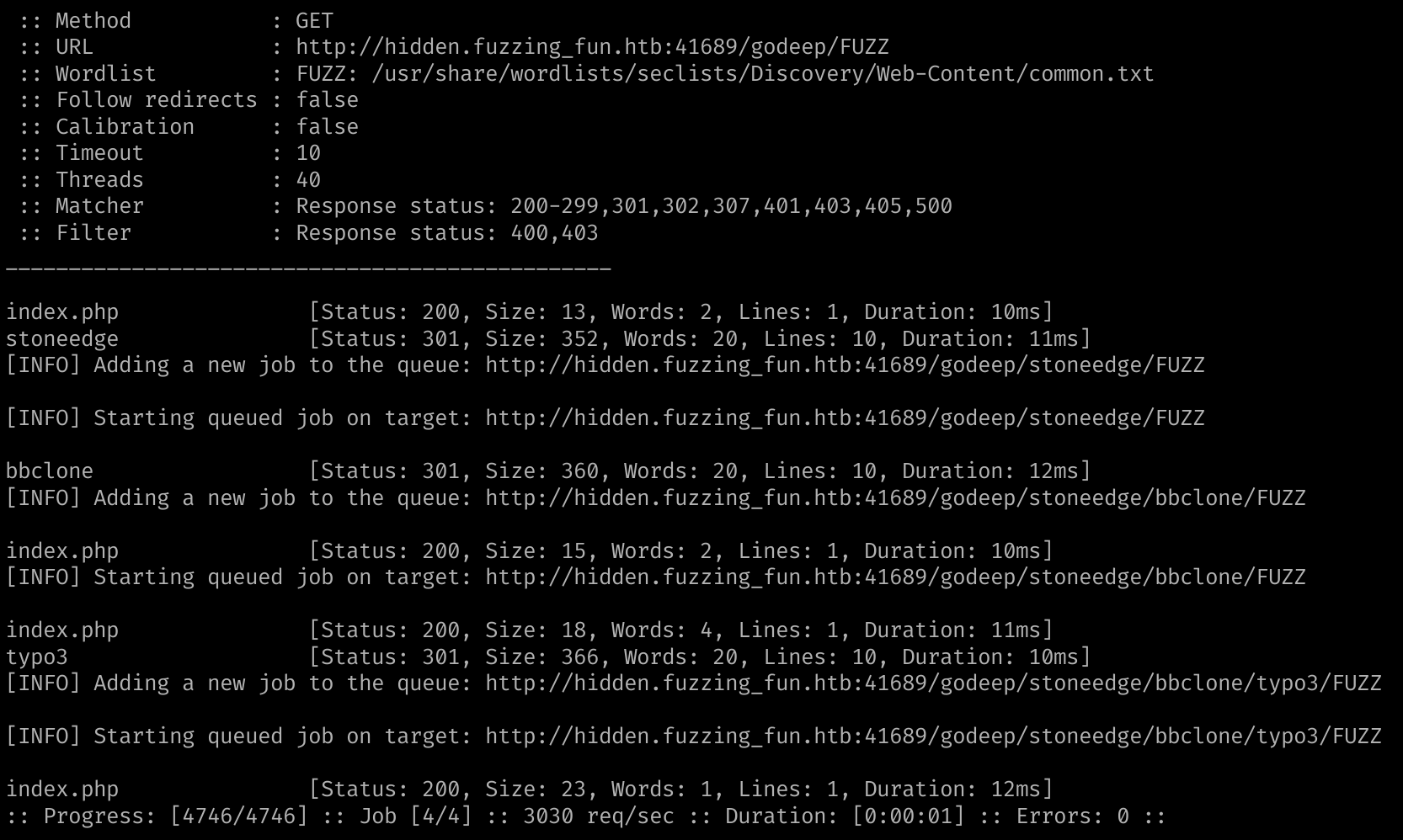
We echo back to the root folder in the main hostname. We can fuzz over the godeep folder. Our recursive command reaches the last endpoint that gives us the flag :