HTTP Fundamentals
HyperText Transfer Protocol (HTTP)
- HTTP is a client / server communication protocol (usually port 80)
- Server processes requests from client and serves resources.
- clients use URL to reach websites by specifying FQDN (or IP). More content on it here.
URL
HTB’s URL and table (slightly more concise).
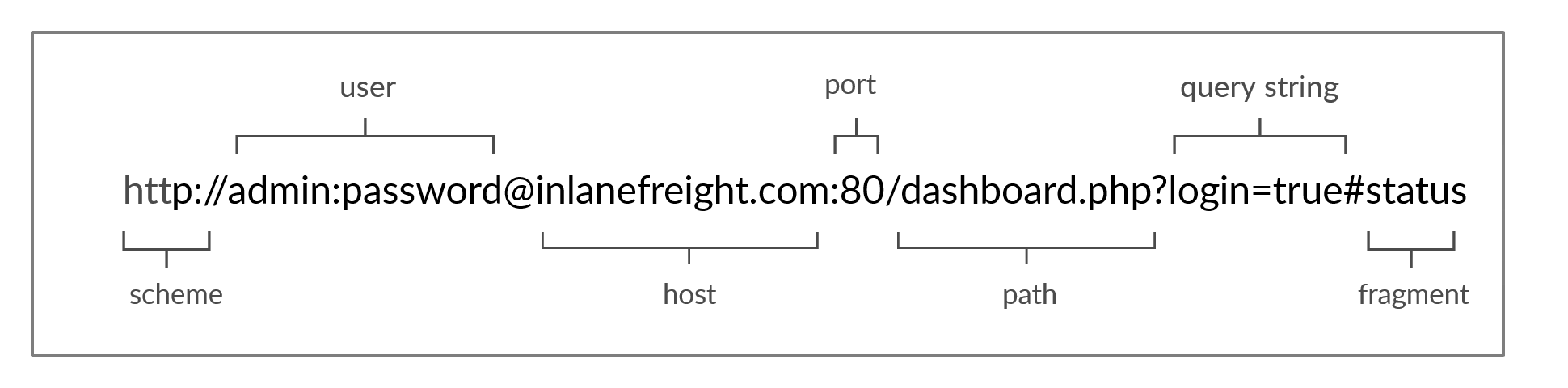
| Component | Example | Description |
|---|---|---|
Scheme | http:// https:// | Used to identify the protocol accessed by the client. Ends with :// |
User Info | admin:password@ | Optional component containing credentials separated by :.Used to authenticate to the host, and separated from the host with @ |
Host | inlanefreight.com | Host signifies the resource location. Can be a hostname or an IP address |
Port | :80 | Port is separated from the Host by :. If no port is specified, http and https respectively default to port 80 and 443 |
Path | /dashboard.php | Points to the resource being accessed, be it a file or a folder. If no path is specified, the server returns the default index index.html. |
Query String | ?login=true | The query string starts with a ?. It consists of a parameter login and a value true. Multiple parameters can be separated by &. |
Fragments | #status | Fragments are processed by the browsers client-side to locate sections within the primary resource (a header or section on the page). |
HTTP Flow
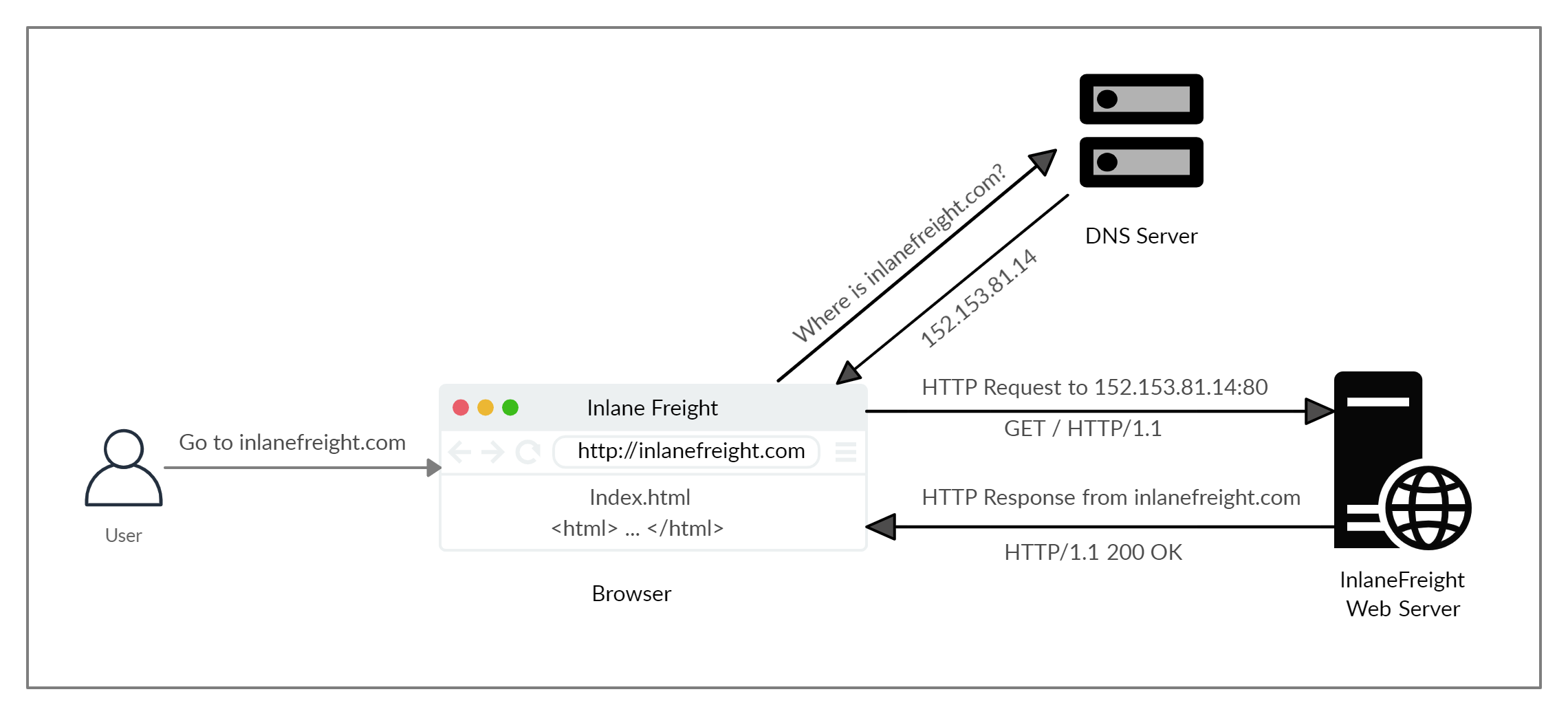
- First time querying a FQDN (not in cache) → DNS request is sent.
- Else, get the associated IP to send the first HTTP request to the server.
- Server receives the HTTP Request GET
/(if no path was given) and sends back the HTTP Response.
cURL
Presented as a way to read raw HTTP response but it’s usefulness lies in the POST method and forging requests, saving requests locally… Burpsuite and proxying requests are better suited for analyzing requests than HTB’s usecase. cURL is a very broad tool nonetheless and being able to use it is necessary.
source
Questions
To get the flag, start the above exercise, then use cURL to download the file returned by '/download.php' in the server shown above.
curl $ip:$port/download.phpSolution

HyperText Transfer Protocol Secure (HTTPS)
HTTP is sent in clear-text without signature → big deal for confidentiality and integrity. Encryption and signature using TLS certificates are now implemented to satisfy both aforementioned requirements.
Remark : if requests to clear-text DNS servers are used, the URL can be caught if the traffic is monitored even if the HTTPS stays encrypted.
HTTPS Flow
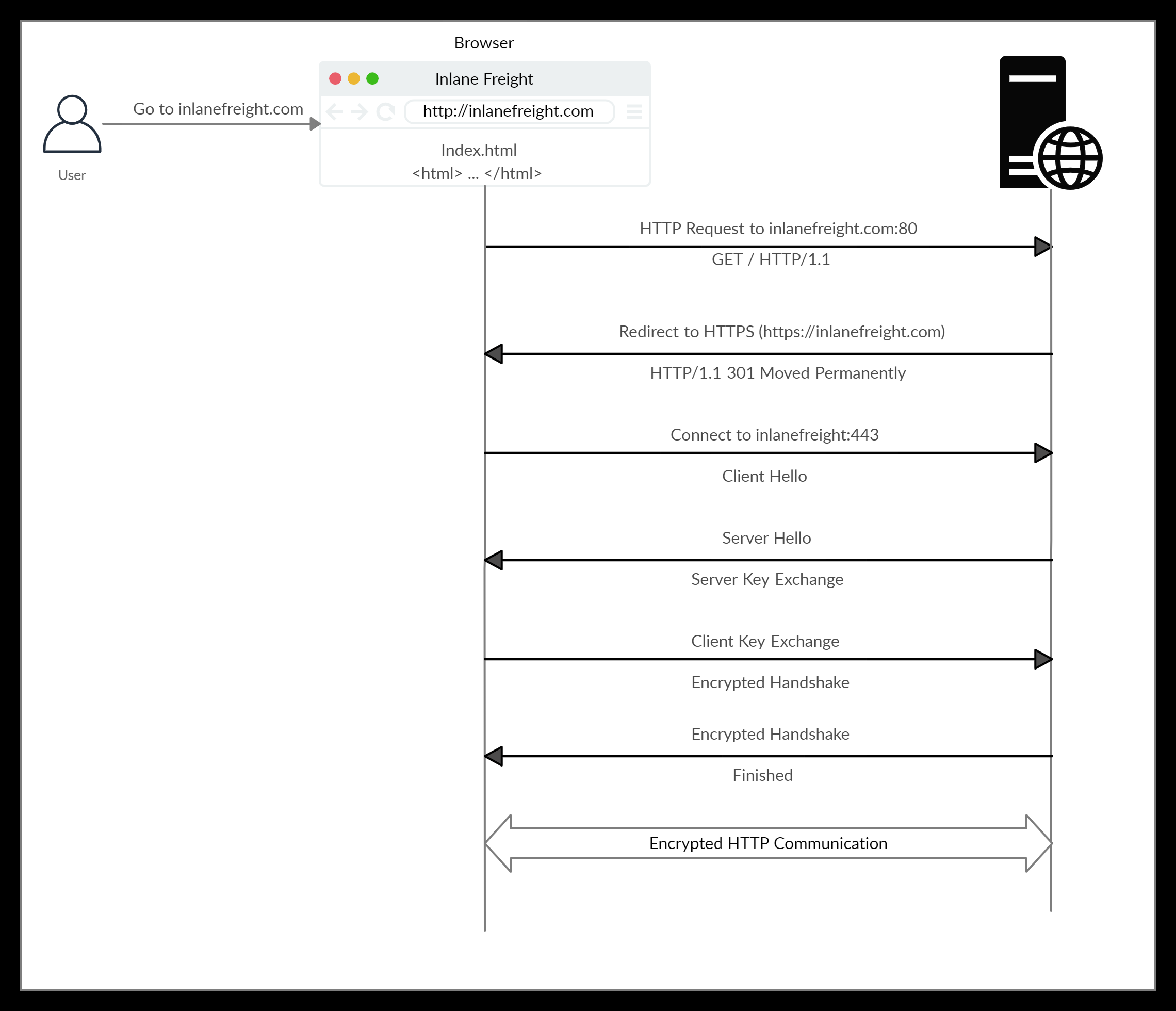
- Redirecting people using HTTP to HTTPS is standard procedure.
- Hello include TLS version available to the client, aswell as encryption algorithms.
- Hello response contains the TLS certificate and the chosen algorithm to establish the secure connection, with a
server random. - Key exchange : client verifies the certificate to the emitting certification authority, then encrypt a
client randomand apremaster secretencrypted using the Server’s public key. Server decrypt using his private key and both generate session keys using the data they possess. - They both Handshake by respectively sending an encrypted “Client Finished” and “Server Finished” with the built encryption key.
- The session is now encrypted using the shared symmetrical key.
TLS 1.3 Handshake
Note that the procedure using TLS 1.3 has less steps. The details can be read here : https://www.cloudflare.com/learning/ssl/what-happens-in-a-tls-handshake/
Circular transclusion detected: Knowledge-Notes/curl
HTTP Requests and Responses
AS mentioned before, HTTP works by exchanging request (client) and response (server).
HTTP Request
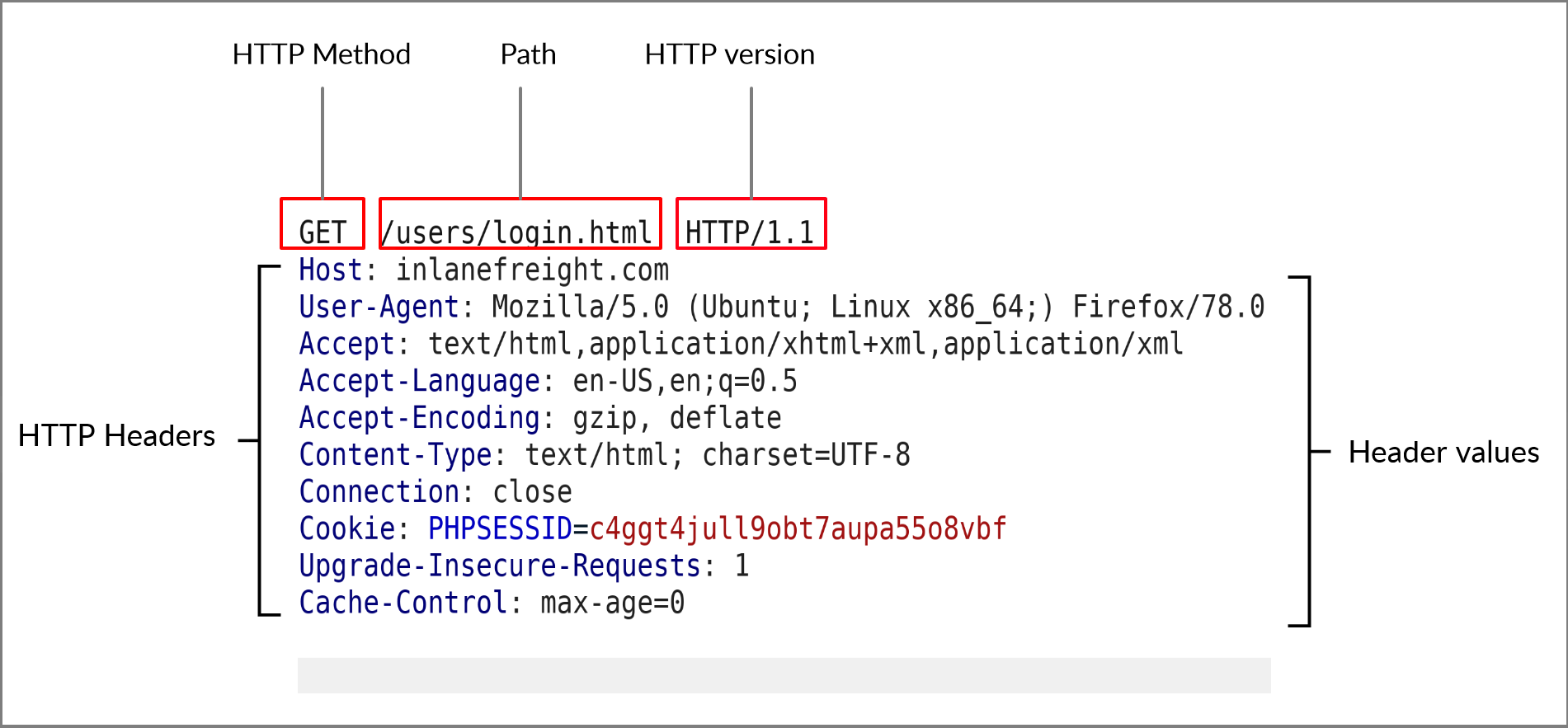 The URL would be
 https://inlanefreight.com/users/login.html. The picture is self explanatory.
HTTP Response
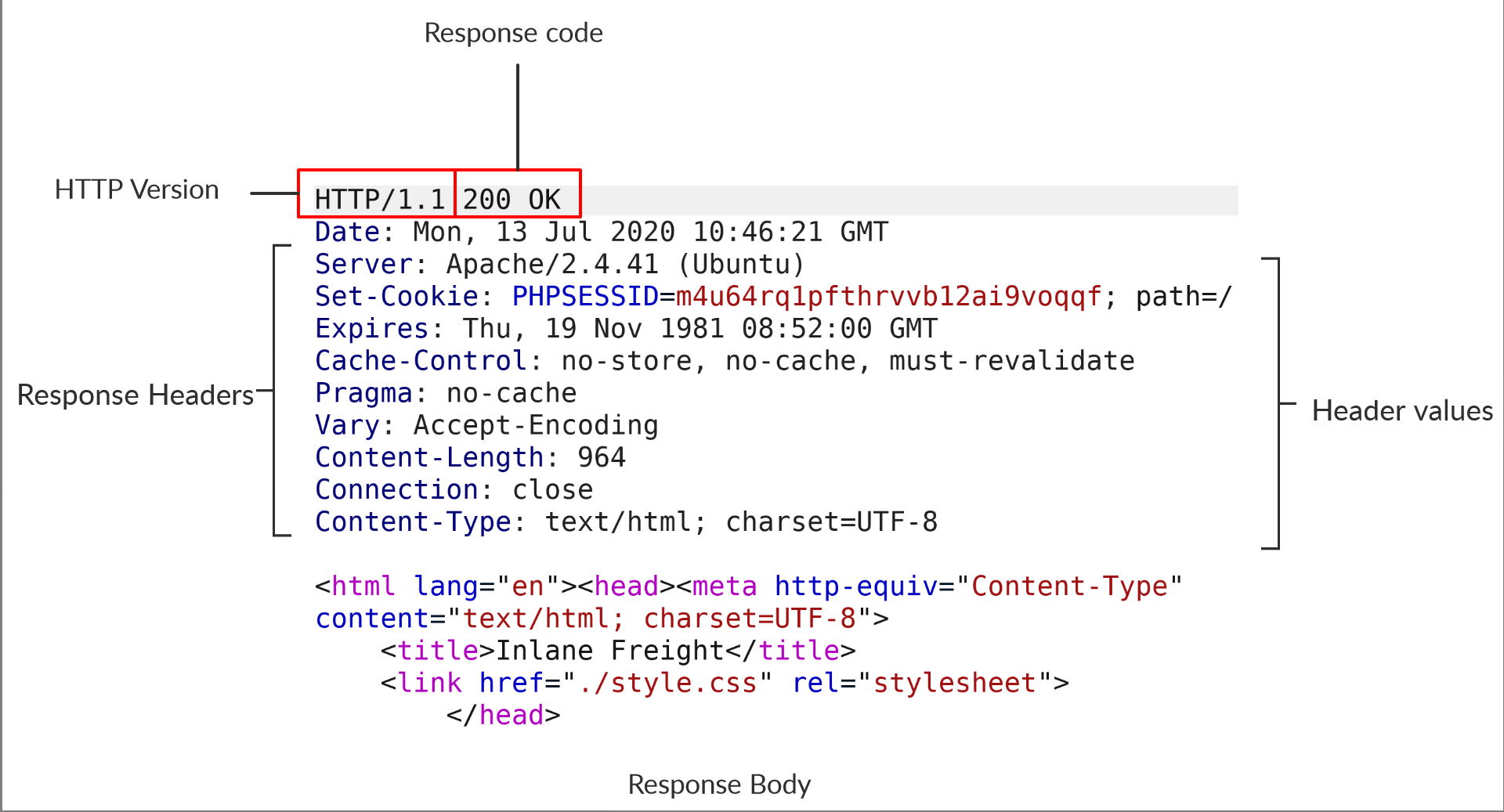 HTTP Response codes should be looked up at pretty much every time for gathering immediate information on the server’s behaviour.
Response Headers and values should be analyzed as they can reveal a lot of information about the server if not setup properly.
Circular transclusion detected: Knowledge-Notes/curl
Browser DevTools
Get comfortable using DevTools on your browser, especially network, console, debugger, storage fonctionnality (on Firefox).
-
Network tab is particularly useful to keep tracks of different requests sent from the current loaded page and identifying which resources are fetched.
-
Storage allow for example to change our cookies value.
-
Debugger is particularly effective to analyze scripts triggering and search for client-side vulnerabilities or exposed sensitive data.
Questions
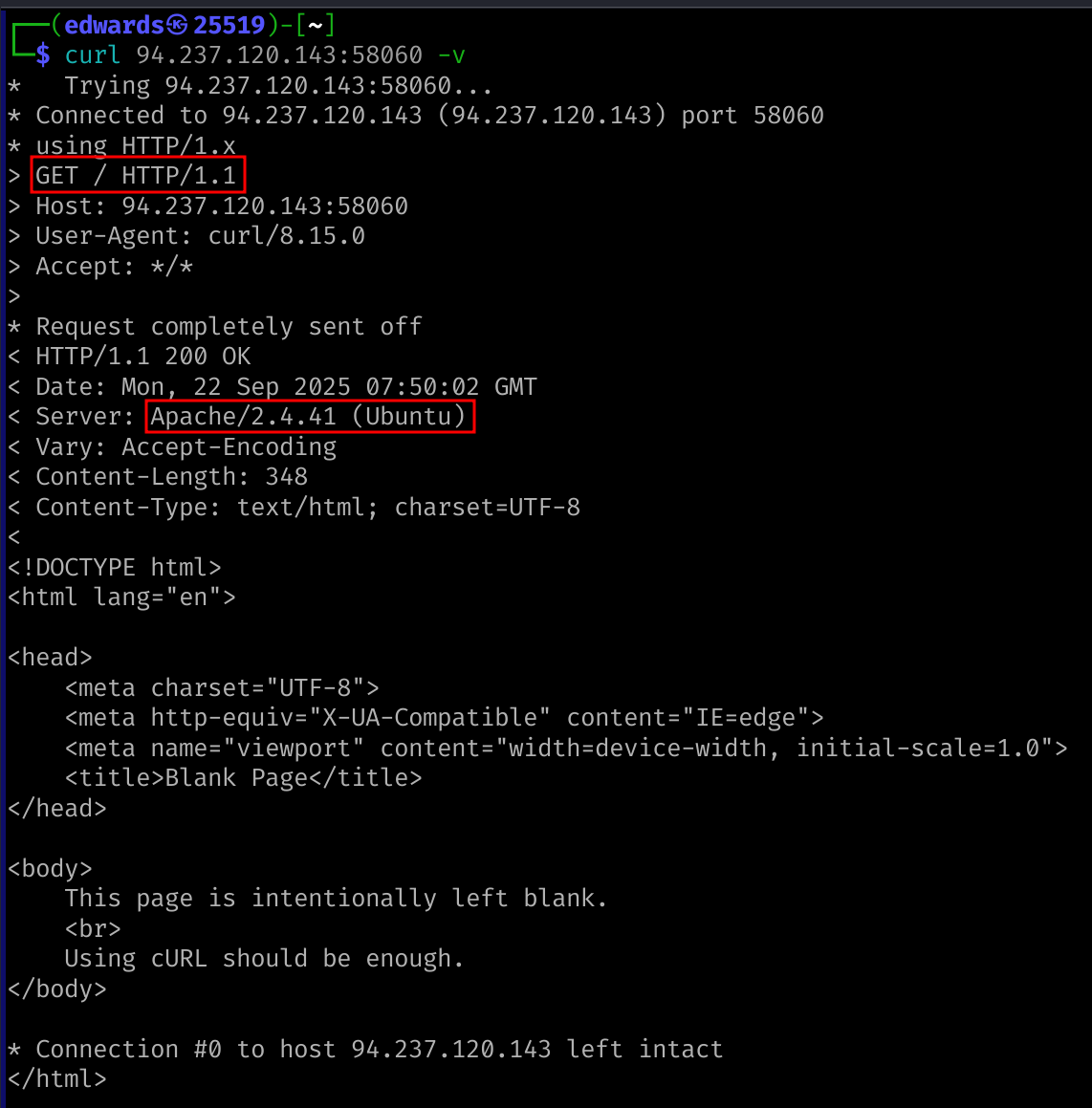
What is the HTTP method used while intercepting the request? (case-sensitive)
GET
Send a GET request to the above server, and read the response headers to find the version of Apache running on the server, then submit it as the answer. (answer format: X.Y.ZZ)
2.4.41
Solution
HTTP Headers
HTTP headers let the client and the server pass additional information with a message in a request or response. from Mozilla documentation
All following tables originates from Hack The Box resources but Description field has been greatly shortened to decrease verbosity. I encourage anyone learning to take the time to do the same thing to ensure understanding of content and read through.
General and Entity headers both can be used by requests and responses.
General Headers
| Header | Example | Description |
|---|---|---|
Date | Date: Wed, 16 Feb 2022 10:38:44 GMT | date and time at which the message originated. time to the standard UTC time zone preferred. |
Connection | Connection: close | Dictates the current network connection expectation status.close : they would like to terminate the connection.keep-alive : connection should remain open. |
Entity Headers
| Header | Example | Description |
|---|---|---|
Content-Type | Content-Type: text/html | describe type of resource transferred. automatically added by the browsers client-side, returned server response. charset field for encoding standard (e.g:UTF-8). |
Media-Type | Media-Type: application/pdf | media-type similar to Content-Type for data.crucial in making the server interpret our input. charset can be used with this header. |
Boundary | boundary="b4e4fbd93540" | marker to separate content when more than one in same message. used as --b4e4fbd93540 to separate different parts of a form. |
Content-Length | Content-Length: 385 | size of the sent entity. server uses it to read data from the message body. automatically generated by the browser and tools like cURL. |
Content-Encoding | Content-Encoding: gzip | type of encoding used. |
Request Headers
| Header | Example | Description |
|---|---|---|
Host | Host: www.inlanefreight.com | specify the host being queried. can be a domain name or an IP address. servers can host multiple web-app using vhost. host header is an important enumeration target for revealing other attack vector on target. |
User-Agent | User-Agent: curl/7.77.0 | used to describe the client requesting resources. can reveal a lot about the client, (browser, version, OS). |
Referer | Referer: http://www.inlanefreight.com/ | where the current request is coming from. accessing this website from Google and I’d log https://google.com as the referer . can be manipulated and shouldn’t be considered for logic implementation. |
Accept | Accept: */* | describes which media types the client understand. it can contain multiple media types separated by commas. */* means everything accepted. |
Cookie | Cookie: PHPSESSID=b4e4fbd93540 | Contains cookie-value pairs in the format name=value. Check cookie, used all the time and crucial to understand. |
Authorization | Authorization: BASIC cGFzc3dvcmQK | Another method for to identify clients. After successful authentication, the server returns a token unique to the client. Unlike cookies, tokens are stored only on the client-side and retrieved by the server per request. |
Response Headers
| Header | Example | Description |
|---|---|---|
Server | Server: Apache/2.2.14 (Win32) | information about the HTTP server. can be used to gain information about the server (e.g: version), and enumerate it further. |
Set-Cookie | Set-Cookie: PHPSESSID=b4e4fbd93540 | Contains the cookies needed for client identification. Browsers parse the cookies and store them for future requests. it follows the same format as the Cookie request header. |
WWW-Authenticate | WWW-Authenticate: BASIC realm="localhost" | Notifies the client about the type of authentication required to access the requested resource. |
Security Headers
| Header | Example | Description |
|---|---|---|
Content-Security-Policy | Content-Security-Policy: script-src 'self' | CSP (I don’t know why HTB didn’t consider linking it since it’s pretty fucking important) dictates the website’s policy towards externally injected resources. This could be JavaScript code as well as script resources. This header instructs the browser to accept resources only from certain trusted domains, hence preventing attacks such as Cross-site scripting (XSS) (bypass exists if other vulnerabilities are exploitable). |
Strict-Transport-Security | Strict-Transport-Security: max-age=31536000 | STS (Same thing link it ffs) Prevents the browser from accessing the website HTTP, and forces subsequent connection to HTTPS. thus, prevents attackers from sniffing web traffic and accessing protected information. |
Referrer-Policy | Referrer-Policy: origin | whether the browser should include the value specified via the Referer header or not. help in avoiding disclosing sensitive URLs while browsing. |
Security Headers are set up by the server and sent in responses.
Circular transclusion detected: Knowledge-Notes/curl
Browser DevTools
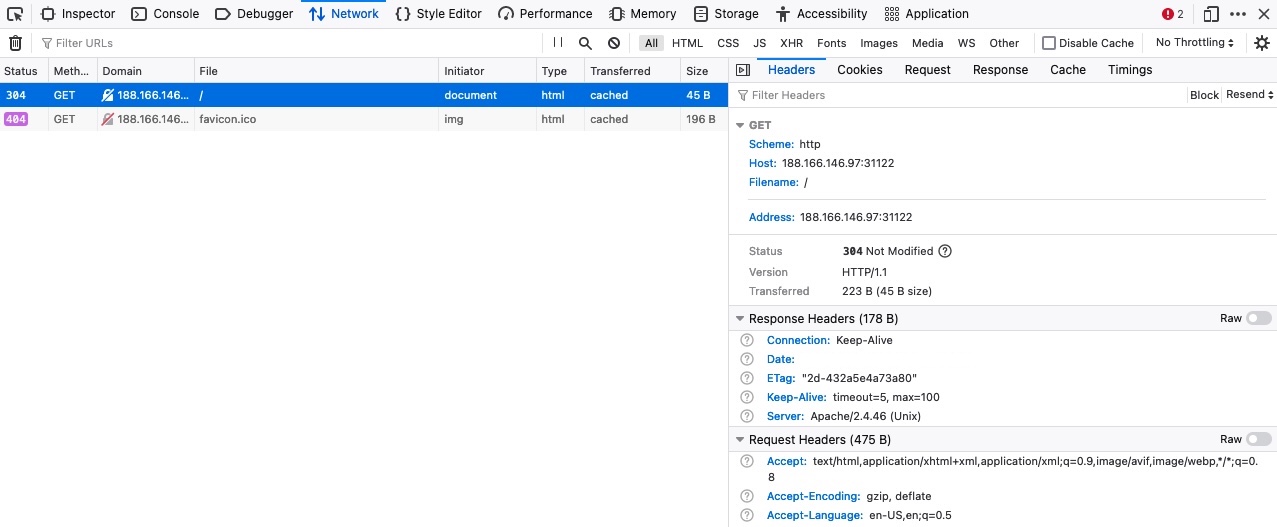 Headers and cookies can be seen for a request using the Network tab. Editing cookies can be done in Storage one.
Questions
The server above loads the flag after the page is loaded. Use the Network tab in the browser devtools to see what requests are made by the page, and find the request to the flag.
HTB{p493_r3qu3$t$_m0n!t0r}Solution
First expected way is to follow the course indication doing so :
An other approach is to use the debugger to identify the unusual script fetch and reach it to get the result.

HTTP Methods
HTTP Methods and Codes
Request Methods
| Method | Description |
|---|---|
GET | Requests a specific resource. Additional data can be passed to the server via query strings in the URL (e.g. ?param=value). |
POST | Sends data to the server. It can handle text, PDFs, and other forms of binary data. This data is appended in the request body. Commonly used when sending information (e.g. forms/logins) or uploading data. |
HEAD | Requests the headers that would be returned if a GET request was made to the server. It doesn’t return the request body and is usually made to check the response length before downloading resources. |
PUT | Creates new resources on the server. Allowing this method without proper controls can lead to uploading malicious resources. |
DELETE | Deletes an existing resource on the webserver. If not properly secured, can lead to Denial of Service (DoS) by deleting critical files on the web server. |
OPTIONS | Returns information about the server, such as the methods accepted by it. |
PATCH | Applies partial modifications to the resource at the specified location. |
GET, HEAD, OPTIONS are supposed to be idem-potent. At no point should such requests impact the server state, contrarely to POST, PUT, DELETE, PATCH.
Status Codes
| Class | Description |
|---|---|
1xx | Provides information and does not affect the processing of the request. |
2xx | Returned when a request succeeds. |
3xx | Returned when the server redirects the client. |
4xx | Signifies improper requests from the client. For example, requesting a resource that doesn’t exist or requesting a bad format. |
5xx | Returned when there is some problem with the HTTP server itself. |
Knowing these is fundamental to assess what’s happening behind the screen.
GET
HTTP Basic Auth
Basically, the webserver’s require an authentication that is unrelated to the web-app logic.
This authentication is stateless and any following request needs to supply the credentials if you don’t retrieve and use the HTTP Authorization Header in subsequent cURL requests.
Credentials can be supplied directly through the URL in the user part as presented in the URL section. cURL also handles the auththe -u option.
Not recommended
Using the URL field to authenticate is not a good practice since any logging (server or client side) or browsing history can reveal the credentials. It’s actually a vulnerability.
Basic Auth should not be confused with Bearer Token which is a different implementation authentication mechanism (list available here).
Circular transclusion detected: Knowledge-Notes/curl
HTTP Authorization Header
This headers stores the base64 encoded value of the HTTP Basic Auth field. If using cURL, it is mandatory to append the header in the request as such : -H 'Authorization: Basic YWRtaW46YWRtaW4='. Note that the authentication scheme is always specified before the value.
Web browser keep this data in memory (not accessible through WebDevTools).
GET Parameters
Network parameters can be accessed with DevTools using CTRL + SHIFT + E by default.
Copy as cURL or copy as fetch are two useful features to get a formatted HTTP request including every header on the selected one. They can be used to include requests in tools parameters such as sqlmap.
Burp suite provides the same functionality on caught, edited or logged request.
Questions
The exercise above seems to be broken, as it returns incorrect results. Use the browser devtools to see what is the request it is sending when we search, and use cURL to search for 'flag' and obtain the flag.
HTB{curl_g3773r}Solution
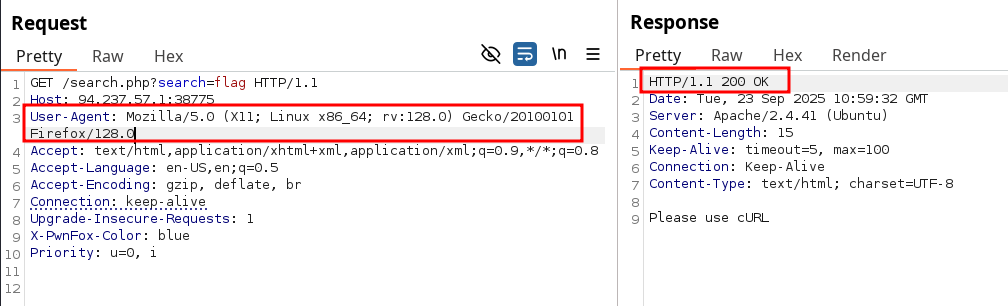
The server uses the user-agent to determine his response. When searching for any content using something different than curl (or atleast not changing the user-agent to curl) you won’t find the flag. In the end it is not mandatory to use cURL as long as the user-agent match the server’s expectations.

Fun thing to notice here is the server is returning a 200 code even without any Authorization header, but returns a 401 once the User-Agent matches ! It might not be exploitable in this context, but this is a logic flaw vulnerability.
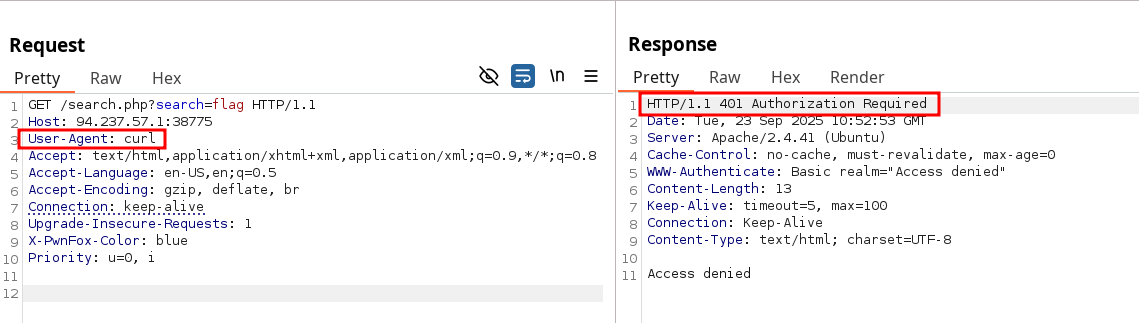
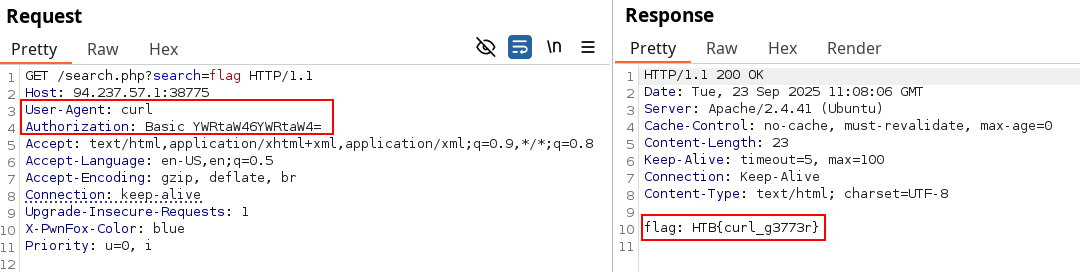
POST
Post requests contains a body, which allow users to send parameters in it instead of the URL. This enable more longer content size, no logging on body and less encoding requirements (but more controls in behaviour) about inputs.
This course is more an interactive step-by-step guide on using WebDevTools, Identifying the body content and Cookies resources. As such, the notes below will be quite simple.
Login Forms
This sections deals with sending parameters in the body instead of URL, such as login in with a POST request containing a simple username=admin&password=admin.
cURL use of -X parameter to send POST requests is briefly mentioned and used to craft a request. the -L flag is also used to follow redirections. All of these are added to cURL cheatsheet.
Authenticated Cookies
Successful login should result in receiving a cookie dedicated to keep our login active. These can be looked up and edited in the DevTools using SHIFT + F9.
JSON Data
The POST request sent using the search functionality contains JSON data in the exercise {"search":"london"}. The whole gimmick of this course is to show how this in a request involve the Content-Type header, and we can once again make use of Copy Request Headers. Showcase the use of a cURL command in using -d for data in the body :
curl -X POST -d '{"search":"london"}' -b 'PHPSESSID=c1nsa6op7vtk7kdis7bcnbadf1' -H 'Content-Type: application/json' http://<SERVER_IP>:<PORT>/search.php
["London (UK)"]
They repeat the process using the copy as fetch functionality and leverage the console to trigger the request again.
Questions
Obtain a session cookie through a valid login, and then use the cookie with cURL to search for the flag through a JSON POST request to '/search.php'
HTB{p0$t_r3p34t3r}
Same thing as the GET question, only curl user-agent is needed to find the flag.
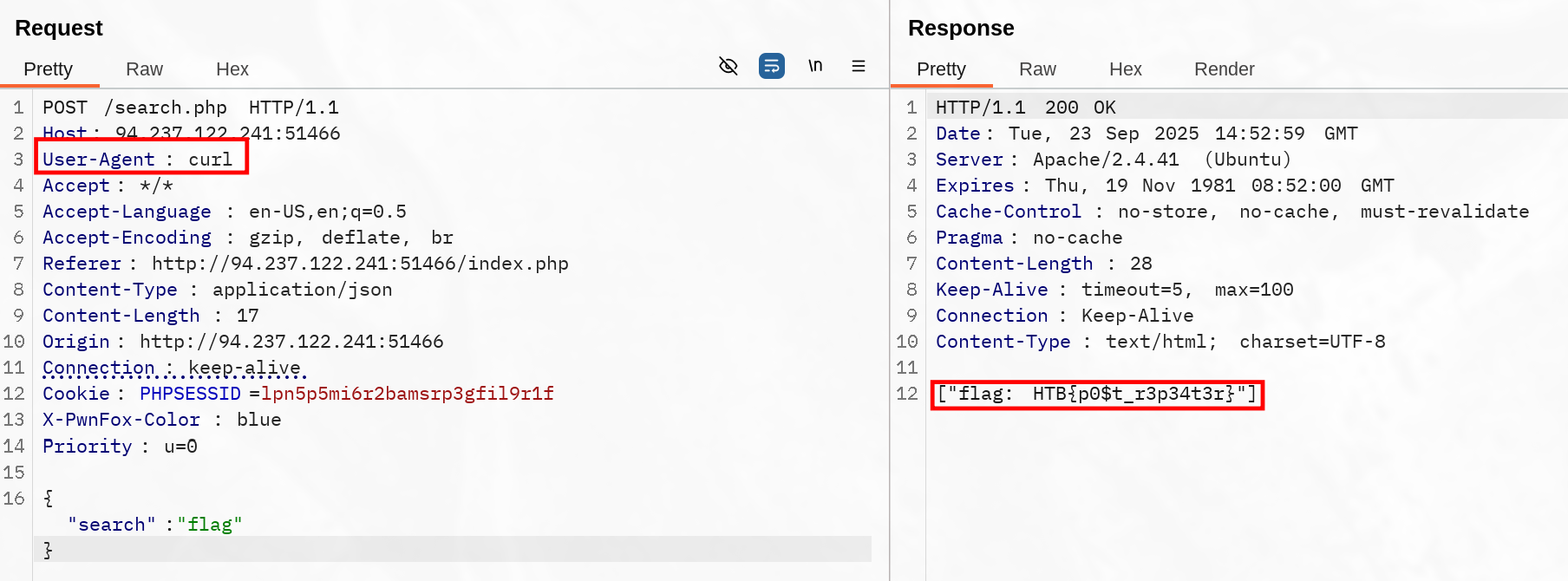
CRUD API
APIs
I think an semi-ELI5 might be valuable here.
A server can host multiple magic boxes for different purposes. API’s are like letterboxes for input or doorbell for a call to interact with these magic boxes.
Each box should explicitly state what it does, and what input it expects to work. However, you are not required to know how it works.
Using an API makes you drop your input in the letterbox if needed, or ring the bell otherwise. The box performs the dedicated action, but the result may not be returned to you.
Boxes behavior are supposed to be determined in advance if properly crafted, and any invalid input supplied won’t be accepted, like if you tried to put a DVD on a Tape player.
Finally, note that the server is providing a response, not the boxes themselves. This answer can be the output or only the status of your request, but it can’t be always trusted if you’re not able to prove the outcome of the magic box process.
CRUD
| Operation | HTTP Method | Description |
|---|---|---|
Create | POST | Adds the specified data to the database table |
Read | GET | Reads the specified entity from the database table |
Update | PUT | Updates the data of the specified database table |
Delete | DELETE | Removes the specified row from the database table |
CRUD is an acronym for (Create ; Read ; Update ; Delete) and an API model.
This is left as an exercise for the reader
I wrote this part before but never synced and shred my computer before pushing it, and I absolutely have 0 motivation writing this again.