Introduction to Web Applications
Introduction
Web Applications vs. Websites
Important distinction on Websites and Web App.
- Websites are static (this one is) and don’t handle any change from the users (Web 1.0).
- Web App are dynamic and allow user to interact with the server in many ways, and allow functionalities like access control, modifying data etc… (Web 2.0).
Web Applications vs. Native Operating System Applications
Native Operating System Applications are most of the time Android or iOS based, Web apps on the other hands will work on phones but are very compatible with any OS including usual computers.
Chrome has been offering a feature to install web apps on OS directly though it is intended to be no longer supported in the years to come, leaving the priority to PWA (Progressive Web Apps).
Web Application Distribution
Simple list of most common web apps providers to be used such as the infamous WordPress, Joomla, OpenCart, Wix, Shopify, DotNetNuke. 3 first are open-sourced whereas the others are closed source and sold to companies for using them.
Security Risks of Web Applications
Quick reminder of how Web Apps are usually the first attack surfaces and thus a critical area to secure. Mention of OWASP Web Security Testing Guide naturally, and use that introductive content to start mentionning Front End Components with HTML, CSS Javascript.
Attacking Web Applications
A lot of words. Emphasis on the impact of exploiting some vulnerabilities on Web Exposed surfaces that could be used on other scopes such as Active Directory enumeration etc…
Quick mention of password spraying possibilities after retrieving usernames through SQLi’s, RCE thanks to File Inclusion, File Upload features, IDOR, Broken Access Control etc…
Web Application Layout
Distinguish Web Application
- Infrastructure : Is the server hosting it’s own database locally or connecting to a dedicated instance that does precisely that ? Is there a reverse proxy and/or load balancer ?
- Components : each piece used together to create the app.
- Architecture : How are each components working together.
To summarize, keeping in mind these 3 concepts are important as an overview of the overall Web Applications concepts. Infrastructure is the design, Components are the pieces, Architecture is the layout.
Web Application Infrastructure
Different types of designs are models. These 4 popular ones will be detailed below :
Client - Server
The foundation of every other models and the most popular. Front-end are tied to user interface aka. the clients. Back-end is the server handling requests and serving appropriate responses.
One Server
This architecture uses client - server model as well, though it a subcategory that centralize every component in one single server. This means the compromission of said server means everything is now accessible. This model is suited for little application due to the ease of deployment, material cost etc… However as soon as the web application needs or complexity grows this should be adapted.
Many Servers - One Database
This is already more interesting since the database is separate from the web application servers and each of them can be segmented for different use cases. Compromission of a web server doesn’t necessarily allow you to compromise others. For this you, will need to find a pivot which is not always possible. In the same way, the database might be configurated to access only specific data from it so you can’t take over all of it.
Many Server - Many Databases
Take every models above and add the multiple database layer. Now multiple databases are setup, some might be dedicated to specific web application server, they can have redundant data to ensure availability etc… this model is pretty technical and hard to setup, especially to balance trafic, ensure correct redundancy etc… However it offers the most control over the exposed data and handling of resources.
Web Application Components
- Client
- Server
- WebServer
- Web Application Logic
- Database
- Services (Microservices)
- 3rd Party Integrations
- Web Application Integrations
- Functions (Serverless)
Web Application Architecture
Distinguish :
- Presentation Layer (UI components and browser resources)
- Application Layer (Processing of input value, authorization, returned resources)
- Data Layer (where to look for a data, store it, access it, serve it).
HTB uses Microsoft resources to display an example, which I will do in my turn :
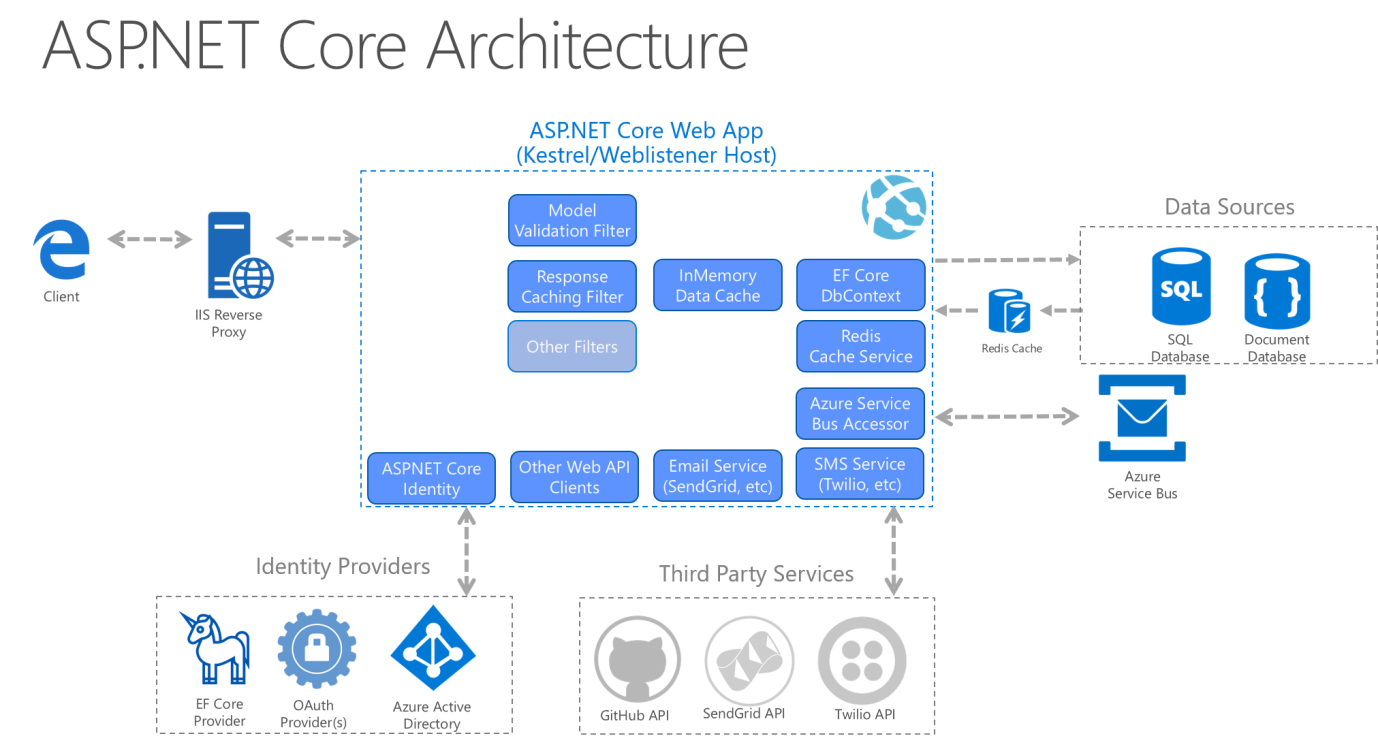
Quick mention of specific web servers running with enough privileges and dedicated operating system can make system calls effectively allowing for use of specific features and performances.
Microservices
Microservices are mentioned but not explained properly. They are distinct components and communicate through APIs with each other. This separation of each features in microservices allow more flexibility because you can program each of them using different language.
HTB sourced AWS document on microservices which is archived, here is the updated link.
Serverless
Basically container deployment hosted by Providers for you. The goal is you deploy the code using frameworks and let them instantiate your resources for you. This is all Cloud stuff going on made to discharge the user from the infrastructure constraint.
Architecture Security
Keep in mind these 3 layers and which model is used when testing a Web App. Good highlight is how a Web App could be technically secure in regard to the sanitization, input etc… while having a flawed access control model giving you control over unintended privileges. RBAC is a specific model for IAM that, if not properly setup, can allow users to leverage privilege access they shouldn’t possess.
Example of compromising a server without finding the database leads to deducing the model they use.
However
Compromising an instance should always be followed by analyzing the neighboring trafic and network and analyzing past or active connection because the server necessarily established a connection to the DB at some point.
Front End vs. Back End
Front End
Holy trinity of HTML,CSS,Javascript that is handled on the client side and rendered for the user. I find exploiting client-side vulnerability generally harder than server-side because of the many security safeguards implemented by the browser itself.
Back End
Everything handled directly by the server. Process requests sent and serve response pages, connection to database. HTB dissects it in 4 pretty accurate categories, such as this table :
| Component | Description |
|---|---|
Back end Servers | The hardware and operating system that hosts all other components and are usually run on operating systems like Linux, Windows, or using Containers. |
Web Servers | Web servers handle HTTP requests and connections. Some examples are Apache, NGINX, and IIS. |
Databases | Databases (DBs) store and retrieve the web application data. Some examples of relational databases are MySQL, MSSQL, Oracle, PostgreSQL, while examples of non-relational databases include NoSQL and MongoDB. |
Development Frameworks | Development Frameworks are used to develop the core Web Application. Some well-known frameworks include Laravel (PHP), ASP.NET (C#), Spring (Java), Django (Python), and Express (NodeJS JavaScript). |
Securing Front/Back End
This really is a summed up presentation of mistakes and vulnerabilities. Quick mention of Whitebox and Blackbox pentesting.
Front End Components
HTML
Many fundamentals here that you shouldn’t need if you already studied IT or Web fundamentals. Most important thing to retain would be this table as a cheatsheet for URL-encoding.
Cascading Style Sheets (CSS)
The article should be self-sufficient
Maybe too early for that in the course but CSS injection are a topic to be looked up in the future.
JavaScript
The article should be self-sufficient
Nothing more than presentation at that point.
Front End Vulnerabilities
Sensitive Data Exposure
Recap of the sensitive data exposure vulnerability. I’m planning on writing it up like every one I find by having a simple template for Description, Impact, Remediation etc…
Very simple assessment :
Questions
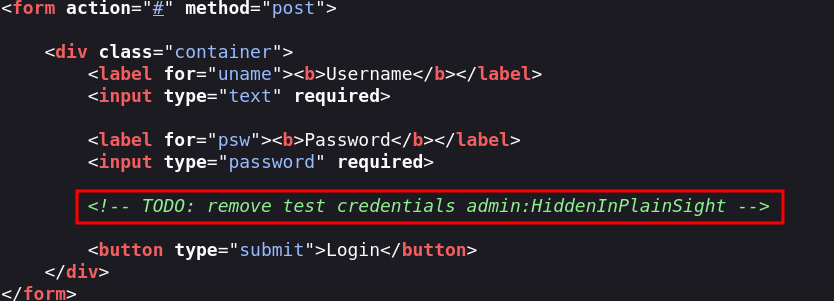
Check the above login form for exposed passwords. Submit the password as the answer.
HiddenInPlainSightSolution
Check source code for the login page
HTML Injection
Important vulnerability to notice. HTML Injection can lead to Cross-Site Scripting (XSS) but not only that. You are able to inject HTML content and such as <img src=x onerror=alert()> are classic ways to trigger code injection. Defacing can also be used to falsify a login component sending the credentials to a hosted server.
It can be also used as open tags when you want to retrieve information like csrf token using dangling markup. Check up HTML Injection vulnerability note.
Questions
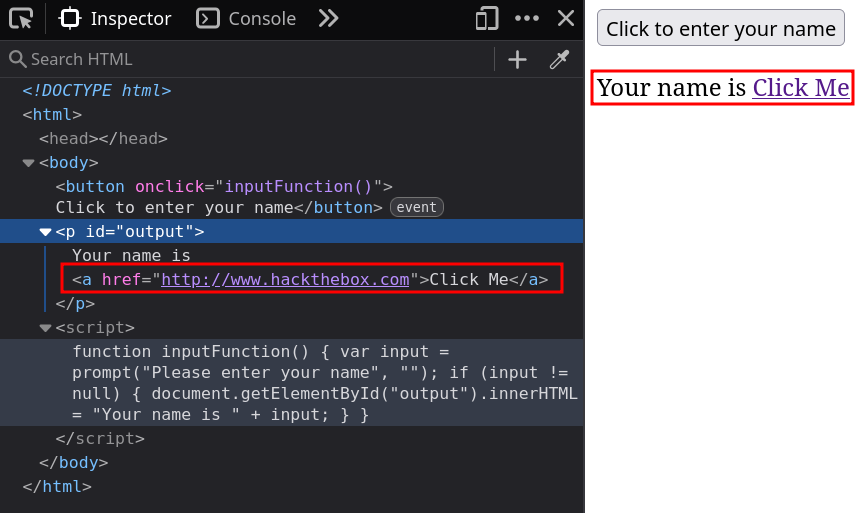
What text would be displayed on the page if we use the following payload as our input:
<a href="http://www.hackthebox.com">Click Me</a>
Your name is Click MeSolution
Replicate the example and find out the result
Cross-Site Scripting (XSS)
Very popular vulnerability explained in the module. Important categories to retain are Reflected, Stored and DOM based XSS. A dedicated note will be published on Cross Site Scripting (XSS). If you’re interesting in diving deeper Portswigger XSS labs are a good way to practice and learn.
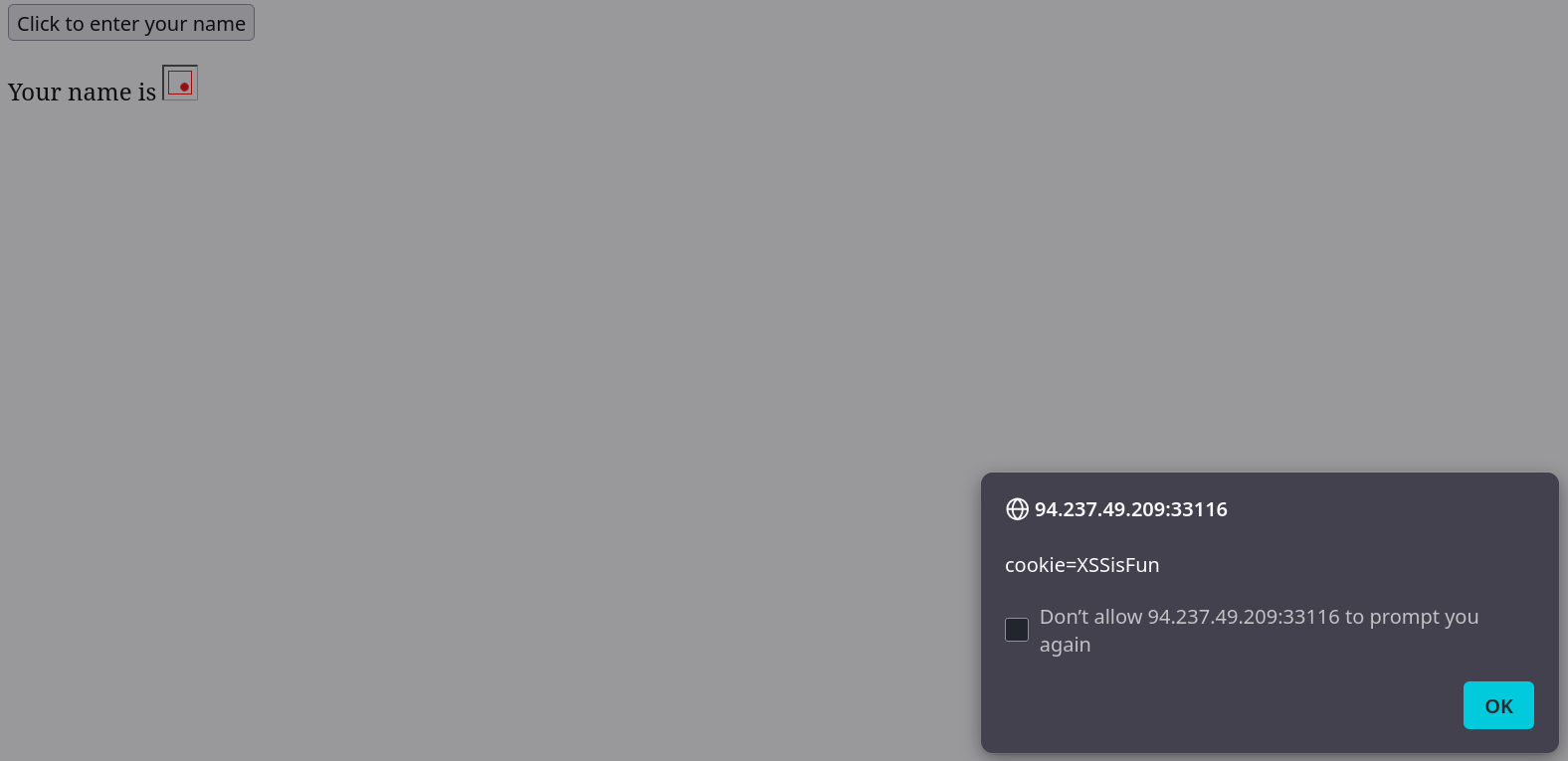
Try to use XSS to get the cookie value in the above page
XSSisFunSolution
Replicate the example and find out the result
Cross-Site Request Forgery (CSRF)
Topic worked on through websecurity academy CSRF labs, check the summed-up note Cross-Site request forgery.
Back End Components
Back End Servers
The article should be self-sufficient
Web Servers
The article should be self-sufficient
Check https://developer.mozilla.org/en-US/docs/Web/HTTP/Reference/Status for HTTP Status code complete and detailed list. RFC is available here too.
Databases
Quick explanation of Databases use case and importance of distinguishing the two most popular models being :
Relational (SQL)
Used to stored multiple types of data with a precise structure in order to make complex queries. It can be used to retrieve sets of specific data by using operators and (JOIN etc…). The data is structures in table, rows and columns etc… The syntax changes depending on the various implementation such as :
- MySQL
- MSSQL
- Oracle
- PostgreSQL
SQLite, MariaDB, Amazon Aurora, and Azure SQL are also mentioned. Check out SQLi to get some info about SQL vulnerabilities.
Non-relational (NoSQL)
Less experienced on the topic. NoSQL aims at achieving different objectives than SQL databases though. It works using JSON and XML in the majority of use cases. The most popular model is Key-Value like a hash table. The most popular databases are :
- MongoDB
- ElasticSearch
- Apache Cassandra Haven’t worked a lot on NoSQL labs but I’ll be working on them through Portswigger.
Not many things to notice, but overall good content
This should be read carefully, some examples of code to deploy these DB, create tables, query … are given.
Development Frameworks & APIs
Most popular framework for respective languages used for deploying servers :
- Laravel : PHP
- Express : Node.JS
- Django : Python
- Rails : Ruby
Identifying the environment is crucial to look for specific vulnerabilities (thinking about SSTI for python for example, Ruby on Rails uses _method parameters that could be exploited with reverse proxy confusion, etc…).
APIs
Might have heard about REST APIs or SOAP, it’s more global than that but important to known about them. Many APIs vulnerability can be exploited, such as changing methods, supplying additional parameters from other APIs etc…
Query Parameters
Play with query in URL for GET, body parameters in POST during testing. Many people don’t follow rigorously rules, especially if they don’t use dedicated frameworks.
SOAP
Particularly suited to share data that needs to be stateful or complex structured data. Used as well with deserialization. HTB Example of SOAP XML message :
<?xml version="1.0"?>

<soap:Envelope
xmlns:soap="http://www.example.com/soap/soap/"
soap:encodingStyle="http://www.w3.org/soap/soap-encoding">

<soap:Header>
</soap:Header>

<soap:Body>
  <soap:Fault>
  </soap:Fault>
</soap:Body>

</soap:Envelope>
REST
Very very popular, get comfortable with it. Tools like Postman are very powerful to play/replay requests with it.
A typical REST API request uses the URL path to specify the API call and sometimes the value associated to ID etc…
You get a response in JSON and also can send POST request with JSON payloads. XML, raw data, URL encoded content can also be received and sent depending on the specifications.
Here is an example of the content you might receive back from a GET API request :
{
  "100001": {
    "date": "01-01-2021",
    "content": "Welcome to this web application."
  },
  "100002": {
    "date": "02-01-2021",
    "content": "This is the first post on this web app."
  },
  "100003": {
    "date": "02-01-2021",
    "content": "Reminder: Tomorrow is the ..."
  }
}
These use case were already mentioned in Web Requests HTTP Methods and Codes.
GETrequest to retrieve dataPOSTrequest to create data (non-idempotent)PUTrequest to create or replace existing data (idempotent)DELETErequest to remove data
Use GET request '/index.php?id=0' to search for the name of the user with id number 1?
superadminSolution

Back End Vulnerabilities
Common Web Vulnerabilities
Broken Auth / Access Control
Broken Authentication and Broken Access Control are the first vulnerabilities mentioned since they are the ones you will check first as authentication is the first barrier for most apps to access some features. Broken Access Control can be checked up after sign-in in and identifying requests that requires authent.
Malicious File Upload
Check up the associated vulnerability note for File Upload. Very sensitive functionality that can lead to critical impact. Fortunately most frameworks are pretty well protected against that as long as the customer use the defined methods. Many technics exist for File Upload, I’ll try to document them progressively as a reminder for work methodology.
Command Injection
If you get a Command Injection on the back-end, the chances it becomes critical or at least very high in impact in risk evaluation is almost guaranteed. Check the associated note, OWASP description is provided by HTB.
SQL Injection (SQLi)
For now all most common vulnerabilities have been looked up, looking at very high impact ones. SQLi vulnerability is a deep topic, notably because of how many types of injection exists. Fortunately the topic is well documented and has many tools, especially sqlmap which has its own module later.
I purposedly didn’t elaborate on these topics because they will be mentioned in depth later.
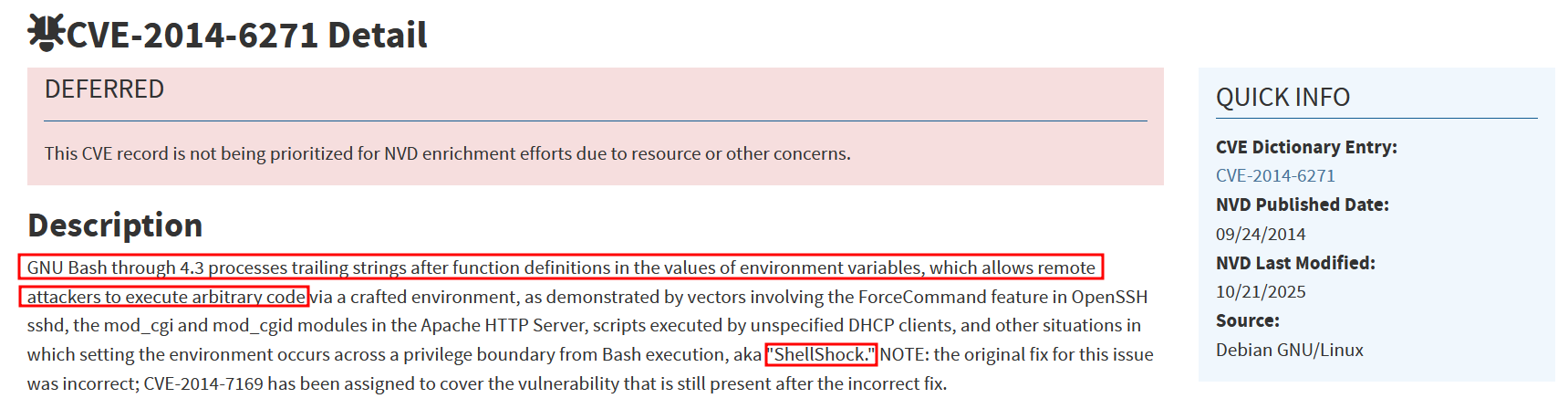
To which of the above categories does public vulnerability 'CVE-2014-6271' belongs to?
Command InjectionSolution
Public Vulnerabilities
Public CVE
Dedicated section in CPTS Getting Started module :
Public Exploits
Finding Public Exploits
source
- Internet research
- Searchsploit tool in Kali linked to Exploit-DB. It can be used with Metasploit, which we will look further into in the next modules.
Common Vulnerability Scoring System (CVSS)
common-vulnerability-scoring-system
Back-end Server Vulnerabilities
Have an old server not patched, with important vulnerability core to the services used and you get these. Mention of Shell-Shock which was used with a write-up on blind ssrf with shellshock exploitation for example.
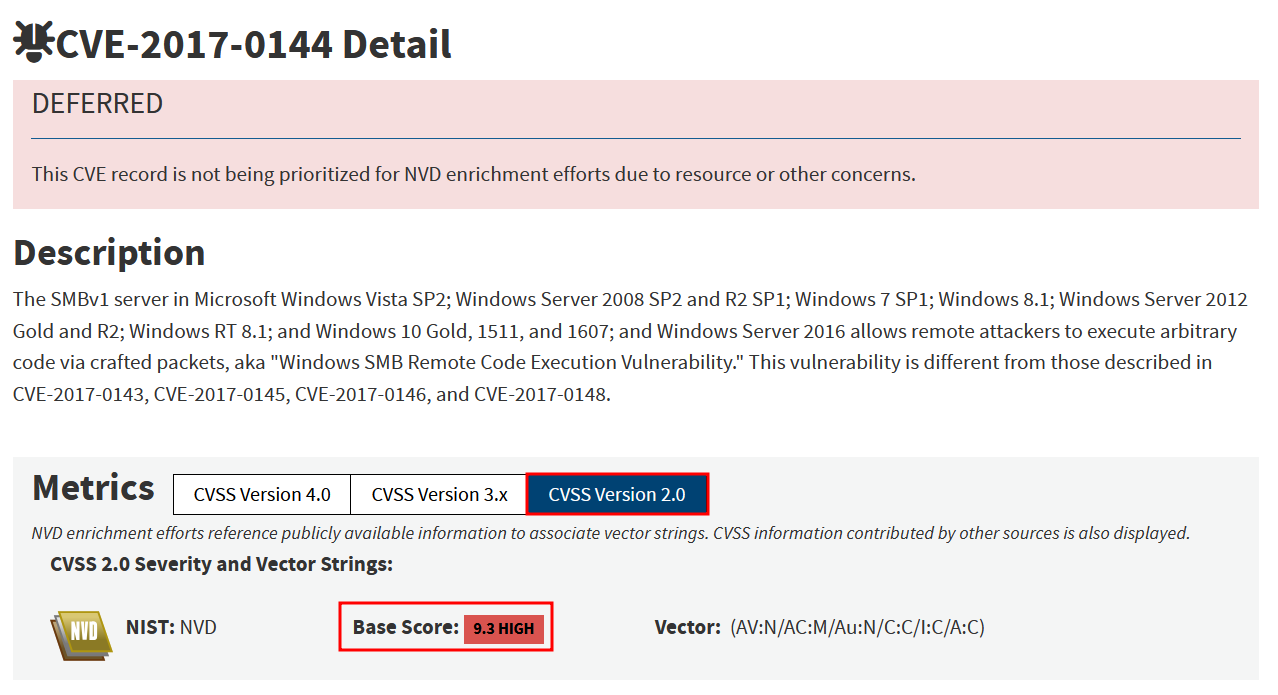
What is the CVSS v2.0 score of the public vulnerability CVE-2017-0144?
9.3Solution
Next Steps
Next Steps
Guide for practicing deploying web servers ourselves etc… Modules like Web Requests and JavaScript Deobfuscation are mentioned to strengthen the overviewed content. They also recommend pwning Easy Box after finishing most modules. They noted Hacking Wordpressmodule however this is no longer in the job role path and has been replaced by Attacking Common Applications. SQL Injection Fundamentals is still relevant to the content given though.